TikTok Video Size & Dimensions 2026 (Resolution + Specs)
# TikTok Video Size: The Complete 2026 Specs Guide
The TikTok video size in 2026 is 1080x1920 pixels with a 9:16 aspect ratio. Maximum file size is 287.6MB on both Android and iOS, and length runs up to 10 minutes on most accounts (60 minutes on select newer accounts). Use MP4 or MOV with the H.264 codec at 30fps, and keep important content within the central safe zone, away from TikTok's UI overlays. If you screen-record TikTok-bound clips on desktop, ScreenSnap Pro exports straight to 1080x1920.
That short answer covers the spec sheet. The harder part is keeping your subject framed when TikTok layers a username at the top, a stack of action buttons down the right, and a caption block across the bottom. This guide walks you through the safe zones, the cover image rules, the tiktok aspect ratio math, and the file tweaks that stop your tiktok video size from rendering blurry on mobile.
Quick reference: TikTok video specs
| Spec | Value |
|---|---|
| Recommended size | 1080 x 1920 pixels |
| Aspect ratio | 9:16 |
| Maximum file size | 287.6MB (Android and iOS) |
| Maximum file size (web upload) | 4 GB |
| Maximum length | 10 minutes (most accounts) / 60 minutes (select accounts) |
| Recommended codec | H.264 (MP4 or MOV container) |
| Audio codec | AAC, stereo, 128 kbps |
| Recommended frame rate | 30 fps (60 fps OK for high-motion) |
| Recommended bitrate | 5 Mbps for 1080p |
| Cover image | 1080 x 1920 (tappable from profile) |
| Top safe zone | 120 px (UI bar) |
| Right safe zone | 150 px (action column) |
| Bottom safe zone | 250 px (caption, sound, follow) |
These specs apply across the For You feed, profile grids, search results, and TikTok Studio uploads. Stick to 1080 x 1920 and you cover every surface.
Why 1080 x 1920 is the only size that survives
You can technically upload at 720p, but you really shouldn't. Modern phones run on Retina-class screens that make 720p look soft next to a sharp 1080p neighbor in the For You feed. 1080 x 1920 is the sweet spot: sharp on every device, light enough to upload fast, and the only tiktok video resolution that matches TikTok's internal re-encoder bucket. Anything below that ratio gets re-encoded twice, which adds visible compression artifacts.
Need to scale a horizontal video frame down to 9:16 for TikTok? A free social media image resizer handles the conversion in seconds, with no editor required.
TikTok aspect ratio: why 9:16 is the only viable option
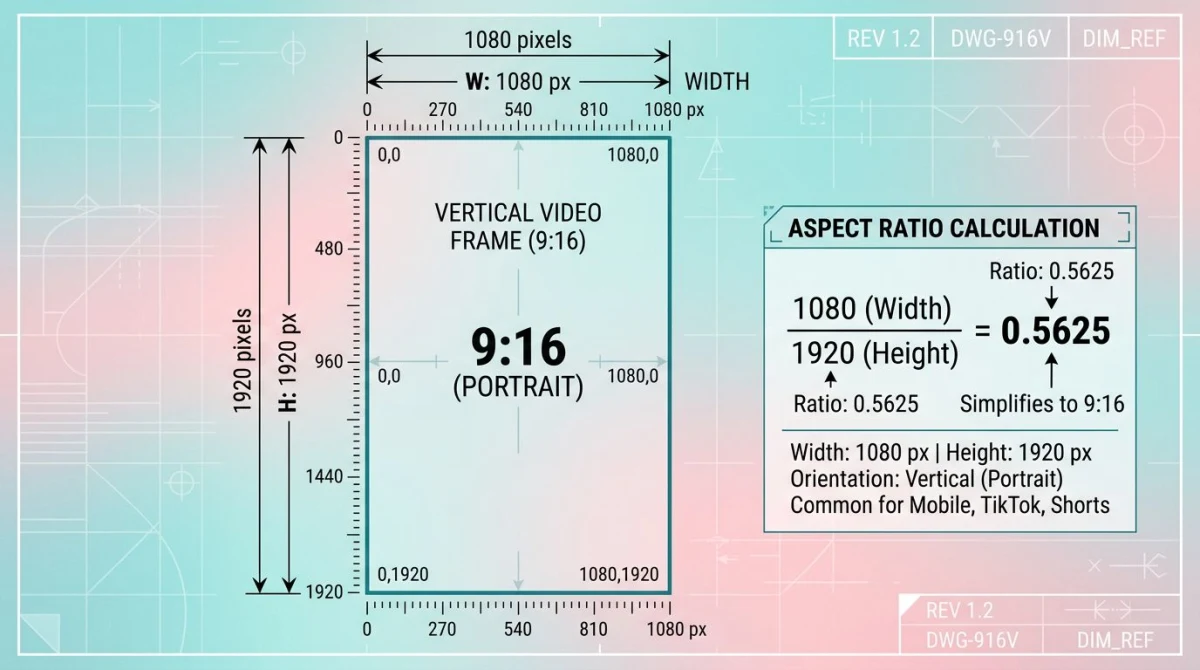
TikTok crops or letterboxes anything that is not 9:16. The math: 1080 / 1920 = 0.5625. If your file ratio drifts off that number, the platform either:
- Letterboxes with black bars (16:9 horizontal footage)
- Crops the sides (1:1 square footage)
- Stretches a few pixels (for ratios just barely off, like 9:15.9)
Letterboxed and cropped videos rank lower in the For You feed. TikTok's algorithm reads "full-screen" as a quality signal, so a 9:16 frame fills the screen and tells the system this clip belongs in the vertical feed. A 16:9 file with thick black bars at the top and bottom signals "this is a YouTube clip cross-posted by a lazy creator," and reach drops sharply.
If you need to convert horizontal or square footage, the aspect ratio calculator finds the exact dimensions you need. For one-off framing of stills before a static post, our free image cropper handles cropping without an editor.
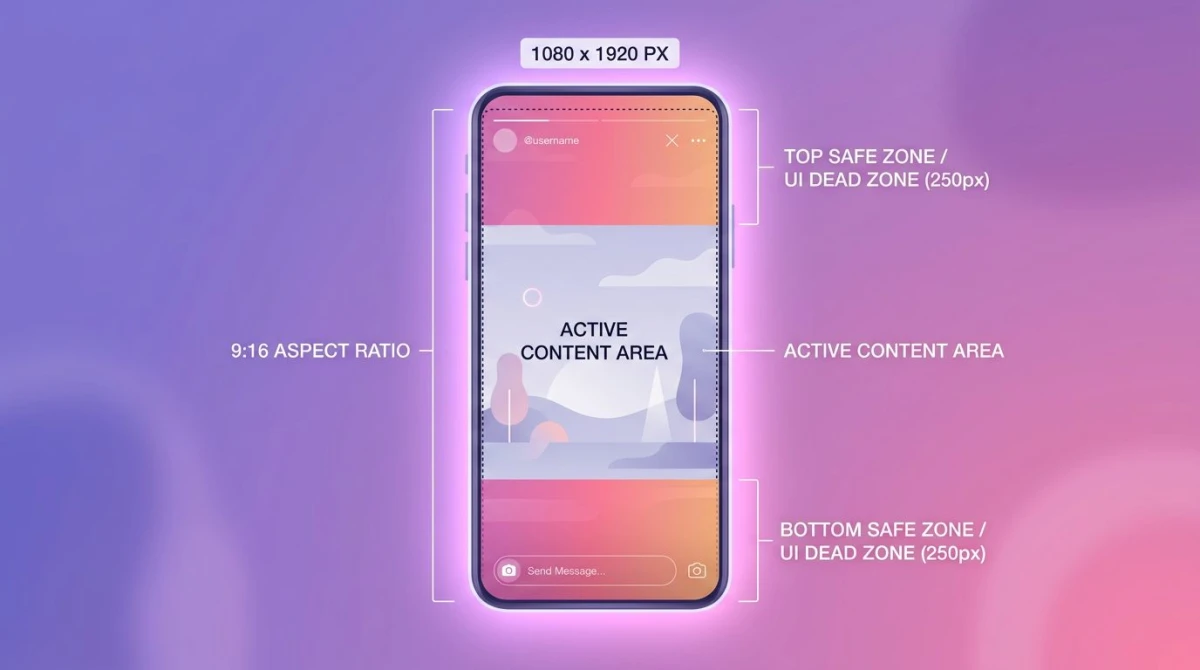
TikTok safe zone: top 120 px, right 150 px, bottom 250 px
This is where most creators slip up. The video frame is 1920 tall and 1080 wide, but TikTok's UI eats the corners. Your hook, captions, faces, and CTA all need to live in the middle.
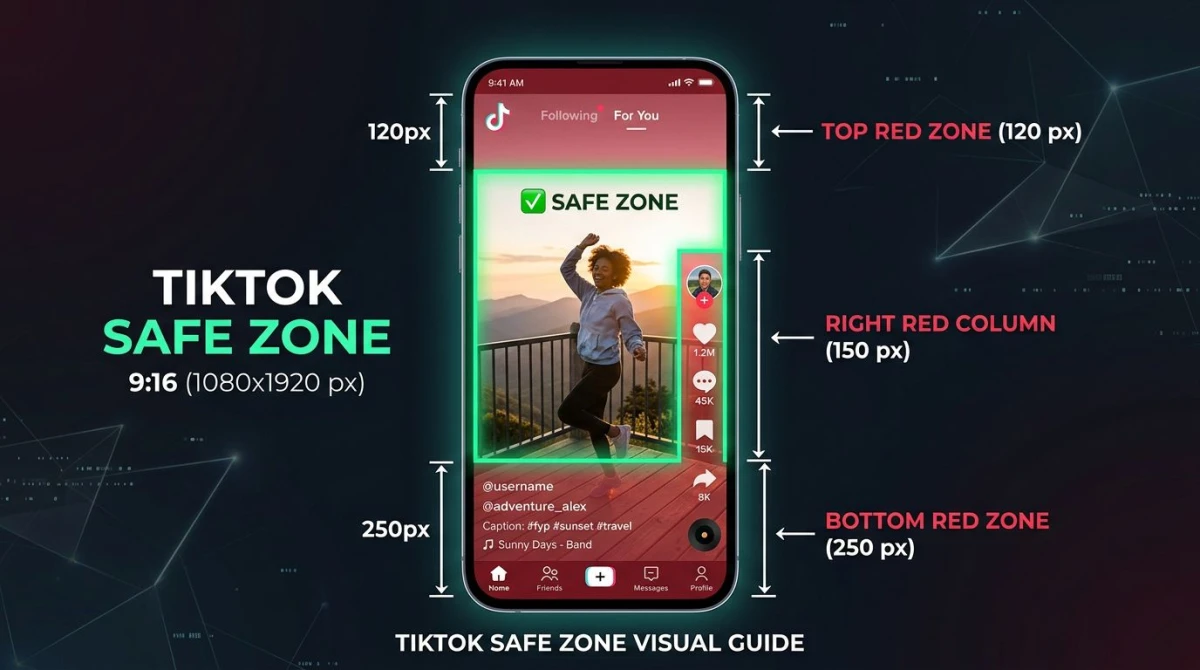
Top zone (0 to 120 px):
- TikTok logo
- "Following" / "For You" tabs
- Search icon
- LIVE badge (when applicable)
Right zone (last 150 px wide, roughly y=600 to y=1700):
- Profile avatar
- Like (heart) button
- Comments count
- Save (bookmark)
- Share button
- Spinning sound disc
Bottom zone (last 250 px):
- Username and handle
- Caption text (often 2-3 lines)
- Sound name with marquee
- Follow button on creator videos
- TikTok Shop links (if commerce-enabled)
That's roughly 520 px of vertical real estate plus a 150 px right column lost to UI. Design your composition around the middle of the frame. Faces, key product shots, and burned-in captions all belong in that center zone.
Pro tip: When you film, set your camera app's grid to "phi grid" or rule of thirds. Then crop tightly enough that the eye-line lands above the bottom 250 px. Watch the playback in TikTok's preview before you publish. That's the only way to be sure nothing important hides under a button.
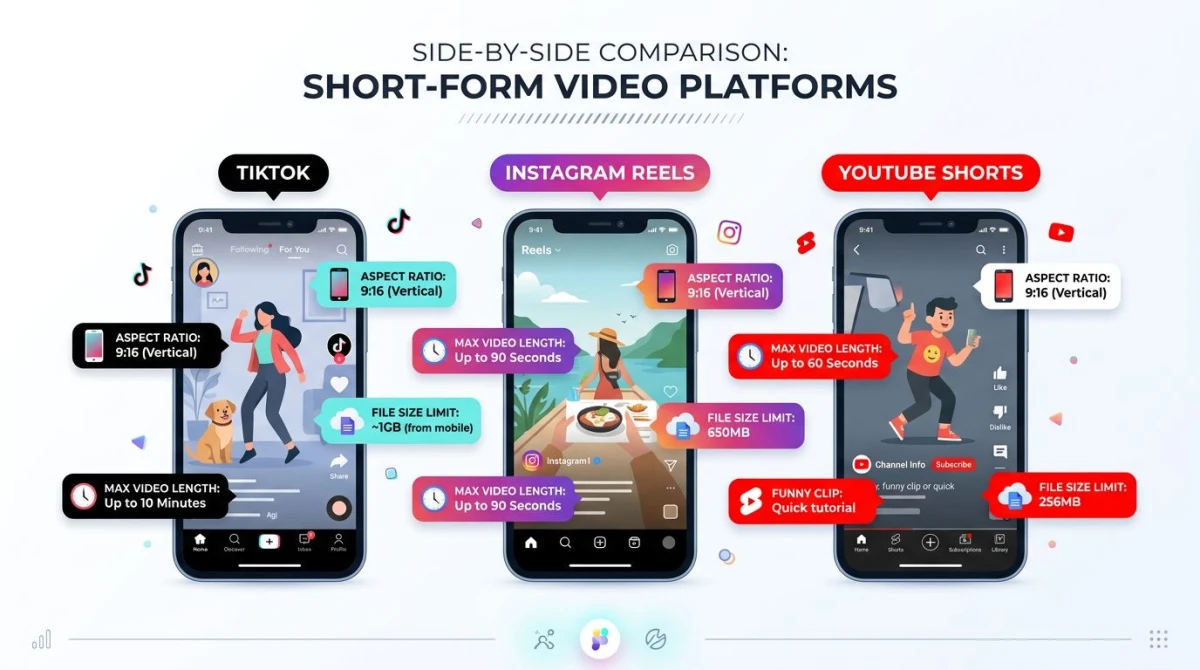
TikTok vs Instagram Reels vs YouTube Shorts: spec comparison
All three platforms run vertical 9:16 video, but the file rules diverge. Use this table to decide whether you can recycle a single export across all three.
| Spec | TikTok | Instagram Reels | YouTube Shorts |
|---|---|---|---|
| Resolution | 1080 x 1920 | 1080 x 1920 | 1080 x 1920 |
| Aspect ratio | 9:16 | 9:16 | 9:16 |
| Max file size | 287.6 MB (mobile) / 4 GB (web) | 4 GB | 256 GB |
| Max length | 10 min (60 min select) | 90s default / 3 min / 15 min select | 60 seconds |
| Codec | H.264 / H.265 | H.264 | H.264 |
| Frame rate | 30 / 60 fps | 30 / 60 fps | 24-60 fps |
| Container | MP4 / MOV | MP4 / MOV | MP4 / MOV |
| Audio | AAC stereo, 128 kbps | AAC stereo | AAC stereo |
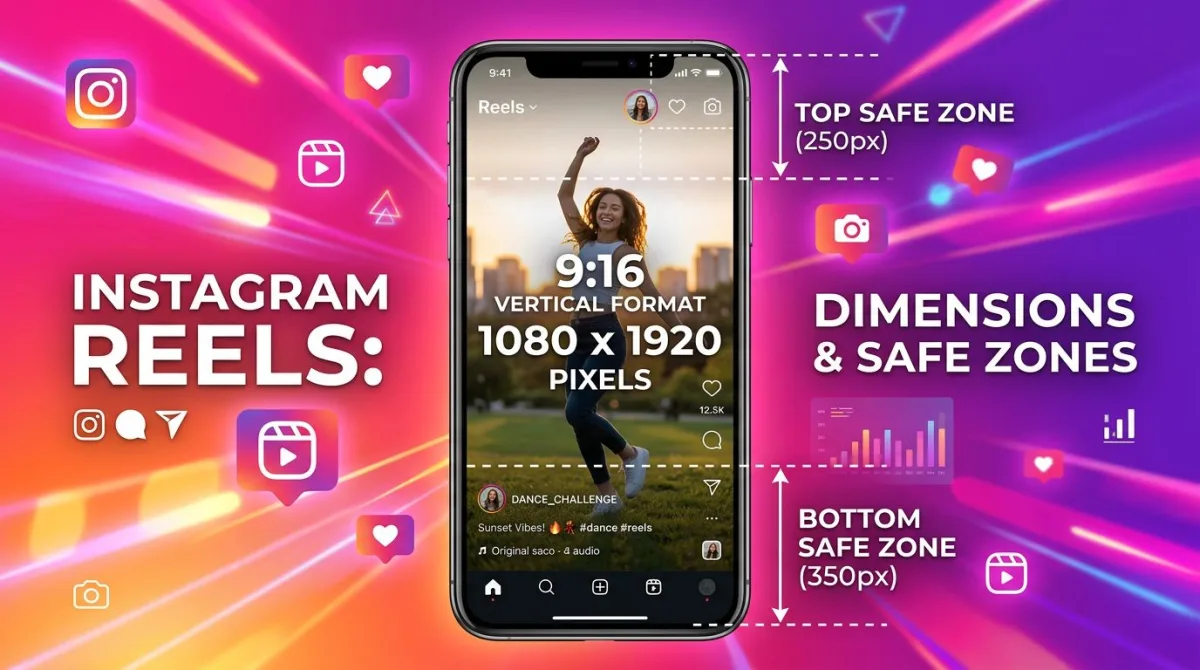
| Top safe zone | 120 px | 250 px | 220 px |
| Bottom safe zone | 250 px | 350 px | 230 px |
The good news: a single 1080 x 1920 H.264 MP4 at 30 fps under 250 MB plays cleanly on all three. The catch is duration: anything over 60 seconds can't go to Shorts, and anything over 3 minutes won't fit on most Reels accounts. For a deep dive on Reels specs, see our Instagram Reels size guide.
File specs: MP4, H.264, AAC, and 287.6 MB
TikTok's encoder accepts more than its docs suggest, but its sweet spot is narrow. Hit these settings and you skip a re-encode pass that softens your footage.
Container: MP4 (preferred) or MOV. Both work. Stick with MP4 for cross-platform reliability.
Video codec: H.264 main profile, level 4.1 or higher. H.265/HEVC also works on newer TikTok builds but compresses harder, which can muddy fast motion. If you shoot HEVC on iPhone, transcode to H.264 before upload for best results.
Audio codec: AAC-LC, stereo, 128 kbps minimum. TikTok strips multi-channel audio. Mono works but stereo helps the Spatial Audio rendering on AirPods.
Frame rate: 30 fps for talking-head and most lifestyle content. 60 fps for sports, gameplay, dance, or anything with rapid motion. Higher frame rates raise file size, which matters once you push past the 287.6 MB mobile cap.
Bitrate: 5 Mbps is the sweet spot for 1080p at 30 fps. Push to 8-10 Mbps for 60 fps content. TikTok will re-encode anything over ~15 Mbps, so don't waste upload bandwidth on a 50 Mbps master file.
File size cap: 287.6 MB on iOS and Android in-app uploads. The web uploader and TikTok Studio accept files up to 4 GB, which is useful for longer-form 10-minute uploads. If your file is over 287.6 MB and you're stuck on mobile, you'll need to re-export at a lower bitrate.
TikTok Studio: the desktop quality lift
TikTok Studio is the desktop-and-browser tool that replaced TikTok's older Creator Center. It accepts much higher quality uploads than the mobile app (up to 4 GB and longer durations) and runs a different transcoder that preserves more detail.
If you edit on a computer (CapCut Pro, Premiere, Final Cut, DaVinci Resolve), export at 1080 x 1920, H.264, 8-10 Mbps, and upload through TikTok Studio rather than AirDropping the file back to your phone. The result is noticeably sharper, especially on motion-heavy content. TikTok Studio also unlocks the analytics dashboard and longer scheduling windows, so it's worth the workflow shift even if you record on mobile.

Tired of plain screenshots? Try ScreenSnap Pro.
Beautiful backgrounds, pro annotations, GIF recording, and instant cloud sharing, all in one app. Pay $39 once, own it forever.
See pricing and featuresLength tiers in 2026: 60s, 3 min, 10 min, and 60 min
TikTok rolled out longer-form video in stages, and the tiers matter for both creative pacing and the algorithm.
Sub-15 seconds: still the format the For You algorithm rewards most aggressively for new and small accounts. High completion rate beats high watch time at this length.
15-60 seconds: the workhorse. Best for hooks-and-payoffs, reaction clips, dance trends, and quick tutorials. Most viral content lives here.
60 seconds to 3 minutes: good for storytelling, explainer content, and tutorial walkthroughs. Watch time becomes more important than completion rate. Aim for at least 70% completion in the first 60 seconds.
3 to 10 minutes: longer-form. Available on most accounts. Useful for deep tutorials, vlogs, and recipe walkthroughs. Don't pad, because TikTok punishes sagging mid-sections hard.
10 to 60 minutes: rolled out to select newer accounts as TikTok pushed into long-form territory. Treat this like YouTube: chapters, B-roll, and a strong cold-open all matter. Most creators won't have access yet; check your TikTok Studio upload screen to see if the option appears.
The optimal length depends on your niche, but a safe rule: shoot for the shortest version that delivers the full payload. A tight 28-second clip outperforms a baggy 90-second cut nine times out of ten.
Cover image: 1080 x 1920 with clear text and a face
The cover image is the thumbnail people see when they land on your profile grid. It uses the same 1080 x 1920 frame as the video but renders cropped to a 1:1.6 ratio in the grid view, then expands to full 9:16 when tapped.
Rules that work:
- Pick a frame with a clear face or product
- Add 2-4 words of text in the upper third (the grid crop)
- Use high contrast, because TikTok's dark UI swallows muted images
- Avoid placing text in the bottom 350 px (gets cut in the grid view)
- Keep the cover consistent with your channel branding
You can also upload a custom static image as the cover. Crop it to 1080 x 1920 first using the image cropper so you control exactly what shows in the grid, then add the two to four words of cover text on top before you upload.
Recording and exporting from common apps
The export settings change app to app. Here are the presets that match TikTok's spec sheet.
iPhone Camera:
- Open Settings → Camera → Record Video
- Pick 1080p at 30 fps for talking content, 60 fps for action
- Set Settings → Camera → Formats to "Most Compatible" (this exports H.264, not HEVC)
- Film vertically, never horizontally
Android Camera:
- Most modern Android phones default to 1080p 30 fps. Confirm in the camera app's video settings
- Samsung Galaxy: Settings (gear) → Video size → FHD 1920 x 1080 → switch to Vertical
- Disable HDR10+ unless you've tested upload, since it can confuse TikTok's encoder
CapCut (mobile):
- Tap the project settings (gear icon)
- Resolution: 1080p
- Frame rate: 30 fps
- Format: MP4
- Smart HDR: off
- Export quality: 1080p, the higher slider position
OBS Studio (Mac/Windows desktop):
- Settings → Video → Base Canvas: 1080 x 1920
- Output Resolution: 1080 x 1920
- Common FPS: 30
- Settings → Output → Recording: Format MP4, encoder x264, bitrate 5000 Kbps
- Useful for recording browser-based or screen content for TikTok tutorials
Adobe Premiere Pro:
- Sequence → Sequence Settings → Frame Size: 1080 horizontal, 1920 vertical
- Pixel Aspect Ratio: Square Pixels (1.0)
- Export: H.264, VBR 1-pass, target 8 Mbps, max 10 Mbps
- Audio: AAC, stereo, 128 kbps
Final Cut Pro:
- File → New Project → Custom: 1080 x 1920, 30 fps
- Share → Apple Devices 1080p, then click the Settings tab to confirm H.264
Best practices: hook in 2 seconds, captions burned in, vertical-first
Specs are half the battle. The other half is creative shape.
Hook in the first two seconds. TikTok's algorithm watches the first 1-2 seconds for swipe-aways. A motion change, a face on screen, or a bold text overlay in that window pays off in retention. Static intros kill reach.
Burn captions into the file. Most TikTok playback happens with sound off (commutes, scrolling in bed, public spaces). On-screen text doubles your watch time on average. CapCut's auto-caption feature handles this in two taps, but review for accuracy and reposition any caption that overlaps the bottom 250 px.
Use trending sounds. TikTok's recommendation engine clusters videos by audio. Pulling a trending sound (even at low volume under your voiceover) signals to the algorithm that you belong with that cluster's audience. Browse the Sounds tab and pick one with rising weekly use.
Compose vertically. Don't shoot horizontal and crop later, because you lose half your resolution. Hold the phone vertically, frame your subject in the middle column, and leave headroom for the top UI bar.
Match your face to the safe zone. If you're a talking-head creator, your face should sit roughly in the upper-middle third of the frame, never below the 1670 px line where the caption block lives.
Why is my TikTok blurry, cropped, or letterboxed?
Three problems, three fixes.
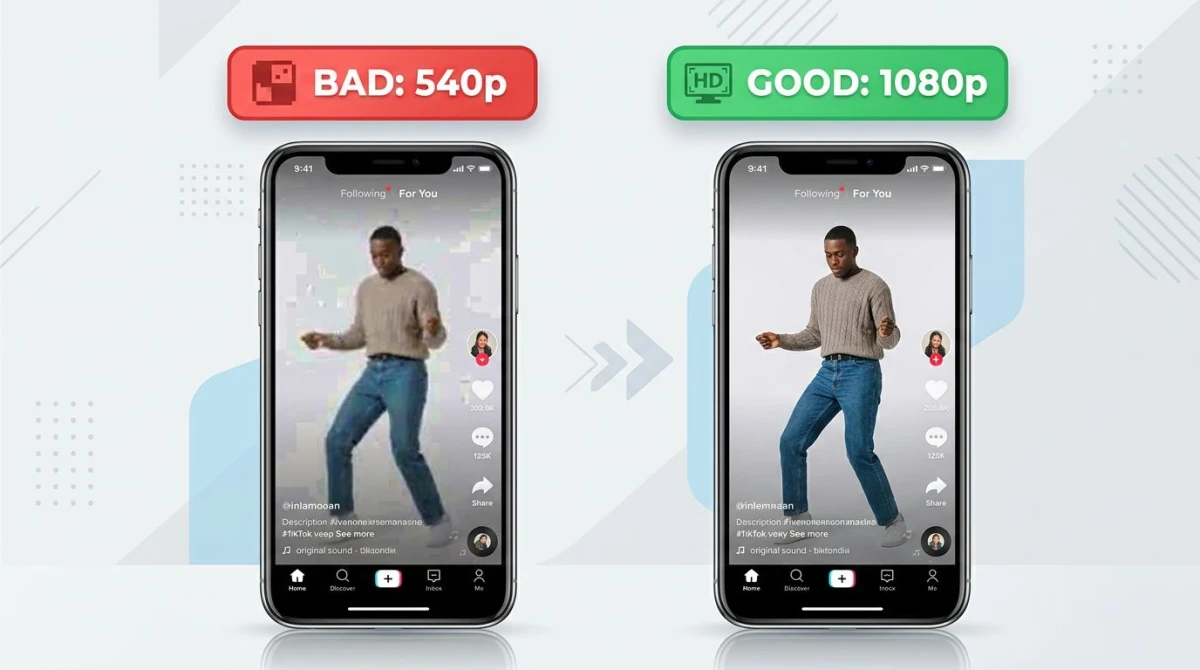
"My video looks blurry."
- You uploaded under 1080p. Re-export at 1080 x 1920.
- Your bitrate was too low. Push to 5 Mbps minimum, 8 Mbps for 60 fps.
- You uploaded HEVC and TikTok re-encoded it twice. Transcode to H.264 first.
- Your phone's "Data Saver" mode is on in TikTok settings. Turn it off.
"My video is cropped."
- Your file isn't 9:16. Check the dimensions; 1080 / 1920 must equal 0.5625.
- You used a 1:1 square. Re-export as 9:16 with the central content visible.
"My video has black bars."
- You uploaded a 16:9 horizontal file. TikTok added letterboxing. Re-export vertical.
- Your editing app exported with the wrong canvas size. Set canvas to 1080 x 1920 before export.
"Important content is hidden behind buttons."
- You ignored the safe zone. Re-edit so faces and captions land between y=120 and y=1670, with a 150 px buffer on the right side.
If you're tracking sizes across multiple platforms (Reels, Shorts, Pinterest, X), the social media image sizes cheat sheet covers every spec in one page.
Capturing screen content for TikTok tutorials
A growing slice of TikTok content is screen-based: app walkthroughs, software tutorials, "here's how I edit photos" demos. Native screen recorders work in a pinch, but they default to your phone or monitor's full resolution, not 9:16.
For desktop tutorials destined for TikTok, a dedicated capture tool helps: ScreenSnap Pro records screen as MP4 or GIF on Mac and Windows, with system audio, microphone, and webcam overlays. Set the capture region to a 1080 x 1920 vertical frame, record your tutorial, annotate hot spots with the 15 built-in tools, and you have a TikTok-ready clip without round-tripping through a separate editor. Pay once at $39: no subscriptions, no watermarks. Annotation also makes drafts easier: pin a screenshot, mark up the parts you want to talk through on camera, and use that as your shot list.
Frequently asked questions
The short version
The 2026 TikTok spec is 1080 x 1920 pixels at 9:16, MP4 with H.264 video and AAC audio, 30 fps for talking content and 60 fps for high motion, under 287.6 MB on mobile or 4 GB through TikTok Studio. Keep faces, captions, and CTAs inside the central safe zone, away from the top 120 px UI bar, right-side action column, and bottom 250 px caption block. Hook in two seconds, burn captions into the file, and lean on trending sounds. Hit those numbers and your video survives TikTok's re-encoder with the resolution intact.
If you're juggling specs across all the major platforms, the social media image sizes cheat sheet is the parent reference. For its closest cousin platform, our Instagram Reels size guide covers the same ground for Meta's vertical short-form. Most clips will survive a single export across both; the safe zones, not the file specs, are where you'll need to make tweaks.

Morgan
Indie DeveloperIndie developer, founder of ScreenSnap Pro. A decade of shipping consumer Mac apps and developer tools. Read full bio
@m_0_r_g_a_n_