Facebook Ad Sizes 2026: Complete Specs Guide
# Facebook Ad Sizes 2026: Every Format, Pixel-Perfect
Facebook feed ads are 1080×1080 pixels (1:1) or 1080×1350 (4:5), Stories ads are 1080×1920 (9:16), and Reels ads use 1080×1920 (9:16). All Meta ad images should be JPG or PNG under 30MB, and videos use MP4 or MOV at H.264, max 4GB. (If you build the ad creative from app screenshots, a tool like ScreenSnap Pro lets you capture at the exact pixel dimensions Meta expects.)
That's the short answer. The longer answer matters because Meta runs the same ad through more than a dozen spots. Each spot crops, scales, or stretches your creative in its own way. Upload a 1.91:1 banner that looks great on desktop and the same file gets squashed into a thumbnail in Reels. Upload a 9:16 vertical and your CTA hides under the Reels UI.
This guide covers the exact facebook ad size for every spot Meta supports in 2026. We cover feed, Stories, Reels, in-stream video, Marketplace, right column, search, and Messenger inbox. We also cover safe zones, file limits, and the text rules that quietly tank reach, even though Meta dropped the 20% rule years ago.
Every Meta ad placement at a glance: feed square, vertical Story, vertical Reel, horizontal in-stream, and carousel.
The Master Cheat Sheet
If you only read one section, read this one. Print it. Tape it next to your monitor. The rest of the article explains the why. This table is the what.
| Placement | Recommended size | Aspect ratio | Max file size | Max length | Best for |
|---|---|---|---|---|---|
| Feed image (square) | 1080×1080 | 1:1 | 30 MB | n/a | Brand & product shots |
| Feed image (vertical) | 1080×1350 | 4:5 | 30 MB | n/a | Mobile-first, more screen real estate |
| Feed image (landscape) | 1200×628 | 1.91:1 | 30 MB | n/a | Link previews, articles |
| Feed video | 1080×1350 | 4:5 | 4 GB | 240 min (15 to 60s recommended) | Sound-off product demos |
| Carousel card | 1080×1080 | 1:1 | 30 MB / card | n/a | Multi-product, step-by-step |
| Stories image | 1080×1920 | 9:16 | 30 MB | n/a | Full-bleed brand moments |
| Stories video | 1080×1920 | 9:16 | 4 GB | 15s (per card) | Short-form vertical hooks |
| Reels ad | 1080×1920 | 9:16 | 4 GB | 15 to 60s | High-watch-time, native feel |
| In-stream video | 1280×720 | 16:9 | 4 GB | 5 to 15s (non-skippable) | Mid-roll on partner videos |
| Marketplace | 1080×1080 or 1200×628 | 1:1 / 1.91:1 | 30 MB | n/a | Local intent, listings |
| Right column (desktop) | 1200×628 | 1.91:1 | 30 MB | n/a | Retargeting, low CPM |
| Search results | 1200×628 | 1.91:1 | 30 MB | n/a | Discovery, broad reach |
| Messenger inbox | 1200×628 | 1.91:1 | 30 MB | n/a | Conversational follow-up |
A few rules apply across every format:
- Minimum width is 600 pixels for any image ad. Below that, Meta marks it low-resolution and throttles delivery.
- JPG or PNG for images. MP4 or MOV for video. Animated GIFs get converted to MP4 and lose frames.
- H.264 video codec, AAC audio, 30fps target. Higher frame rates upload fine but get re-encoded down.
- Captions matter: 85% of Facebook video plays sound-off. Burn them in or upload an SRT.
If you need to convert or rescale before uploading, our free social media image resizer handles every Meta preset on this list.
Feed Ads: The Workhorse Format
Feed is where most of your ad spend lands, and feed has three legitimate sizes. Picking the wrong one is the most common mistake new advertisers make.
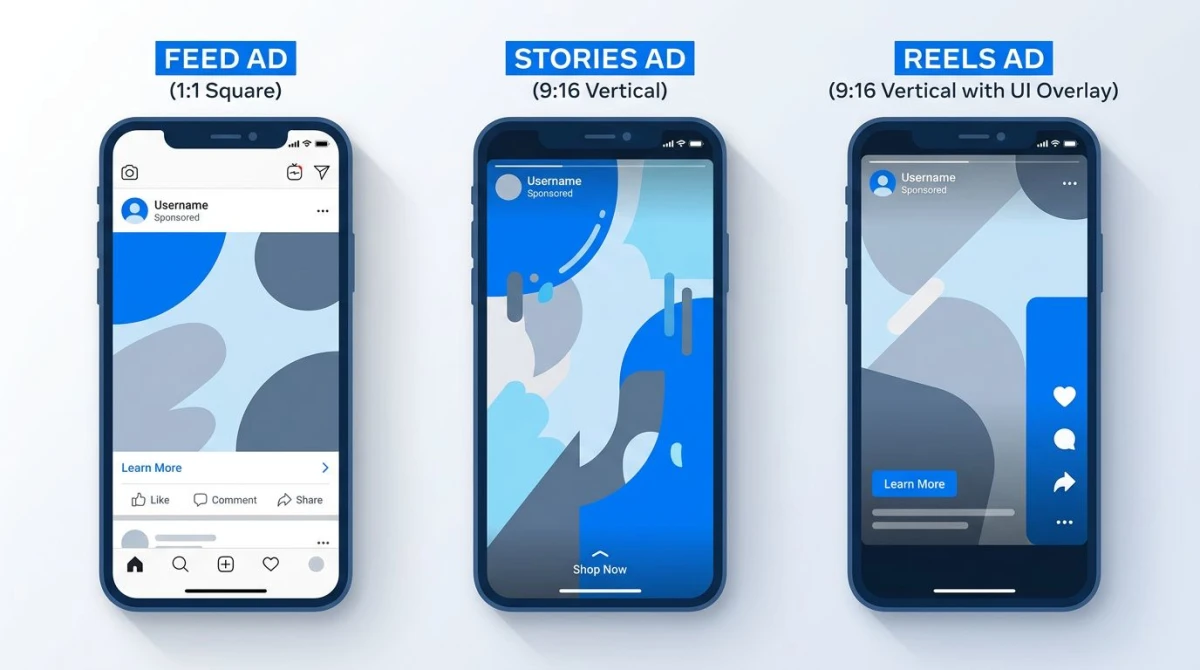
Feed (1:1) vs Stories (9:16) vs Reels (9:16): the same product, three different crops.
Single image feed ad
- Square (1:1): 1080×1080 pixels. The safe default. Renders cleanly on every device.
- Vertical (4:5): 1080×1350 pixels. The mobile-first pick. It takes more screen on phones, which is where 98% of your impressions happen.
- Landscape (1.91:1): 1200×628 pixels. Use when you have a link preview that benefits from a wide hero (articles, long-form pages).
The vertical 4:5 consistently outperforms square in A/B tests. It pushes the like and share UI off-screen, so users scroll less and absorb more. The square is still fine if you need one creative for both feed and Marketplace.
File specs:
- Format: JPG or PNG (PNG preserves crisp edges on logos and screenshots; JPG is smaller for photos)
- Max file size: 30 MB
- Min width: 600 pixels
- Recommended: 1080 pixels wide minimum
Carousel ads
Carousel is up to 10 cards, each at 1080×1080 (1:1). Mixing aspect ratios in the same carousel is technically allowed but Meta will pad whichever card is the odd one out, so just don't.
Carousel works best when each card builds on the last: step 1, step 2, step 3, or product 1, product 2, product 3. The first card is the only one most users see, so it has to earn the swipe.
Per-card specs:
- Image: 1080×1080, JPG/PNG, 30 MB max
- Video: 1080×1080, MP4/MOV, 4 GB max, 240s max
- Headline: 40 characters
- Description: 20 characters
- 2 to 10 cards
Feed video ads
Feed video matches the feed image specs in aspect ratio: 4:5 vertical (1080×1350) is the modern default. Some advertisers still use 1:1 (1080×1080) for cross-placement campaigns, and 16:9 (1280×720) is allowed but it gets letterboxed on mobile and looks dated.
File specs:
- Format: MP4 or MOV (MOV lets you keep alpha channels, but Meta strips them anyway)
- Codec: H.264 video, AAC audio
- Max file size: 4 GB
- Max length: 240 minutes, but in practice aim for 15 to 60 seconds. Watch-through rates collapse after 30 seconds on cold traffic.
- Frame rate: 30fps (60fps uploads, gets re-encoded)
- Captions: SRT file or burned-in subtitles. Required for accessibility and sound-off viewing.
If your raw footage is the wrong aspect ratio, our aspect ratio calculator finds the right crop without distortion, and the image cropper handles still frames.
Stories Ads: Vertical, Full-Bleed, Brutal Pacing
Stories ads are 1080×1920 pixels (9:16), the same dimensions for image and video. The format is unforgiving: full-screen vertical, fast skip gesture, and the top and bottom 14% of the frame is hidden under Meta's UI.
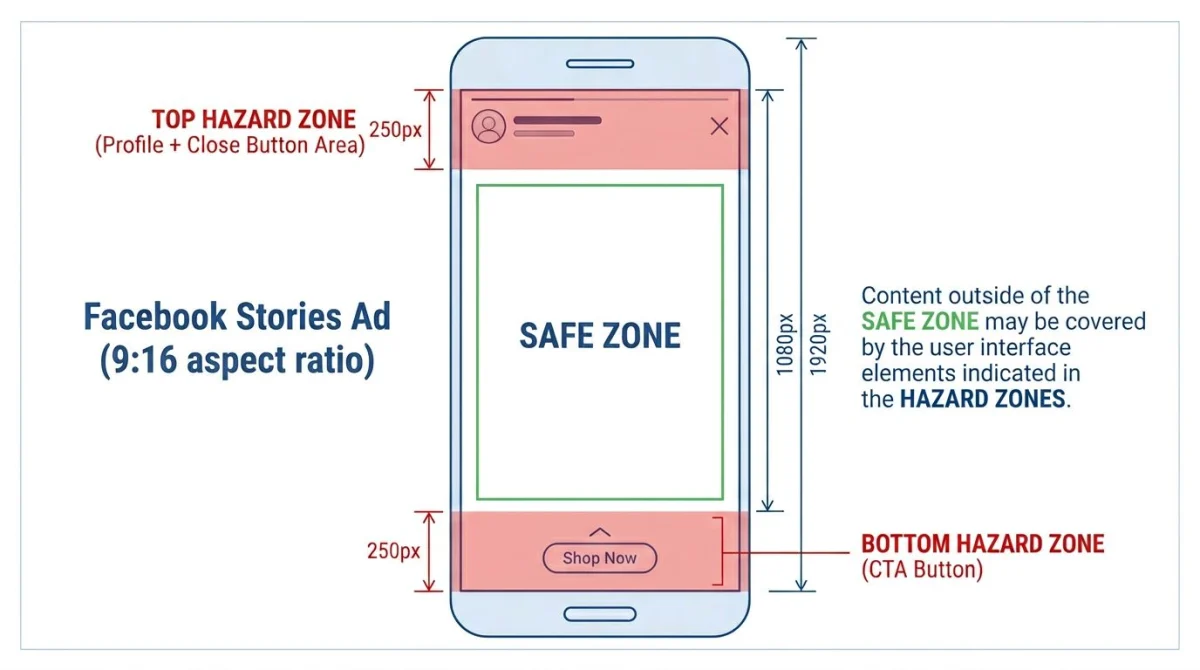
The middle 1080×1420 is your safe zone. Anything in the top 250px or bottom 250px will get covered by UI.
Stories image ads
- Dimensions: 1080×1920 pixels
- Aspect ratio: 9:16
- Format: JPG or PNG
- Max file size: 30 MB
Stories video ads
- Dimensions: 1080×1920 pixels
- Aspect ratio: 9:16
- Format: MP4 or MOV, H.264, AAC
- Max file size: 4 GB
- Max length: 15 seconds per card (longer videos auto-split into multiple Story cards)
Safe zones (the part everyone skips)
Meta's profile circle and account name sit in the top 250 pixels. The CTA button and "more options" sit in the bottom 250 pixels. Anything you put there is gone.
Design rule: keep all logos, text, faces, and product shots inside the central 1080×1420 area. That's the band from y=250 to y=1670. Treat the top and bottom as bleed.
Reels Ads: The 2026 Growth Channel
Reels ads are 1080×1920 (9:16), identical dimensions to Stories, but the placement context is completely different. Reels users expect snappy, native-feeling content. A polished commercial-style cut feels out of place and gets scrolled past.
- Dimensions: 1080×1920 pixels
- Aspect ratio: 9:16
- Format: MP4 or MOV
- Max file size: 4 GB
- Length: 15 to 60 seconds (15s converts best for cold traffic; up to 90s allowed but unusual)
- Audio: Required. Reels users watch with sound on more than feed users do, so design for it.
- Caption sticker: Native captions overlay the bottom third, so keep your own text out of the bottom 30%.
The "native feel" point matters for ROAS. Top-performing Reels ads in 2026 look like organic Reels: handheld, hook in the first 1.5 seconds, captions on, music synced. The same agency-polished cut that wins in feed often loses in Reels.
In-Stream Video Ads
In-stream ads play mid-roll inside Facebook video content (think YouTube pre-roll, only positioned mid-roll). Specs match traditional 16:9 video.
- Dimensions: 1280×720 pixels minimum (1920×1080 preferred)
- Aspect ratio: 16:9 (4:5 and 1:1 also accepted)
- Format: MP4 or MOV, H.264, AAC
- Max file size: 4 GB
- Length:
- Non-skippable: 5 to 15 seconds
- Skippable: up to 10 minutes (rarely used)
- Captions: Strongly recommended, because viewers don't always have audio on partner content
In-stream is the only major Meta placement where landscape 16:9 is still the right pick. If your campaign mixes feed, Stories, Reels, and in-stream, you'll need at least two creative crops.
Carousel and Collection Ads
Carousel we covered above (multi-card swipe, 1080×1080 per card).
Collection ads are a hybrid: a feed-level cover image or video, plus a grid of product images that opens into an Instant Experience. Specs:
- Cover image: 1080×1080 (1:1) or 1080×1080 video
- Cover video: same as feed video specs (MP4/MOV, 4 GB max)
- Product images: 1080×1080, JPG/PNG, 30 MB each
- Catalog source: at least 4 products
Collection works best for ecommerce with a real product feed. If you're running a single offer, stick with carousel.
Marketplace, Right Column, Search, and Messenger
These are the "other" placements: lower volume, but useful for retargeting and broad reach campaigns.
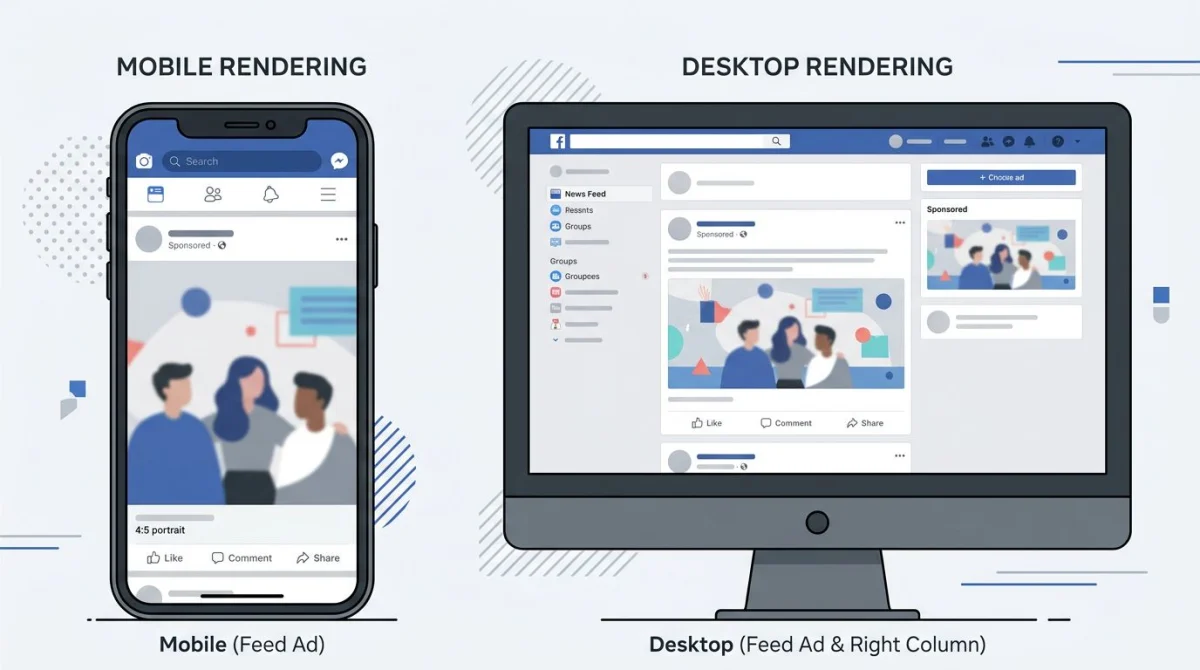
Mobile shows feed + Stories + Reels. Desktop adds the right-column slot: same campaign, different placements.
Marketplace ads
Local-intent placement. Two acceptable sizes:
- 1080×1080 (1:1). Preferred, matches the listing thumbnail style
- 1200×628 (1.91:1). Also works, gets letterboxed slightly
- Format: JPG/PNG, 30 MB max
Right-column ads (desktop only)
Small banner on the desktop sidebar. Cheap, low CTR, useful for retargeting warm audiences.
- Dimensions: 1200×628 pixels
- Aspect ratio: 1.91:1
- Min width: 254 pixels (renders at smaller size in the rail)
- Format: JPG/PNG, 30 MB max
- Headline: 25 characters
- Description: 30 characters
Search results ads
Inline placement inside Facebook's search results.
- Dimensions: 1200×628 pixels
- Aspect ratio: 1.91:1
- Format: JPG/PNG, 30 MB max
Messenger inbox ads
Appears as a card between conversations in the Messenger app.
- Dimensions: 1200×628 pixels
- Aspect ratio: 1.91:1
- Format: JPG/PNG, 30 MB max
- Headline: 25 characters
- Description: 30 characters
- Body text: 125 characters
A single 1200×628 banner covers right column, search, and Messenger inbox. That's a handy time-saver when you're making lots of ads at once.
Instant Experience and Lead Form ads
These two formats use a feed creative as the cover, then open a full-screen experience inside Facebook.
Instant Experience (formerly Canvas):
- Cover: any feed format (1:1, 4:5, or 1.91:1)
- Inside: vertical-stacked images and videos at 1080 wide
- Background images: 1080×1920 (9:16)
- Video clips inside: same as feed video specs
Lead Form ads:
- Cover image: 1080×1080 (1:1) or 1080×1350 (4:5)
- The form itself uses a Meta-styled template, so no custom dimensions are needed
- Image specs match standard feed image specs
Branded Content / Partnership Ads
When a creator tags a brand and the brand boosts the post, the dimensions are whatever the original organic post used. In practice:
- Feed organic post → 1:1 or 4:5 image, 1:1 or 4:5 video
- Reels → 9:16 video
- Stories → 9:16 image or video
The boost inherits the format. There's no "ad version" to re-export, because you're paying to amplify what's already there.

Tired of plain screenshots? Try ScreenSnap Pro.
Beautiful backgrounds, pro annotations, GIF recording, and instant cloud sharing, all in one app. Pay $39 once, own it forever.
See pricing and featuresThe Aspect Ratio Cheat Sheet
Five aspect ratios cover every Meta placement. Memorize these and the dimension numbers stop mattering.
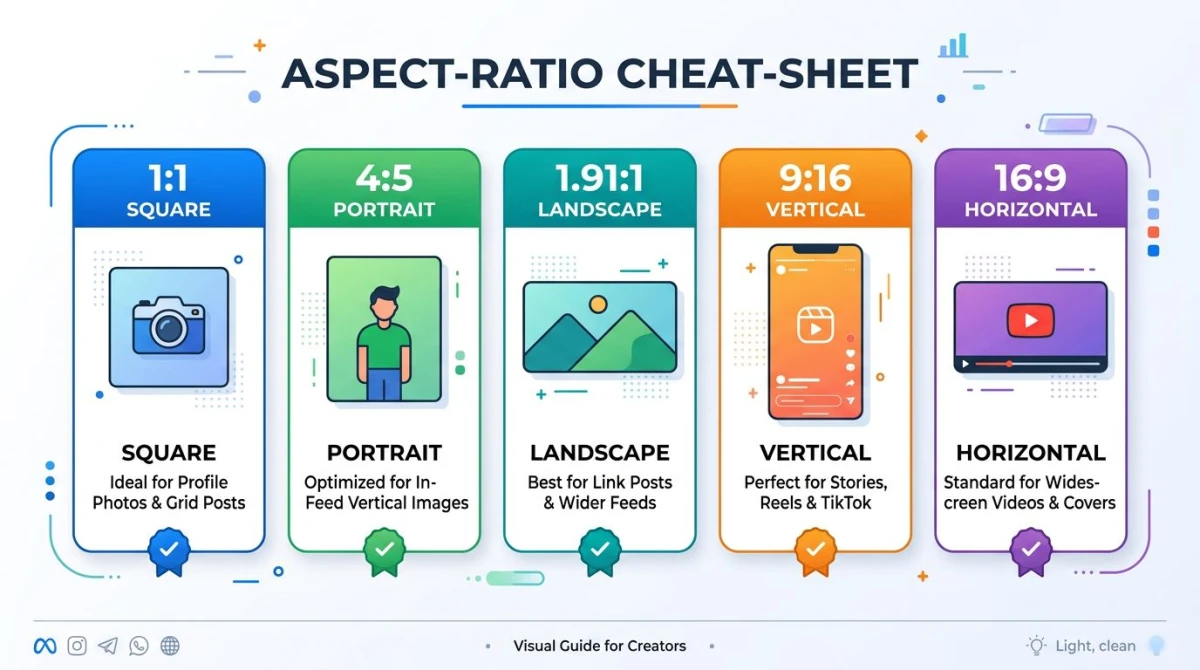
The five ratios that cover every Meta ad placement.
| Ratio | Dimensions | Where it shows |
|---|---|---|
| 1:1 | 1080×1080 | Feed (square), Carousel, Marketplace |
| 4:5 | 1080×1350 | Feed (vertical), mobile-first |
| 1.91:1 | 1200×628 | Right column, Search, Messenger, Feed link previews |
| 9:16 | 1080×1920 | Stories, Reels |
| 16:9 | 1280×720 | In-stream video |
If you only have time to design two crops: 4:5 for feed and 9:16 for Stories and Reels. That covers ~90% of mobile impressions.
Why Meta keeps so many ratios
It's a fair question. Why not pick one and standardize? Two reasons. First, Reels and Stories are full-screen vertical placements that came from mobile-only contexts (Snapchat, Instagram Stories, then TikTok). Second, the news feed grew up alongside desktop, where 1.91:1 link previews were the default for years. Meta has been slowly nudging advertisers toward 4:5 and 9:16, but it can't drop legacy ratios without breaking older ad accounts.
The practical upshot: design once at 4:5, once at 9:16, and let Meta's automatic placement handle the rest. Manually crafting every aspect ratio is rarely worth the effort unless you're spending more than $50,000 a month.
Asset Customization vs Automatic Placement
Two settings inside Ads Manager change how your creative gets cropped:
- Automatic placement (default): Meta fits your single creative into every placement. Cheap and fast. Looks ok for most campaigns.
- Asset customization: you upload a different crop for each placement (feed, Stories, Reels, in-stream, etc.). More work, better results.
Rule of thumb: small budgets stay on automatic. Mid-to-large budgets do asset customization. The lift in CTR from native-feeling crops is usually worth the production time once you're past $5,000 a month in spend.
The 20% Text Rule (and Why It Still Matters)
Meta officially dropped the 20% text overlay rule in 2020. You can now upload an ad with any amount of text and it won't be auto-rejected.
But the algorithm still penalizes high text density. Here's what changed: instead of a hard reject, Meta's delivery system internally scores text density and quietly limits reach for ads that are mostly text. Your ad runs, your spend goes through, and your CPM is 30 to 50% higher than a text-light version of the same offer.
Practical guideline: keep text to under 20% of the image area. Yes, the same number. The tool to check is gone, but the algorithm's preference isn't.
What counts as "text" in 2026:
- Words burned into the image
- Logos with prominent wordmarks (the wordmark counts; the icon doesn't)
- Watermarks
- Numbers and pricing overlays
What doesn't count:
- Text inside book covers, album art, infographic screenshots, or product packaging that's the actual product
- Captions in the body copy (those are unlimited)
- Text on a CTA button
If you need to compress a text-heavy creative before re-uploading, run it through our image resizer with the 4:5 preset.
Compression and Quality (the Hidden Killer)
Meta re-compresses every image and video you upload. Always. There is no "high quality" toggle. This means:
- Upload at 2× resolution. A 1080×1080 ad uploaded at 2160×2160 keeps more detail after Meta's pass.
- Use PNG for screenshots, logos, and UI shots. JPG on top of JPG = stacked artifacts.
- Use H.264 with a high bit rate for video. 8 to 12 Mbps for 1080p holds up well through Meta's re-encode.
- Avoid heavy gradients and fine text. Both compress badly. Solid backgrounds and bold sans-serif copy hold up best.
If your final file is over the 30 MB image cap, you're almost always over-resolving. Drop to 1080 wide, save at JPG quality 85, and you'll be under 2 MB with no visible difference.
The 2× upload trick
Designers call this "supersampling." You design at twice the target size, then export at 2× and let Meta scale it down. The math is simple. A 1080-pixel ad uploaded at 2160 pixels gives Meta extra detail to work with. The re-encode still runs, but it starts from a richer source.
This works for both image and video. For a feed video at 1080×1350, render at 2160×2700 if your editor can handle it. For a Stories ad at 1080×1920, render at 2160×3840 (which is 4K vertical). The file size goes up, but you stay well under the 30 MB image cap and 4 GB video cap.
Color and gamma drift
Meta's pipeline shifts color slightly. Saturated reds dull, deep blacks lift, and skin tones can warm up or cool down by a few percent. There's no fix you can apply on your end, so all you can do is plan around it. Soft pastels survive better than punchy neons. Pure black logos render as near-black after the pass. If you have brand color rules, test with a small spend before scaling.
Fonts and text legibility
Text that looks crisp in your design tool can blur after upload. The rule of thumb: any body text on the ad should be at least 30 pixels tall at the upload size. For a 1080×1350 feed ad, that's roughly 24 to 28 point sans-serif. Headlines can be larger. Anything smaller than 24 pixels tall will smear after compression. Small text is also one of the things Meta's algorithm uses to flag high text density.
Best Practices for 2026
What's working in Meta paid right now, based on the campaigns we and our customers run:
- Vertical-first design. 4:5 for feed, 9:16 for Stories and Reels. Square is fine but no longer the default.
- Hooks in the first 1.5 seconds. Average watch time has dropped every year since 2020. If your value prop isn't visible right away, you've lost them.
- Captions on every video. 85%+ of plays are sound-off. Use an SRT or burn captions in.
- Less text in-image, more text in body copy. The ad creative gets the low-text-density boost. The body copy carries the message.
- Native-feeling Reels. Polished commercial cuts under-deliver in Reels. UGC-style and creator content out-perform.
- Test creative weekly. Creative fatigue sets in around day 7 to 10 on most accounts.
- One headline per audience. Dynamic creative testing covers the rest.
- Add alt text. It helps screen readers and slightly helps relevance scoring.
Accessibility checklist
Meta's relevance score now factors in accessibility signals. Three quick wins:
- Alt text on every image. Use the alt field in Ads Manager. Describe the visual, not the call to action.
- Captions on every video. Either burn them in (safer for sound-off) or upload an SRT in Ads Manager.
- Color contrast for text overlays. Aim for at least a 4.5:1 ratio between text and background. White text on a busy photo fails this, so add a dark gradient overlay first. Our color contrast checker gives you a pass-or-fail score in one click.
Mobile-first thinking
Roughly 98% of Facebook impressions render on a phone. Two implications. First, anything you design for desktop will get cropped or scaled on mobile, so design mobile-first and let desktop figure itself out. Second, your ad will be viewed on a screen smaller than your design preview. Always do a final check at 375 pixels wide (iPhone display width) to spot text that's too small or details that get lost.
Creative refresh cadence
Most ad accounts see CTR drop 30 to 50% by day 10 of the same creative. The frequency cap on a winning ad set is around 3 to 5 in a 7-day window before fatigue kicks in. Plan for a fresh creative every 7 to 14 days on evergreen campaigns. For seasonal pushes, plan three to five variants up front so you can rotate without going back to the drawing board.
Troubleshooting: Why Is My Facebook Ad Rejected, Blurry, or Underperforming?
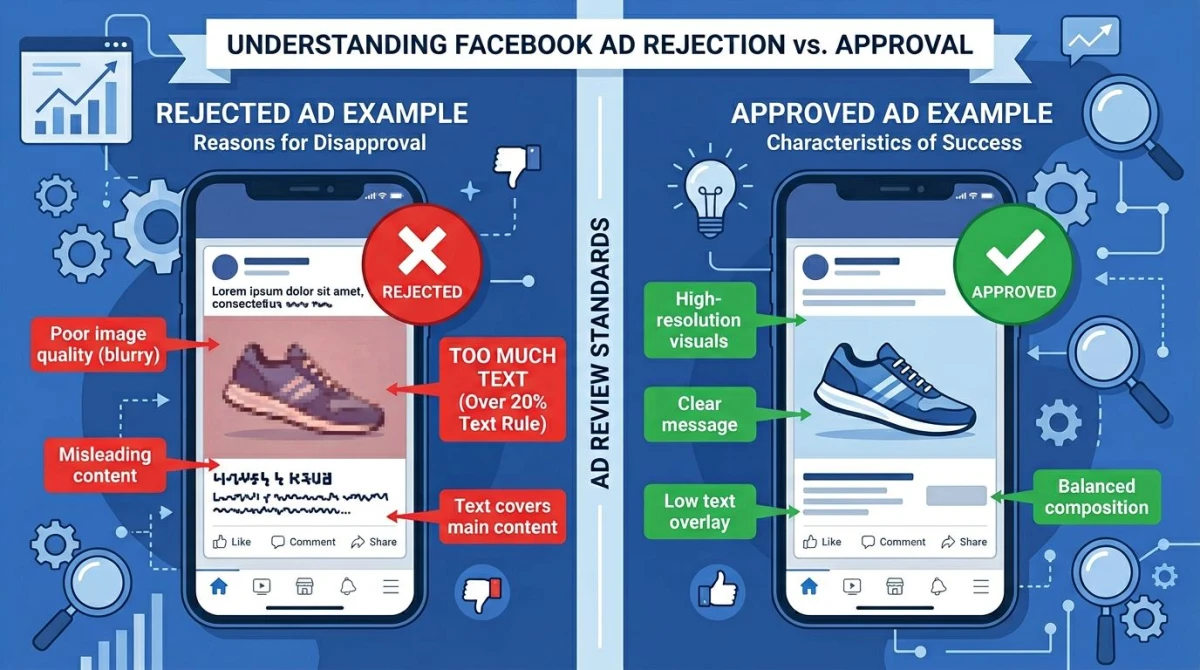
The four most common upload failures: text density, low resolution, wrong aspect ratio, wrong file format.
The four causes account for ~95% of rejections and quality flags:
1. High text density. Even though the 20% rule is officially gone, the algorithm still flags text-heavy creatives. Fix: reduce text-in-image, move copy to body text. Re-upload.
2. Low resolution. Anything under 600px wide gets a low-quality flag and reduced delivery. Fix: re-export at 1080px minimum. For square feed, use 1080×1080. For 4:5, use 1080×1350.
3. Wrong aspect ratio for the placement. A 1.91:1 banner uploaded for Stories looks like a tiny letterboxed bar. Fix: design for 9:16 specifically, or use Meta's automatic placement adjustments only for low-stakes campaigns.
4. Wrong file format. GIF, WebP, and HEIC all get rejected or auto-converted with quality loss. Fix: stick to JPG or PNG for images, MP4 or MOV for video.
A few less-common ones:
- Trademark or copyrighted material in the creative
- Misleading text overlay ("CONGRATULATIONS!" without a real promo, "100% guaranteed", etc.)
- Personal attribute targeting in copy ("Are you depressed?" type lines, which get auto-flagged)
- Before/after weight loss imagery. Explicitly disallowed
For Meta's full policy detail, see the Meta Ads Policies page.
Where ScreenSnap Pro Fits
When your ad creative is a product screenshot, app UI, or website mockup, the polish matters as much as the dimensions. ScreenSnap Pro is a one-time $39 screenshot and recording tool for Mac and Windows that adds professional gradient backgrounds and clean annotations to product shots. That is the kind of polish that helps a UI screenshot survive Meta's compression and stand out in the feed. Built-in 500+ wallpapers and 15 annotation tools mean a product mockup goes from raw capture to ad-ready in under a minute. It's not a replacement for Figma or your design pipeline, but it's the fastest way we know to turn a clean screen capture into a feed-worthy creative.
Frequently Asked Questions
Related Reading
- Facebook cover photo size guide: the matching dimensions for your Page header
- Social media image sizes cheat sheet: every platform, every format
- Instagram Reels size guide: Meta's other vertical-first placement
- Instagram Story size guide: same 9:16, slightly different safe zones

Morgan
Indie DeveloperIndie developer, founder of ScreenSnap Pro. A decade of shipping consumer Mac apps and developer tools. Read full bio
@m_0_r_g_a_n_