Changelog Examples 2026: 8 Great Ones + Template
A changelog is a running list of the notable changes in each version of a product, newest first. A good changelog example groups entries by type (Added, Changed, Fixed, Removed), shows a version number and a date on every release, and is written for people, not machines. The rest is style.
The hard part is seeing what that looks like when a real team keeps it up week after week. Below are eight real changelogs, each with a screenshot, what it gets right, and one habit worth stealing. Then you get a copyable template, the format rules, and a short guide to automation.
If you came here for the announcement side of shipping, the post on how to write release notes covers that. A changelog is the record. Release notes are the story you tell about one release. You need both, and they feed each other.
The 8 changelog examples at a glance
Each changelog below solves a different problem. A library needs diff links, an API needs loud breaking change labels, and a desktop app needs version numbers users can match to their build.
| # | Changelog | Type | Best for | Stand-out habit |
|---|---|---|---|---|
| 1 | Keep a Changelog | Open-source file | Projects that want the reference format | Unreleased section and a Breaking: marker |
| 2 | React | Open-source file | Large libraries with many contributors | Changes grouped by package, with PR links and credits |
| 3 | Stripe | API docs | APIs with paying integrators | A "Breaking changes" filter and dated API versions |
| 4 | GitHub | Platform blog | Multi-product platforms | Release, Improvement and Retired labels, plus RSS |
| 5 | Linear | SaaS page | Products that sell on polish | Story up top, fixes and improvements lists below |
| 6 | Supabase | SaaS page | Teams with many breaking changes | Type labels that include Breaking Change and Deprecation |
| 7 | Raycast | Desktop app | Apps with installable versions | Per-platform tabs and one page per version |
| 8 | ScreenSnap Pro | Desktop app | Small teams shipping often | A one-line summary before every list |
Pick the one closest to your audience and borrow from the rest.
8 changelog examples worth copying
1. Keep a Changelog's own CHANGELOG.md
Best for: open-source projects that want to follow the reference format to the letter.
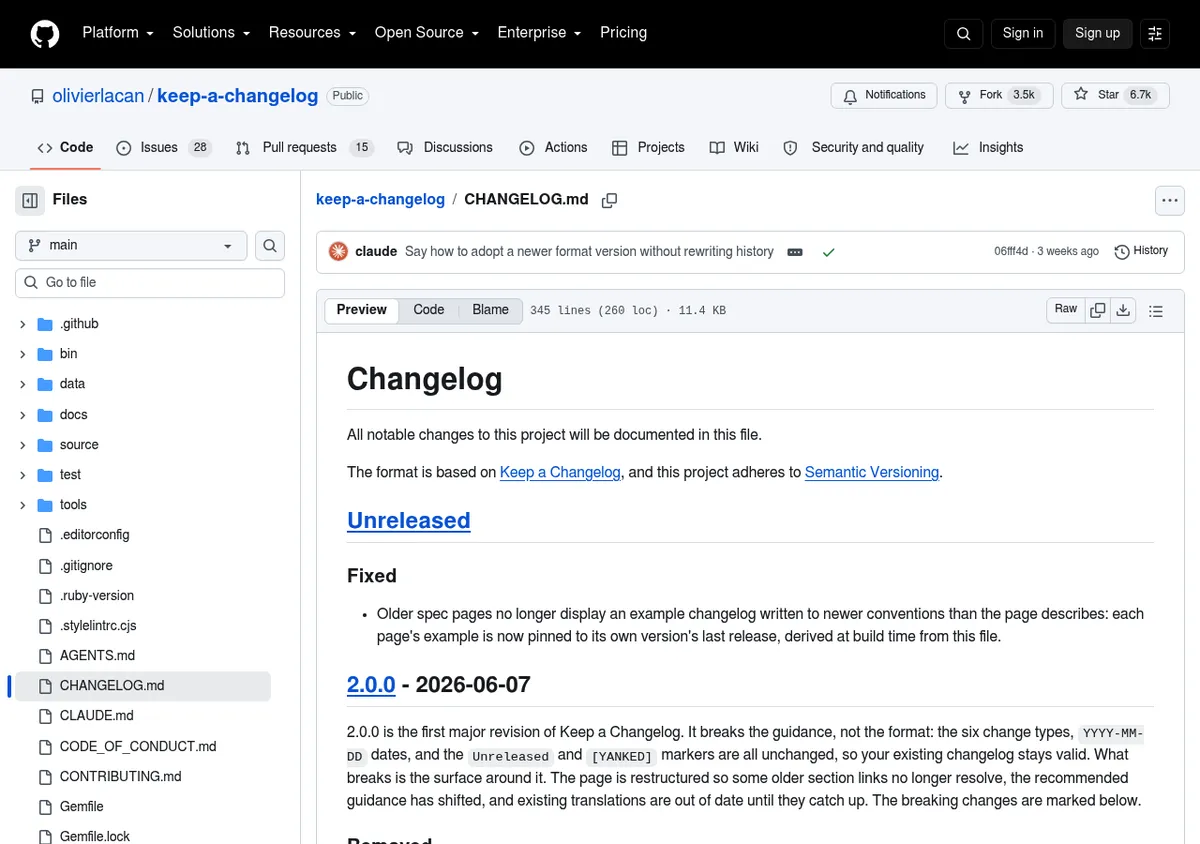
Keep a Changelog is the spec most developers mean when they say "changelog format." The project keeps its own CHANGELOG.md on GitHub, and it is the cleanest changelog example you will find. The file opens with a # Changelog heading and a two-line preamble. That preamble names the format it follows and says the project uses Semantic Versioning.
Right under it sits an Unreleased section. It collects changes that are merged but not shipped yet. At release time, the maintainers rename it to the new version and start a fresh one.
What it gets right:
- One heading shape for every release. Each version reads
## [2.0.0] - 2026-06-07. The date is ISO 8601, so there is no guessing whether 06/07 means June or July. - Only the groups it needs. Version 2.0.0 uses Removed, Changed and Added. Empty groups are left out, not shown as blank headings.
- Breaking changes marked inline. Entries that break things start with a bold Breaking: prefix. They stay inside their normal group instead of moving to a separate section.
- Diff links at the bottom. The bracketed version numbers are Markdown reference links. Each one points to a GitHub compare view between two tags, so a reader can see the exact code diff.
Steal this: the short intro paragraph above a big release. Version 2.0.0 opens with a few sentences saying what breaks and what stays valid. Then the lists take over.
Watch out for: a plain file has no search, filters or subscribe button. For a library, that is fine. For a product with non-technical users, you will want a web page as well.
2. React's CHANGELOG.md
Best for: large libraries with many packages and many contributors.
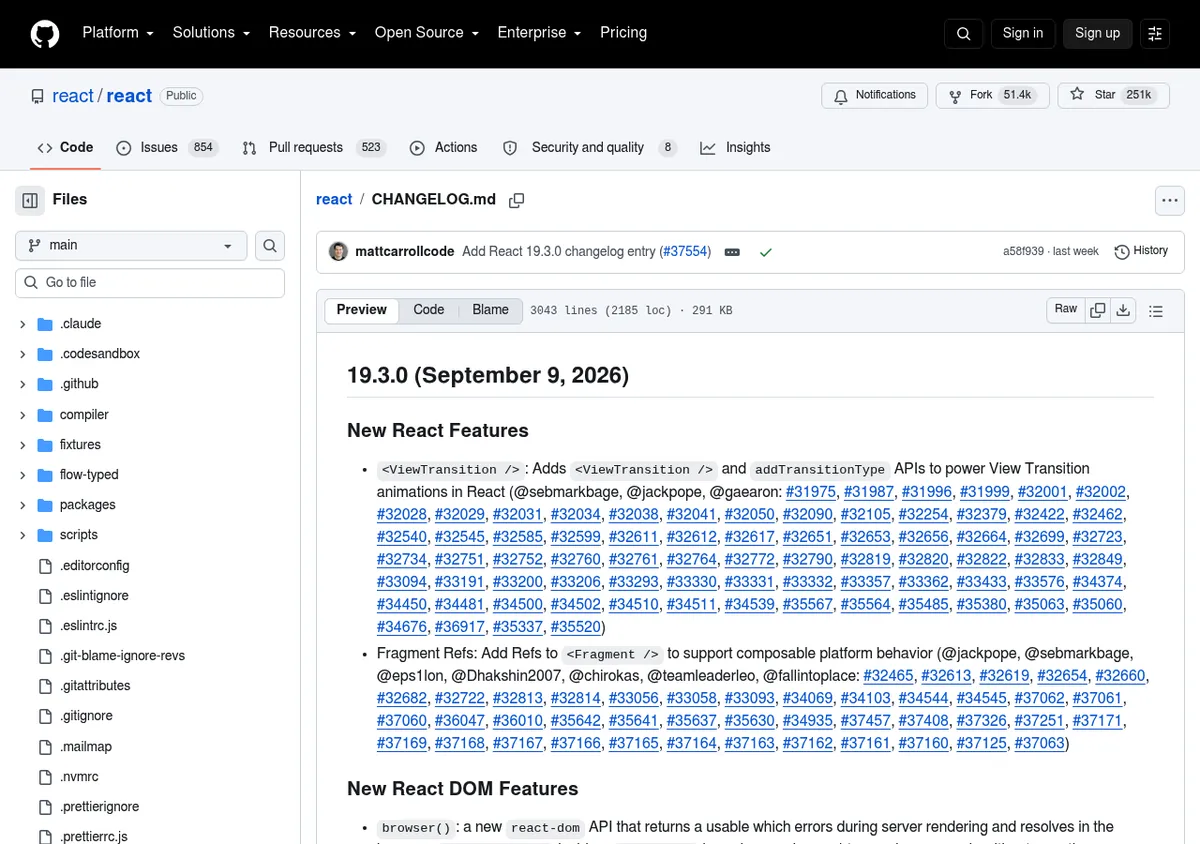
The React changelog is a single Markdown file with more than 3,000 lines. Each release gets a heading with the version and a written-out date, such as 19.3.0 (September 9, 2026).
Big releases then split into sections such as "New React Features", "New React DOM Features" and "All Changes." Under "All Changes," entries are grouped by package: React, React DOM, React Server Components and so on.
What it gets right:
- Grouping by package. A developer who only uses React DOM can jump to that section. In a monorepo, this is often more useful than grouping by change type alone.
- Every entry is traceable. Most bullets end with the author's GitHub handle and links to the pull requests behind them. The ViewTransition entry in 19.3.0 links dozens of PRs.
- Short, direct entries. Lines like "Fix
useDeferredValuegetting stuck" say what changed in a handful of words.
Steal this: credit contributors by name. It costs one line and it rewards the people who did the work.
Watch out for: date formats drift across releases in the file ("Jan 26, 2026", "October 1st, 2025"). This is why the spec recommends YYYY-MM-DD.
3. Stripe API changelog
Best for: APIs where one breaking change can take down a customer's checkout.
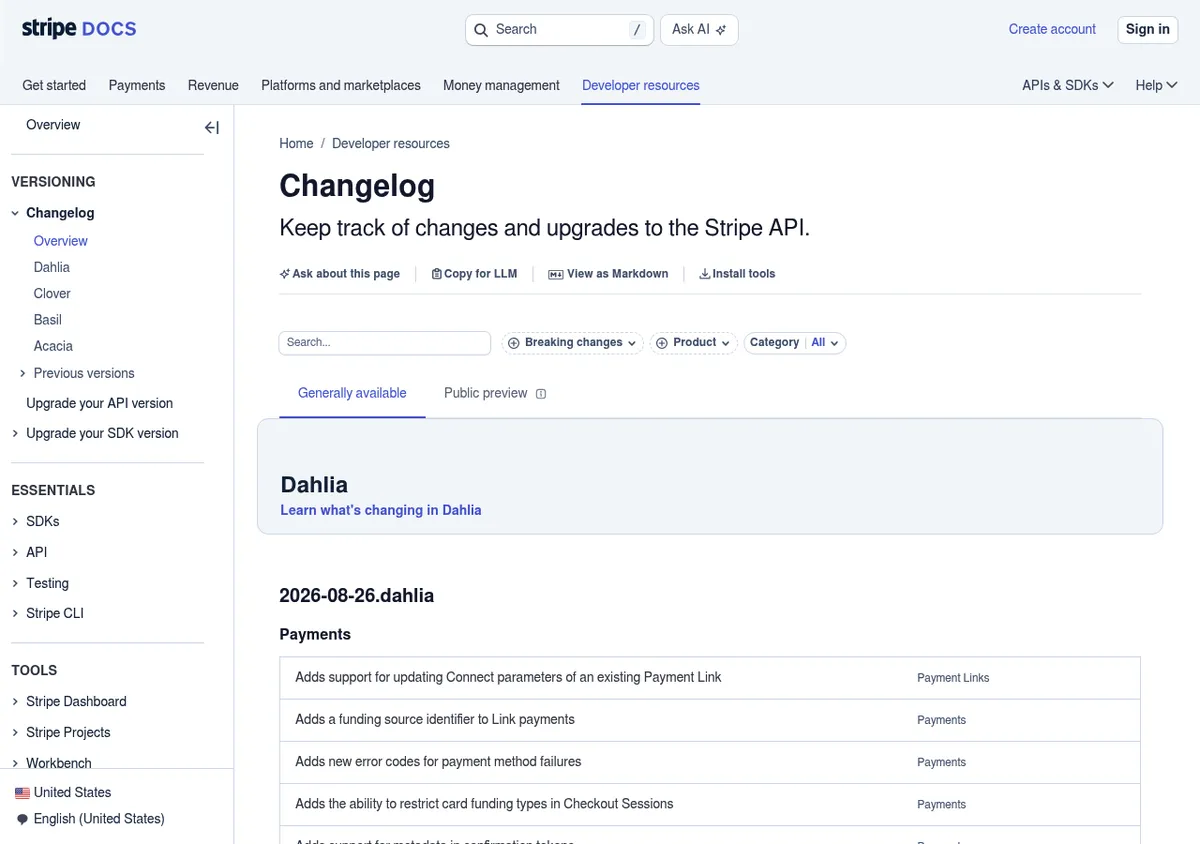
The Stripe changelog lives inside the developer docs. Its tagline is plain: keep track of changes and upgrades to the Stripe API. Releases are grouped under names such as Dahlia, Clover, Basil and Acacia. Inside each one, API versions carry a date plus the release name, like 2026-08-26.dahlia.
Every change sits in a table row. The row shows a title, the affected products, whether the change is breaking, and a category. Each title links to its own page with the details.
What it gets right:
- A "Breaking changes" filter. The top of the page has search plus filters for breaking changes, product and category. An integrator can hide everything except what might break their code.
- Versions that are also dates.
2026-08-26.dahliatells you when the version shipped and which major release it belongs to, in one string. - Generally available and public preview tabs. Preview changes live on their own tab, so they do not clutter the stable list.
Steal this: a yes or no "breaking" field on every entry. When a change can cost money, readers should never have to read the prose to find out.
Watch out for: this depth is built for API integrators. A consumer app would not need it.
4. GitHub Changelog
Best for: platforms with many products and a large, mixed audience.
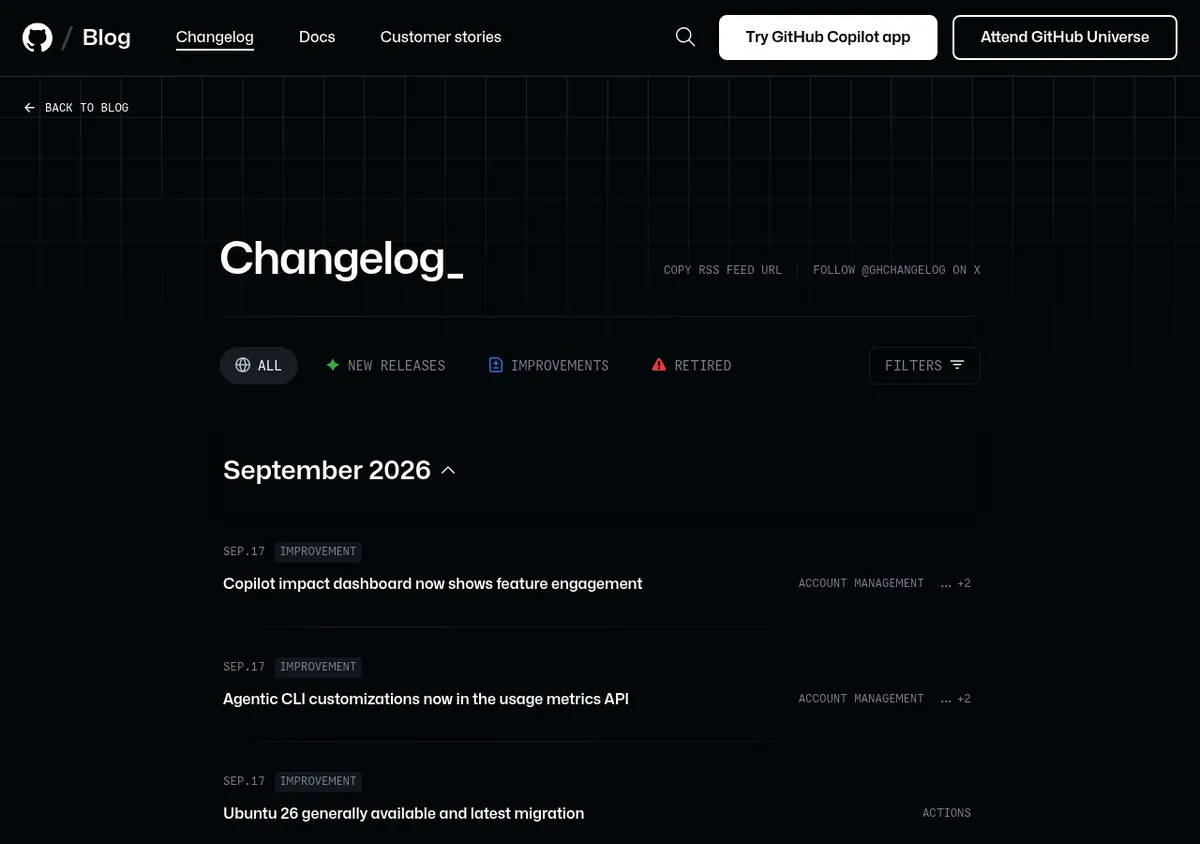
The GitHub Changelog is part of the GitHub blog. Entries are grouped by month. Each one is a short card with a date, a type label, a linked title and product tags such as Copilot or Actions.
There are three type labels: Release, Improvement and Retired. A filter panel lets you narrow the list by product area, and the header offers an RSS feed URL and a link to follow the changelog account on X.
What it gets right:
- A "Retired" label. Deprecations and shutdowns get their own label and color, so they are hard to miss. "SHA-1 in HTTPS on GitHub sunset" is filed there.
- One post per change. Each entry has its own URL, which makes it easy to share a single change in a team chat or a support reply.
- Several ways to follow along. RSS, a social account and a newsletter signup mean people can get updates where they already read.
Steal this: give removals their own visible label. Most changelog readers skim for one thing: "Is something I use going away?"
Watch out for: there are no version numbers, because GitHub.com ships all the time. That works for a hosted service. It would not work for software people install.
5. Linear changelog
Best for: SaaS products where the changelog doubles as marketing.
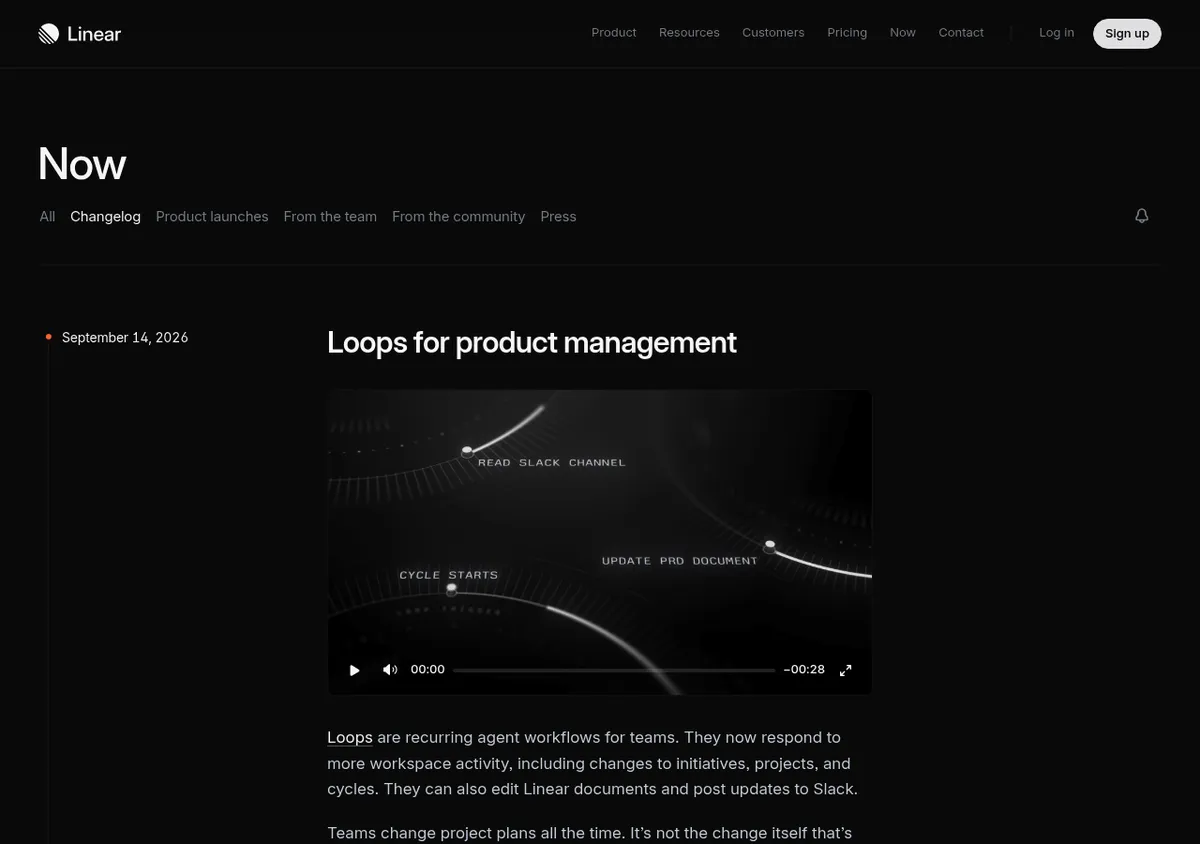
The Linear changelog sits in a "Now" section next to product launches and team posts. Each entry is a dated post, such as "Loops for product management" from September 14, 2026. There are no version numbers.
A post leads with the headline feature: a title, a product video or large screenshot, and a few paragraphs on the problem it solves. Below that come grouped lists of small changes under headings such as Fixes, Improvements and API. Each item carries a short area label.
What it gets right:
- Two layers in one post. Casual readers get the story and the video. Power users scroll down to the full list of fixes.
- Problem first, feature second. The writing explains why teams need the change before it explains what the button does.
- Links to docs. Posts point to the docs for setup details, so the changelog stays short.
Steal this: the "Fixes" and "Improvements" lists under the main story. Small fixes are proof that a product is cared for. Hiding them wastes that proof.
Watch out for: without versions, a user who reports a bug cannot say which build they had. That is fine for a web app that everyone gets at once.
6. Supabase changelog
Best for: developer platforms that ship breaking changes and deprecations often.
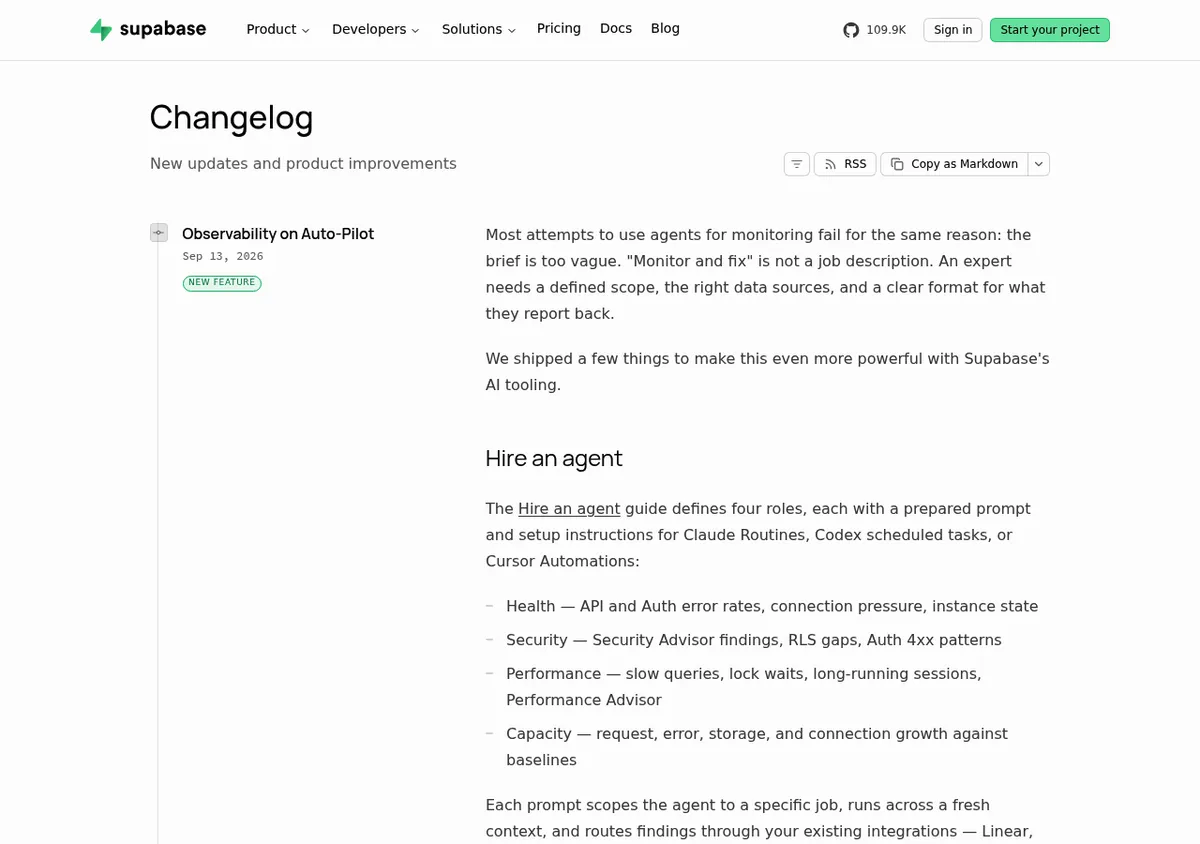
The Supabase changelog is one post per change, newest first. Each post shows a title, a date, a type label and one or more product areas, then a short summary.
The type labels are worth copying word for word: New Feature, Improvement, Bug Fix, Breaking Change, Deprecation and Policy. Area labels cover things like Auth, Database, Storage, Realtime and the client libraries.
What it gets right:
- Breaking Change and Deprecation are first-class labels. A reader can spot them without opening a post.
- Deadlines in plain words. Many posts say what you must do and by when, such as upgrading to a newer version before a set date.
- RSS and "Copy as Markdown." The header has an RSS button and a button to copy the changelog as Markdown, which is handy for pasting into internal notes.
Steal this: a "Policy" label. Pricing, limits and terms changes are changes too, and users hate finding them by accident.
Watch out for: titles sometimes carry stage tags in different styles ("[Public Alpha]", "Feature Preview:", "(Beta)"). Pick one pattern and keep it.
7. Raycast changelog
Best for: desktop and mobile apps where users can see which version they run.
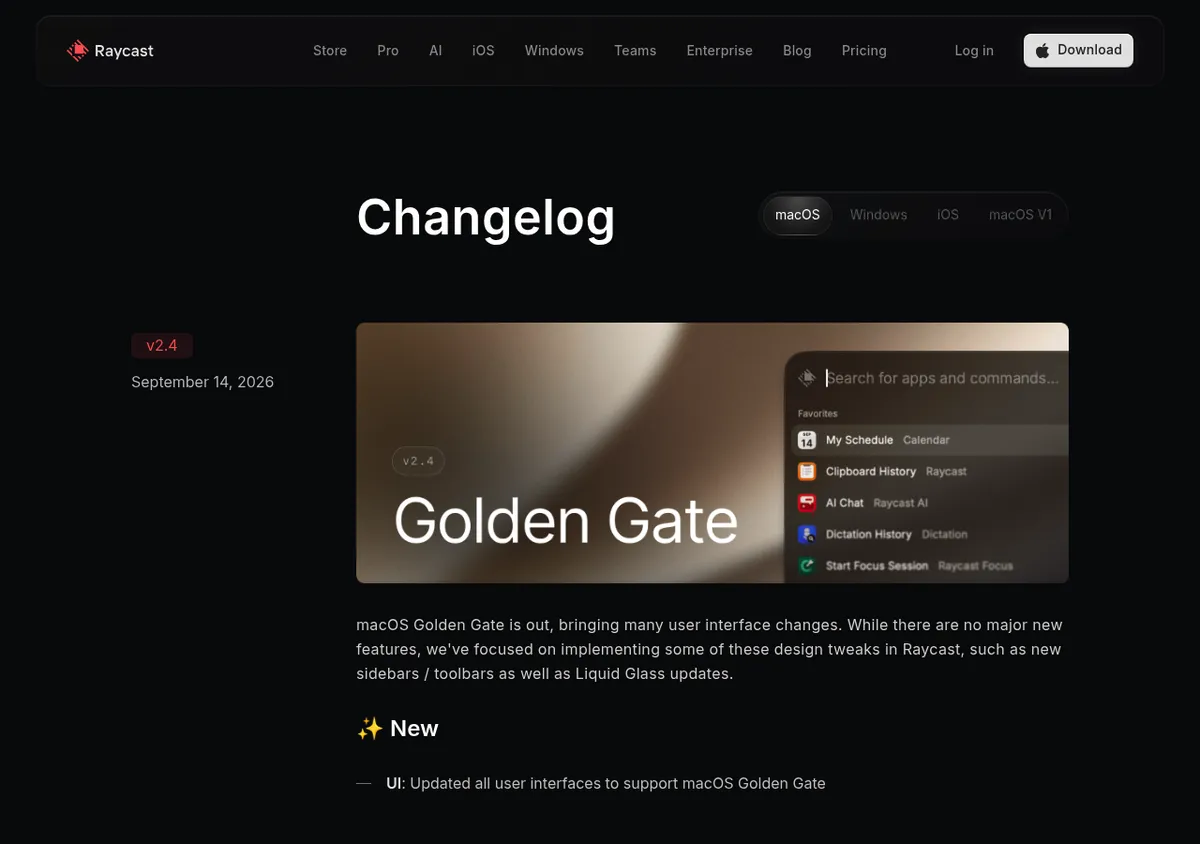
The Raycast changelog has tabs for each platform: macOS, Windows, iOS and the older macOS V1. Every entry shows a version number and a date, such as v2.4 on September 14, 2026. The version links to its own page.
An entry opens with a hero image and a short intro. Then come three fixed sections: New, Improvements and Fixes, each with an emoji. Every bullet starts with a bold area label, like "AI Chat:" or "Clipboard History:".
What it gets right:
- Separate tabs per platform. Mac users do not have to read about Windows fixes, and the other way round.
- Area labels on every bullet. You can scan for the feature you use and skip the rest.
- Honest intros. Big releases explain trade-offs in plain language, not only the good news.
Steal this: the fixed New / Improvements / Fixes order. When every release uses the same three blocks, readers learn where to look.
Watch out for: the version jump from v0.71 to v2.0 needs the context of the 2.0 post to make sense. If you renumber, say so in the changelog itself.
8. ScreenSnap Pro changelog (a worked walkthrough)
Best for: small teams that ship often and write for non-developers.
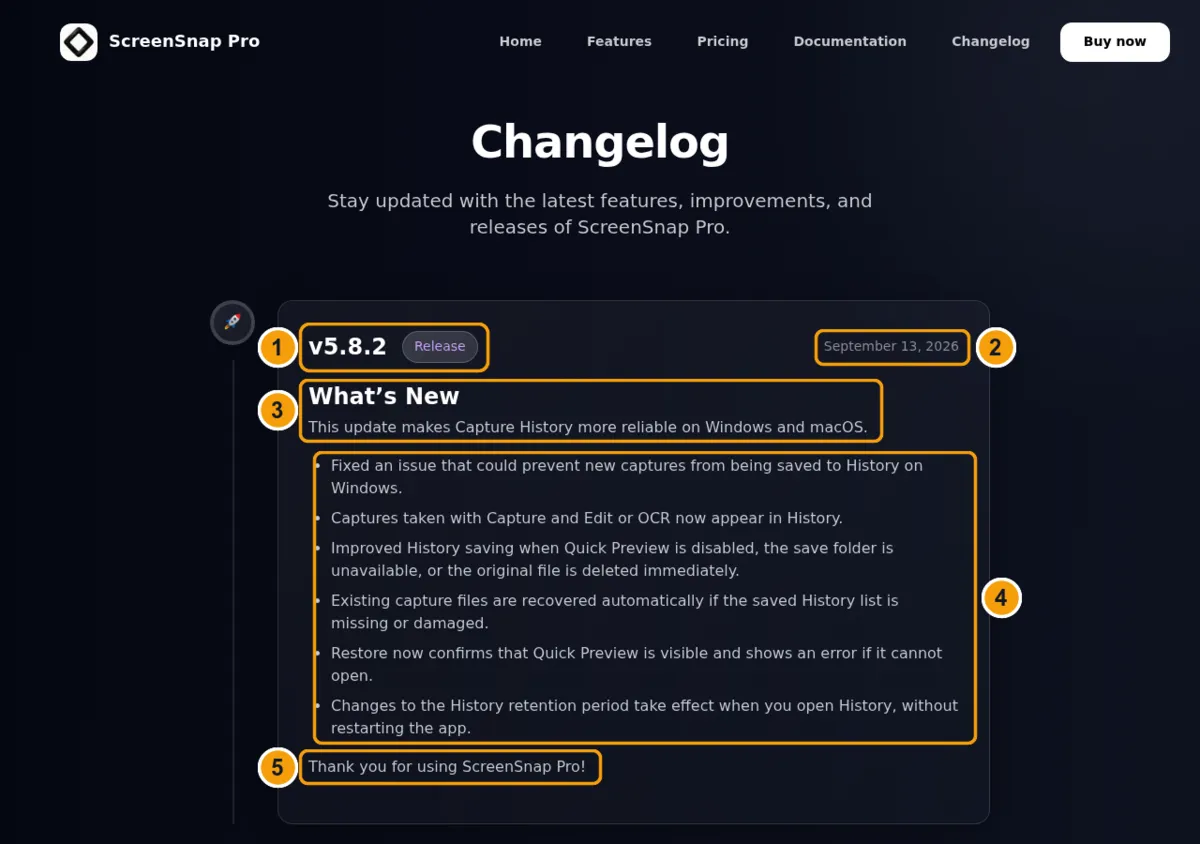
The last example is the ScreenSnap Pro changelog, a screenshot and screen recording app for Mac and Windows. It is a useful walkthrough because it shows the choices a small team makes, good and bad. Here is how one entry breaks down, using the numbers in the screenshot:
- Version and badge.
v5.8.2in large type, with a "Release" badge beside it. - Date. "September 13, 2026," spelled out and aligned right.
- Summary line. Under a "What's New" heading, one sentence sets the theme: this update makes Capture History more reliable on Windows and macOS.
- The change list. Six plain-English bullets. Each describes what the user will notice, not what the code does.
- Sign-off. A short "Thank you for using ScreenSnap Pro!" to close.
What it gets right:
- The one-sentence summary. A reader knows in five seconds whether the release matters to them.
- User language. "Captures taken with Capture and Edit or OCR now appear in History" is a fix described by its effect.
- Platform named when it matters. Fixes that only affect Windows say so.
What could be better:
- No type groups. Fixes and improvements share one list. Added, Changed and Fixed headings would help on longer releases.
- The badge adds little. Every recent entry is labeled "Release," so the label does not tell readers anything new.
- No per-version links or feed. You cannot link to one version or subscribe by RSS.
- Gaps in the numbering. Some patch versions are not listed (the page goes from v5.7.1 to v5.7.3). The spec's advice is that every version should have an entry, even a one-liner.
Steal this: the summary line. Of all the habits on this page, it is the cheapest one to adopt.
What the best changelog examples have in common
- Newest first. Every example puts the latest change at the top.
- A date on every entry. Versions are optional. Dates are not.
- Consistent groups. Keep a Changelog uses Added, Changed and Fixed. Raycast uses New, Improvements and Fixes. Supabase uses labels. The names differ, but each team uses the same set every time.
- Breaking changes are loud. A bold prefix, a filter, a colored label. Nobody buries them in prose.
- Written for the reader. None of them pastes a raw commit log.
- Linkable. Almost all of them give each version or post its own URL or anchor.
- A way to follow. RSS, email, social or an in-product feed. A changelog nobody sees does not do its job.
If your changelog does these seven things, it is already better than most.
Changelog format: Keep a Changelog vs Common Changelog
Two written specs cover most open-source changelog formats. They agree on a lot, but they split on a few details.
Common Changelog is a stricter take on Keep a Changelog. It is built for packages that use git tags and Semantic Versioning.
| Rule | Keep a Changelog 2.0.0 | Common Changelog |
|---|---|---|
| File name | CHANGELOG.md | CHANGELOG.md, starting with # Changelog |
| Change types | Added, Changed, Deprecated, Removed, Fixed, Security | Changed, Added, Removed, Fixed (in that order) |
| Unreleased section | Yes, at the top | No |
| Date format | YYYY-MM-DD | YYYY-MM-DD |
| Release heading | ## [1.0.0] - 2026-09-18 | ## 1.0.0 - 2026-09-18 (no "v") |
| Breaking changes | Breaking: prefix inside its group | Breaking: prefix, sorted first |
| Links to PRs and commits | Optional, as reference links | Expected on each entry |
| Author credit | Optional | Expected, after the references |
| Yanked releases | [YANKED] tag on the heading | A one-line notice instead |
Which should you pick? Keep a Changelog is the safer default, and its six types cover security fixes and deprecations. Common Changelog suits package maintainers who want every line traceable to a commit and an author.
For a SaaS or desktop app, borrow the parts that help your readers: dates, groups, breaking change markers and links.
Changelog vs release notes: what's the difference?
People mix these up all the time, and some teams call either one a release log. Here is the simple version.
| Changelog | Release notes | |
|---|---|---|
| Scope | Every notable change, every version | One release |
| Lifespan | Grows forever | Written once, when the version ships |
| Audience | Anyone who wants the full record | Users who want the highlights |
| Tone | Plain and factual | Can include story and marketing |
| Where it lives | CHANGELOG.md or a /changelog page | Blog post, email, app store, in-app card |
Keep a Changelog 2.0.0 puts it well: the changelog is the source, and release notes are drawn from it. At release time, the version's section in your changelog is already the first draft of the release notes. Copy it, then add screenshots and a few lines of context.
For the announcement side, the release notes template has copyable versions for major releases, patches and in-app "What's New" cards.

Tired of plain screenshots? Try ScreenSnap Pro.
Beautiful backgrounds, pro annotations, GIF recording, and instant cloud sharing, all in one app. Pay $39 once, own it forever.
See pricing and featuresA changelog template you can copy
This template follows Keep a Changelog 2.0.0. Paste it into CHANGELOG.md at the root of your repo and replace the example lines.
# Changelog

All notable changes to this project will be documented in this file.

The format is based on [Keep a Changelog](https://keepachangelog.com/en/2.0.0/),
and this project adheres to [Semantic Versioning](https://semver.org/spec/v2.0.0.html).

## [Unreleased]

### Added

- Export history as CSV from the Settings page.

## [2.1.0] - 2026-09-18

Faster search and a new export option. No breaking changes.

### Added

- Saved searches you can pin to the sidebar.
- CSV export for the activity log.

### Changed

- Search results now load in under a second on large projects.

### Deprecated

- The `legacy_sort` option. It will be removed in 3.0.0. Use `sort_by` instead.

### Fixed

- Dates in exported PDFs now use your time zone.
- The app no longer freezes when you paste a long file name.

## [2.0.0] - 2026-08-02

### Changed

- **Breaking:** `parse()` now returns a result object instead of throwing.
  See the upgrade guide for the two-line fix.

### Removed

- **Breaking:** Support for Node 16.

### Security

- CVE-2026-00000: Fix path traversal in the file upload handler.

## [1.4.2] - 2026-07-15 [YANKED]

### Fixed

- Crash on startup for some Windows users.

[Unreleased]: https://github.com/you/project/compare/v2.1.0...HEAD
[2.1.0]: https://github.com/you/project/compare/v2.0.0...v2.1.0
[2.0.0]: https://github.com/you/project/compare/v1.4.2...v2.0.0
[1.4.2]: https://github.com/you/project/releases/tag/v1.4.2
The CVE number above is a placeholder. Swap in your own, and link to the full advisory.
A web changelog template for apps
If your changelog lives on a website and your readers are not developers, a lighter shape works better. This is the pattern Raycast and ScreenSnap Pro share, with type groups added:
## v3.2.0 · September 18, 2026

One sentence on what this release is about.

**New**
- **Area:** What the user can now do.

**Improved**
- **Area:** What got faster, easier or clearer.

**Fixed**
- **Area:** What was broken and now works.
Keep the order the same in every release. Leave out any group that is empty.
Changelog format rules that keep release history readable
These are the rules that matter most, drawn from both specs and the eight examples above.
Group changes by type
Pick a small set of change types and stick to it. Keep a Changelog's six (Added, Changed, Deprecated, Removed, Fixed, Security) are the standard.
The spec also has a tie-breaker for the most common question. If the old behavior was a bug, it goes under Fixed. If it worked as intended and now works differently, it goes under Changed. Resist new categories like "Performance" or "Dependencies." A faster parser is a Changed entry. A dependency bump only belongs in the changelog if users feel its effect.
Use ISO dates
Write dates as YYYY-MM-DD. The format sorts correctly, reads the same in every country, and is an ISO standard. On a website you can show a friendlier date. Keep the ISO date in the file or the page markup.
Say which versioning scheme you use
Semantic Versioning is the common choice: MAJOR for breaking changes, MINOR for new features, PATCH for fixes. It is not the only one. Calendar Versioning works well for apps that ship on a schedule, and Stripe's dated API versions are a variation of it.
Products that deploy all the time can skip versions and keep dated entries, as GitHub, Linear and Supabase do.
Mark breaking changes on the entry itself
Put a Breaking: prefix on the line, and keep it inside its normal group. Say what breaks: the API, the command line, a file format or a config option.
Add a one-line fix when it fits. When the fix takes more than a few steps, link to a migration guide instead of writing it all in the changelog.
Deprecate before you remove
Mark a feature as Deprecated in one release. Remove it in a later one, and name the version that will remove it. That gives users time to plan. If you record nothing else, record deprecations, removals and breaking changes.
Make every version linkable
A version heading should be something you can link to. In a Markdown file, that means reference links to compare views, as in the template. On a website, it means an anchor or a page per version.
"Fixed in 2.1.0" with a link closes support tickets faster than "Fixed in a recent update."
Keep yanked releases visible
If you pull a release because of a serious bug, do not delete its entry. Mark it [YANKED] so people who installed it know why it vanished.
Write for a reader, not a reviewer
Each entry should make sense on its own. "Fixed login" is a note to yourself. "Fixed a bug that signed you out after 5 minutes on Safari" is a changelog entry.
Before and after: rewriting weak changelog entries
Most weak changelogs are written from the developer's seat. Here are four common entries, rewritten for the reader.
| Before | After | Why it's better |
|---|---|---|
fix: null check in auth middleware (#482) | Fixed: You no longer get signed out when your session token expires during an upload. | Describes the effect, not the code |
| Various bug fixes and performance improvements. | Fixed: Exports over 100 MB no longer fail on Windows. Changed: Search is about twice as fast on large projects. | Specific enough to trust |
| Removed old API. | Removed: Breaking: The /v1/users endpoint. Use /v2/users, which returns the same fields. | Names what broke and the fix |
| Updated dependencies. | (left out) | Users feel no change, so it does not belong |
The pattern: start with what the user will notice, name the area, add the fix if something broke, and cut anything nobody would miss.
If your team files bugs with a clear "expected vs actual" format, half the work is done. A good bug report template already describes the problem in user terms, so the Fixed entry nearly writes itself.
How to automate your changelog without losing the human part
Automation can save hours, but every spec and every example above agrees on one point. A raw commit log is not a changelog. Tools can draft; people should decide what is notable.
Structured commits
Conventional Commits gives commit messages a fixed shape, like feat: or fix:. Tools read those prefixes to pick the next version number and draft a changelog.
- release-please opens a release pull request with a drafted changelog that you can edit before merging.
- semantic-release runs in CI and publishes the version and notes for you.
- Changesets asks contributors to write a short change note with each pull request. That puts the human sentence in from the start.
- git-cliff builds a changelog from your git history using a template you control.
Host-generated release notes
GitHub can generate release notes automatically from merged pull requests. It is a quick start. Keep a Changelog 2.0.0 warns that these notes live in the host's database, not in your repo, so they do not move with your code. Use them as a draft and keep CHANGELOG.md as the record.
AI drafts
A language model can turn a diff into a fluent changelog in seconds. That is also the risk: it is now easy to publish a changelog nobody read. If you use one, give it the same brief you would give a new contributor:
- Summarize notable, user-facing changes only.
- Never paste the git log.
- Sort each change into one of the six types.
- Mark breaking changes.
- Cut anything not worth reading.
Keep that brief in an AGENTS.md or CLAUDE.md file so coding agents see it every time. Then read the draft before you publish it.
Keep CI in a supporting role
Let CI move the Unreleased section into a dated version and check the format. Do not make a changelog edit a required check on every pull request, or people will add lines only to pass it.
Add screenshots and GIFs to your changelog entries
Look back at the eight examples. The web changelogs that feel alive (Linear, Raycast, Supabase) use images or video for their big features. A changelog is mostly text, but one visual can explain a new feature faster than three paragraphs.
A few rules keep visuals useful:
- Show the change, not the whole screen. Crop to the panel or button that changed.
- Use a GIF or a short video for anything that moves. A 5-second loop shows a new drag-and-drop flow better than a still.
- Annotate sparingly. One arrow or numbered callouts, like the ScreenSnap Pro walkthrough above. Not ten.
- Keep files small. A 20 MB GIF slows the whole page. You can compress a GIF in your browser with a quality slider and frame skipping before you embed it, or follow this guide to reduce GIF file size.
For more on sizing, cropping and naming images in docs, see this guide to screenshots in technical documentation. If you are picking a recorder, this roundup of GIF screen capture tools compares the options.
This is where a dedicated capture app earns its place. ScreenSnap Pro captures a region, window or full screen, records GIFs and video, and has 15 annotation tools, including arrows, a numbered counter and blur for hiding customer data. Cloud upload gives you a link to paste into your changelog or release post. It runs on Mac and Windows and costs $39 once, with no subscription.
Frequently Asked Questions
Start with one habit
You do not need to rebuild your changelog this week. Pick one habit from the examples above: a summary line, a Breaking: prefix, a Fixed group, or ISO dates. Add it to your next release.
Then make the next entry easier to read with one clear screenshot. If you want a faster way to capture, annotate and share those images, ScreenSnap Pro is a one-time $39 purchase. One license with 2 seats covers two computers, Mac or Windows. See the pricing.

Morgan
Indie DeveloperIndie developer, founder of ScreenSnap Pro. A decade of shipping consumer Mac apps and developer tools. Read full bio
@m_0_r_g_a_n_