Requirements Traceability Matrix (RTM): Template + Examples
A requirements traceability matrix (RTM) is a table that links every requirement to the test cases that verify it, their latest results, any open defects and the evidence behind each result. It shows at a glance which requirements passed, which failed and which have no test at all.
You need one when a contract, an audit or a product owner asks, "Are we covered for release 3.4?" It is a core QA testing document. Below you get a template, a filled example, gap formulas and evidence an auditor can check.
What is a requirements traceability matrix?
A requirements traceability matrix is a coverage table: one row per requirement, with columns for its tests, results, defects and proof. The ISTQB glossary defines a traceability matrix as one that relates work products "to determine the coverage achieved." Traceability itself is the ability to set up explicit links between related work products, such as a requirement and its test.
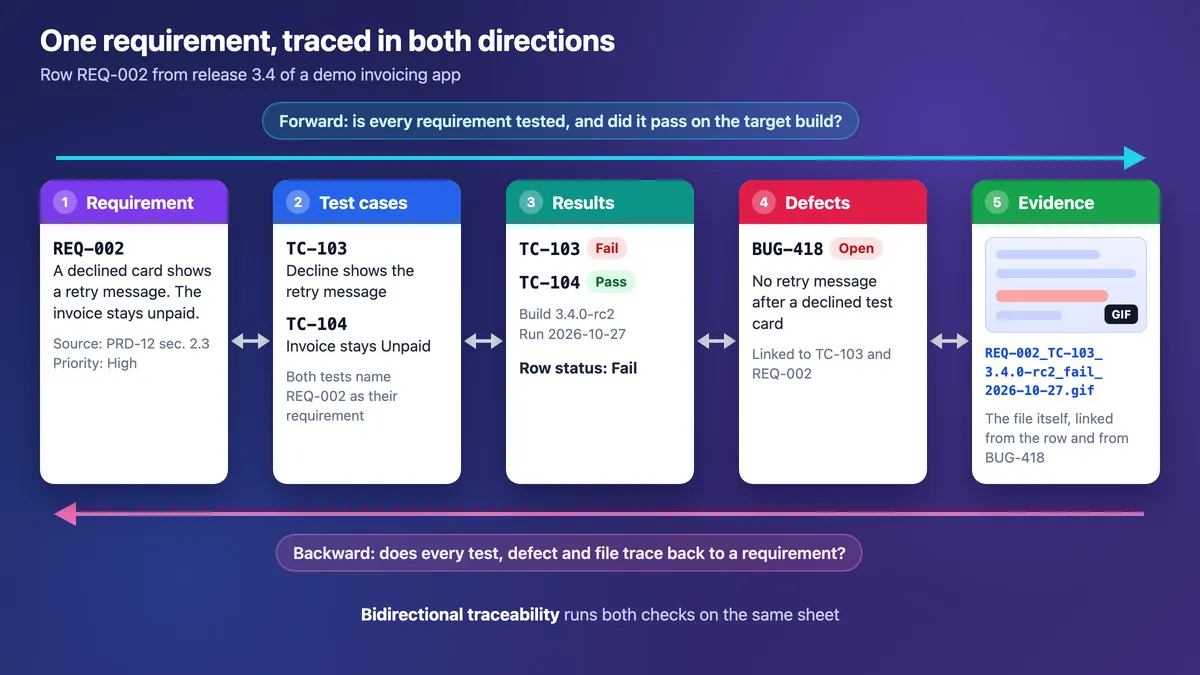
An RTM in testing answers three questions: is every requirement tested, what passed on which build, and what breaks if a requirement changes?
- It finds untested requirements before a client does.
- It shows what a change breaks, since every linked test needs a rerun.
- It ties each defect to a requirement.
- It gives auditors proof: a result plus the file behind it.
Contracts, audits and regulated software expect one, for example under FDA's General Principles of Software Validation (2002) for medical device software, IEC 62304, ISO 26262 in cars and DO-178C in aircraft. Test tools and quality-system software fall under FDA's Computer Software Assurance guidance instead. Your quality system sets the format, and the matrix alone does not prove compliance.
A QA lead or business analyst usually owns the RTM. A traceability matrix in project management uses the same table to trace requirements to deliverables instead of tests.
Types of traceability: forward, backward and bidirectional
There are three types of traceability, and one sheet serves all three.
| Type | Direction | Question | What it catches |
|---|---|---|---|
| Forward | Requirement to tests and results | Is every requirement tested and passing? | Untested or failing requirements |
| Backward | Test or defect to requirement | Why does this test exist? | Orphan tests and scope creep |
| Bidirectional | Both ways | Is coverage complete on both sides? | Gaps both ways, plus change impact |
An unlinked test may be a regression or security check, so record its source rather than delete it. Keep one sheet with two filter views, by requirement and by test.
Where an RTM fits among test documents
The RTM sits above the test plan and test cases and links both back to requirements.
| Document | Answers | Scope |
|---|---|---|
| RTM | Is every requirement tested, passed and proven? | All requirements in a release |
| Test plan | How, when and by whom testing happens | One release or project |
| Test case | How to check one outcome | One behavior |
All three are technical documents QA teams keep, and a test plan's exit criteria often require "no Not covered rows."
Requirements traceability matrix template (copy and paste)
Copy this RTM template as Markdown for a repo or wiki, or as CSV for Google Sheets and Excel.
| Requirement ID | Description | Source | Priority | Test case IDs | Status | Defect IDs | Evidence link |
| --- | --- | --- | --- | --- | --- | --- | --- |
|  |  |  |  |  |  |  |  |
|  |  |  |  |  |  |  |  |
Save the CSV below as rtm.csv, then import it with File > Import > Upload in Google Sheets or Data > From Text/CSV in Excel.
Requirement ID,Description,Source,Priority,Test case IDs,Status,Defect IDs,Evidence link
REQ-002,"Declined card shows a retry message, invoice stays unpaid",PRD-12 sec. 2.3,High,"TC-103, TC-104",Fail,BUG-418,evidence/3.4/REQ-002_TC-103_3.4.0-rc2_fail_2026-10-27.gif
How to fill each column:
| Column | Weak | Strong |
|---|---|---|
| Requirement ID | IDs that change when rows move | Fixed-width IDs, never reused: REQ-001 |
| Source | "Email from Sam" | A PRD section (stable IDs), story key, contract clause or policy |
| Test case IDs | "Checkout tests" | Case IDs from your test tool or sheet |
| Status | "In dev" or "Done" | Verification status, never dev status |
| Defect IDs | "Some bugs" | Filed bugs with steps and evidence |
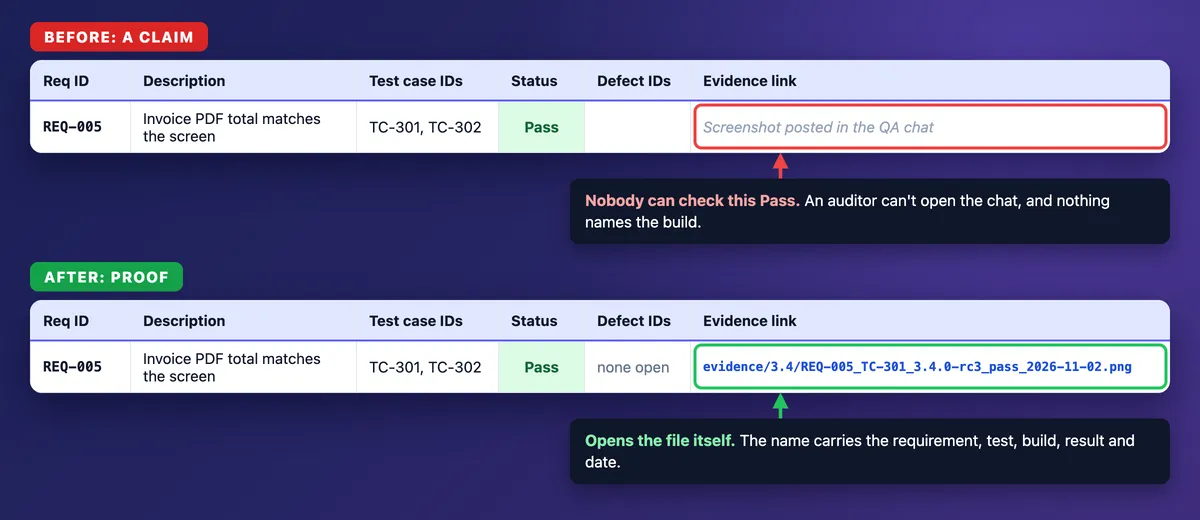
| Evidence link | A chat message or quick-share link | The path or URL of the file itself in the test run, ticket or evidence folder |
Make Status a dropdown with five values: Not covered, Not run, Pass, Fail and Blocked. (In the two-tab layout below, it becomes a formula.) Mark a row Pass only when every linked test passed on the target build and no linked defect is open.
Optional columns: verified in build, owner, verification method (test, inspection, analysis, or an automated visual diff from visual regression testing) and a design reference that traces forward into your software design document.
Requirements traceability matrix example
Here is a filled software requirements traceability matrix for release 3.4 of a demo B2B invoicing app, tested on build 3.4.0-rc2 (October 26 to 30) and rc3 (November 2).
| ID | Requirement | Source | Priority | Tests | Status | Defect | Evidence |
|---|---|---|---|---|---|---|---|
| REQ-001 | Card payment marks the invoice paid | PRD-12 sec. 2.1 | High | TC-101, TC-102 | Pass | REQ-001_TC-101_3.4.0-rc3_pass_2026-11-02.png | |
| REQ-002 | Declined card shows a retry message, invoice stays unpaid | PRD-12 sec. 2.3 | High | TC-103, TC-104 | Fail | BUG-418 | REQ-002_TC-103_3.4.0-rc2_fail_2026-10-27.gif |
| REQ-003 | Receipt email within 5 minutes | PRD-12 sec. 2.4 | Medium | TC-105 | Blocked | ENV-22 (email sandbox down) | |
| REQ-004 | Passwords need 12+ characters (8 before spec v2) | Security policy v2 | High | TC-201 | Not run (still checks 8) | ||
| REQ-005 | Invoice PDF total matches the screen | Contract clause 7.2 | High | TC-301, TC-302 | Pass | REQ-005_TC-301_3.4.0-rc3_pass_2026-11-02.png | |
| REQ-006 | Admins export payments to CSV | Story PAY-88 | Medium | Not covered | |||
| REQ-007 | New pages meet WCAG 2.2 AA contrast | NFR-4 | Medium | TC-401 | Pass | REQ-007_TC-401_3.4.0-rc3_pass_2026-11-02.png |
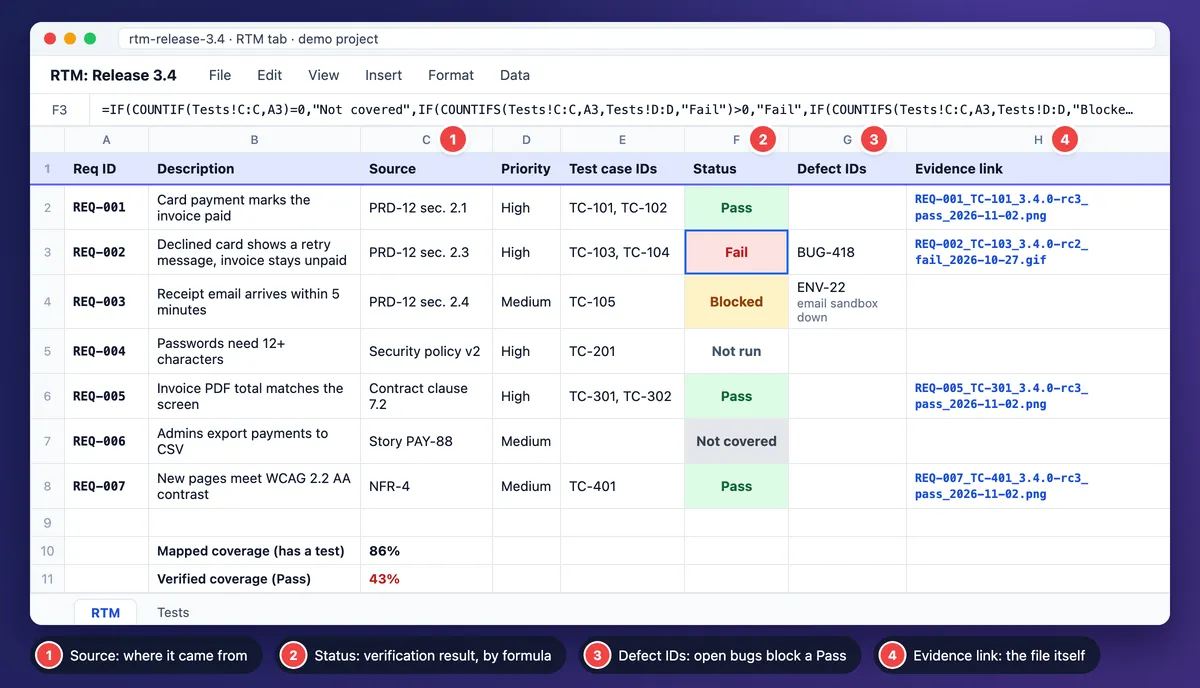
REQ-007's proof is a checker result plus a screenshot of the color pair. WCAG 2.2 AA needs 4.5:1 for normal text and 3:1 for large text and UI components, and a free color contrast checker gives you the ratio.
The backward check finds TC-999, "dark mode toggle," with no requirement. The product owner adds one or retires the test.
Five follow-ups remain: fix BUG-418 and rerun TC-103, restore the email sandbox, update TC-201, test the CSV export (or drop it from 3.4), and link or retire TC-999.
Then report two numbers. Mapping coverage is 6 of 7 (86%), because six requirements have a test. Verified coverage is 3 of 7 (43%), because only three passed on rc3 with proof.
A high mapping number can hide a release that is not ready.

Tired of plain screenshots? Try ScreenSnap Pro.
Beautiful backgrounds, pro annotations, GIF recording, and instant cloud sharing, all in one app. Pay $39 once, own it forever.
See pricing and featuresHow to create an RTM in Excel or Google Sheets (6 steps)
Six steps turn a blank sheet into a working RTM template in Excel or Google Sheets.
1. Collect requirements with stable IDs. Use user stories, or acceptance criteria for risky stories, one row per criterion. Add the non-functional rows teams forget, such as security and accessibility.
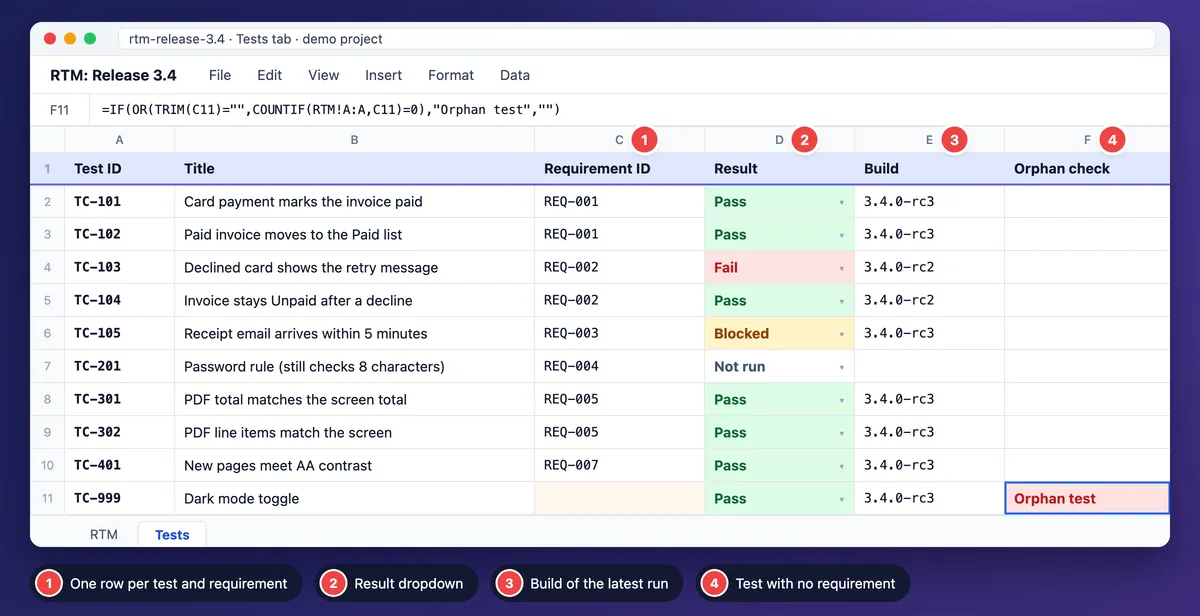
2. Pick a layout. One tab works for small releases: type the test IDs into column E. For bigger ones, add a Tests tab with one row per test and requirement pair (A Test ID, B Title, C Requirement ID, D Result, E Build).
3. Add the formulas. These use functions available in both Google Sheets and Excel. FILTER needs Google Sheets or Excel 2021 or later (including Microsoft 365), and TEXTJOIN needs Excel 2019 or later.
Gap flag (one tab, in a helper column next to Status):
=IF(TRIM(E2)="","Not covered","")Orphan test (Tests tab, column F):
=IF(OR(TRIM(C2)="",COUNTIF(RTM!A:A,C2)=0),"Orphan test","")Status roll-up (RTM column F with two tabs; cell K1 holds the target build, such as 3.4.0-rc3):
=IF(COUNTIF(Tests!C:C,A2)=0,"Not covered",IF(COUNTIFS(Tests!C:C,A2,Tests!D:D,"Fail")>0,"Fail",IF(COUNTIFS(Tests!C:C,A2,Tests!D:D,"Blocked")>0,"Blocked",IF(COUNTIFS(Tests!C:C,A2,Tests!D:D,"Pass",Tests!E:E,$K$1)=COUNTIF(Tests!C:C,A2),"Pass","Not run"))))A blank, mistyped or old-build result rolls up to Not run, never to Pass. The formula reads results only, so check the linked defects before you accept a Pass, or add a defect status column.
Test IDs (RTM column E with two tabs):
=IFERROR(TEXTJOIN(", ",TRUE,FILTER(Tests!A:A,Tests!C:C=A2)),"")Coverage (mapped, then verified; format both as percentages):
=1-COUNTIF(F2:F200,"Not covered")/COUNTA(A2:A200)
=COUNTIF(F2:F200,"Pass")/COUNTA(A2:A200)
4. Add the dropdown and colors. With two tabs, the Pass, Fail, Blocked and Not run dropdown goes on the Tests tab's Result column, since RTM Status is a formula. With one tab, it goes on Status.
Color Fail red, Blocked amber and Not covered grey. See Google's help on dropdowns and conditional formatting, or Excel's on drop-down lists and conditional formatting.
5. Save three filter views: Not covered, Fail or Blocked, and Pass without evidence.
6. Name an owner and update triggers. Update the sheet when a requirement changes, a test is added or retired, a defect opens or closes, or a release build lands. At sign-off, save a dated PDF or CSV export, or one long scrolling screenshot of the sheet (on Mac or on Windows).
A scrolling capture only follows the sheet down, so hide or narrow columns (or zoom out) until it fits the window width first.
Keep it current when a requirement changes
When a requirement changes, update its tests, rerun them and keep the old proof. For REQ-004 (8 to 12 characters):
- Update TC-201 to check 12 characters.
- Rerun it on 3.4.0-rc3.
- Capture new evidence and link it in the row.
- Mark the old 8-character file as superseded, and keep it.
- Check that the release notes mention the new rule.
In Agile teams, rows are stories or acceptance criteria, updated every sprint rather than before audits. Build them from tracker links, not retyped IDs, and save a dated snapshot per release.
Common RTM mistakes
These eight mistakes break most matrices:
- IDs that change or get reused. Retire old IDs instead.
- Three requirements in one row. Split them.
- Dev status in the Status column. "In review" is not a result.
- Tests linked only to lift coverage. Link only real checks.
- Evidence in chat or quick-share links. Link the file itself.
- No build number. A Pass on rc1 says nothing about rc3.
- Real customer data in screenshots. Use seeded test data.
- Updating only before audits. Use the step 6 triggers.
How to build an RTM in Jira, Xray, TestRail or Azure DevOps
Test tools keep these links for you, so the matrix becomes a report.
- Jira. A requirements traceability matrix in Jira starts with links. Link each story to its test work items with one dedicated link type. Atlassian offers a Jira RTM template built on requirement work items, links and dashboards.
- Xray. Xray adds Test, Test Execution and Test Plan work items and gives each requirement a coverage status: OK, NOK, NOTRUN, UNKNOWN or UNCOVERED. Its Requirement Traceability Report follows requirements through tests, test runs and defects in both directions, and exports to CSV.
- TestRail. Requirement keys go in each case's References field. The Coverage for References (Cases), Comparison for References (Results) and Summary for References (Defects) reports show mapping, results and bugs. The Jira Coverage Check needs an active Jira Requirements integration, finds Jira items without tests and exports CSV.
- Azure DevOps. In Azure Test Plans, tests you add from the board or in requirement-based suites stay linked to their requirement.
- GitHub-only teams. Use one issue per requirement, test IDs in test names and a CSV RTM in the repo. Add a Requirement ID field to the issue form (GitHub enforces required fields only in public repositories).
A sheet works while one owner keeps it current, but it costs upkeep time, hand-typed IDs drift, and it goes stale between audits. Move to a tool when several teams, configurations or releases share tests. Either way, export a dated snapshot at sign-off.
Close the loop: test evidence auditors can open
A Pass in a cell is a claim, and the Evidence link is the proof.
A valid Evidence link points to the file itself (on the test run, the ticket or one release evidence folder) that anyone on the project can open without chat access. If you attach the file to the Jira work item, the proof sits next to the ticket. A screenshot tool's quick-share link is fine for a quick look, but it is not a permanent record, so keep it out of the Evidence link column.
Aim each proof at the value that proves the row:
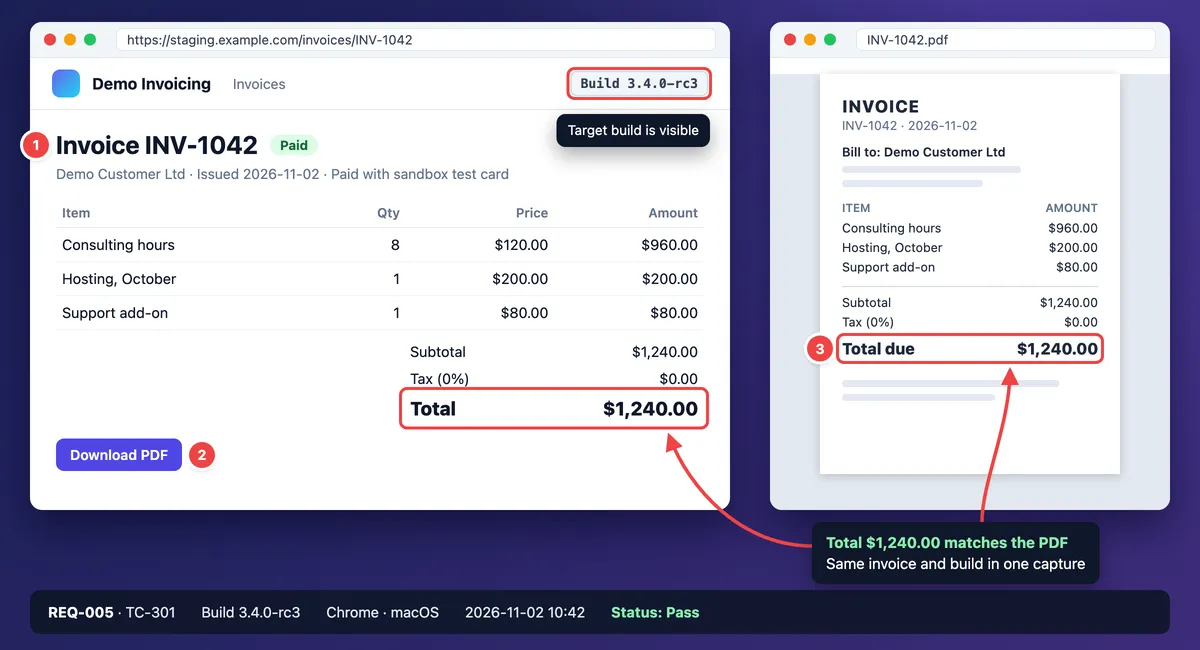
- REQ-001: a final screenshot with numbered markers matching TC-101's steps, a callout on INV-1042 (Paid, $1,240.00) and build 3.4.0-rc3 in view.
- REQ-002: the failure recording, linked from BUG-418 and the row.
- REQ-005: the PDF total beside the screen total: "Total $1,240.00 matches the PDF."
- REQ-007: the contrast checker result.
- API or CLI rows: the response, or a terminal recording.
For a failure, record 5 to 15 seconds of the defect as a video, trim it and export MP4 or GIF. A direct GIF recording is fine when nothing needs trimming (see GIF screen capture on Mac or on Windows). Link the clip on the defect and in the row.
Type file names by hand, REQ-ID first: REQ-002_TC-103_3.4.0-rc2_fail_2026-10-27.gif. One search then finds every proof for a requirement. Capture tools name files from what they know, such as the date, the app or a random ID, so the REQ-ID has to come from you.
Keep superseded files: REQ-004's old 8-character proof stays, marked superseded, next to the rc3 file.
Before an audit, run the "Pass without evidence" filter. Then walk one row like an auditor: open REQ-005's link, compare the totals, match the build and confirm no linked defect is open. At sign-off, save the dated export from step 6.
On screenshots, cover card numbers, emails, tokens and patient or customer data with solid, opaque boxes, because blur and pixelate can be reversed (see how to redact text). Recordings are hard to redact later, so record seeded test data only, such as a test card and a demo customer. Keep notifications and other tabs out of the capture area, and crop rather than blur.
Copy an error message or a requirement ID from a screenshot with the free text extractor. For a PDF spec, screenshot the page first. Per-run capture is in the test case guide above.
In regulated teams, retention and e-record rules come from your quality system. Sign-off evidence for user acceptance testing follows the same idea.
Snipping Tool on Windows and the Mac screenshot tools with Markup handle single captures. If you file evidence every day, ScreenSnap Pro keeps it in one flow: Counter numbers that match your test steps, solid boxes for card numbers and tokens, and Scrolling Capture for a long report behind a login (select the area, click Start Capture, scroll down manually, click Finish).
Frequently Asked Questions
Start with the requirements that would hurt most
Pick the requirements that would hurt most if they broke, such as payments, security and contract terms. Give each one a test, a result and a file.
If you capture test evidence every week, ScreenSnap Pro handles the capture, the numbered steps and the redaction boxes in one app. It is a one-time $39 purchase: 1 license, 2 seats (2 computers, Mac or Windows). See pricing.

Morgan
Indie DeveloperIndie developer, founder of ScreenSnap Pro. A decade of shipping consumer Mac apps and developer tools. Read full bio
@m_0_r_g_a_n_