Software Design Document Template + Example (2026)
A software design document (SDD) is a written plan for how a system or feature will be built before coding starts. It covers the problem, goals and non-goals, current state, proposed design, alternatives considered, risks and rollout, so reviewers catch costly mistakes while changes are still cheap.
A complete design doc has 10 sections:
- Header: title, author, reviewers, status, dates and links.
- Context and problem: what is broken or missing, and why now.
- Goals and non-goals: what success looks like, and what is out of scope.
- Current state: how it works today, with screenshots, metrics and logs.
- Proposed design: architecture, data model, APIs and UI changes.
- Alternatives considered: the other options, and why they lost.
- Security, privacy, performance and observability: the checks every change needs.
- Testing strategy: how you will prove it works.
- Rollout, migration and rollback: how it ships, and how it comes back out.
- Risks, open questions and decision log: what is still unknown, and who owns it.
Below you get a copy-paste Markdown template, a filled example for a realistic feature, and a review checklist. The example leans on annotated screenshots. A reviewer who sees the current state in five seconds argues about the design, not the facts.
What is a software design document?
A software design document describes how you plan to build something and why you chose that plan. The engineer or architect who will lead the build writes it. Reviewers, the product manager, QA, SRE and future maintainers read it.
It sits between the problem and the code. The problem often shows up as a pile of tickets or bug reports. The design doc turns that pile into one agreed plan before anyone opens a pull request.
Teams use several names for the same thing: SDD, design doc, technical design document (TDD) and tech spec. The formal ancestor is the "software design description" in IEEE 1016. Its 2009 edition is now marked inactive, and it shows up mostly in regulated or contract work. Most product teams follow the lighter style in Design Docs at Google: context, goals and non-goals, the design, alternatives, and cross-cutting concerns.
For a short spoken overview, this four-minute explainer covers the same ground:
Software design document vs technical design document, tech spec, SRS, PRD, ADR and RFC
These names overlap, and teams use them loosely. The table shows how they usually differ.
| Document | Purpose | Written when | Owner | Typical length | Lifespan |
|---|---|---|---|---|---|
| Software design document (SDD) | How a feature or system will be built, and why | After requirements, before code | Lead engineer or architect | 3 to 20 pages | Updated until launch, then kept as "as built" |
| Technical design document (TDD) | Same as an SDD in most teams; sometimes one component only | Before building that component | Engineer who builds it | 2 to 10 pages | Until the component ships |
| Tech spec | Build details: endpoints, schemas, config | After the design is agreed, or folded into the SDD | Engineer who builds it | 1 to 10 pages | Until the code matches it |
| SRS (software requirements specification) | What the system must do, not how | Before design, often in contract or regulated work | Business analyst or product owner | 10 to 50+ pages | Versioned baseline for the project |
| PRD (product requirements document) | What to build and why, from the user's side | Before design | Product manager | 2 to 8 pages | Until the feature ships |
| ADR (architecture decision record) | One decision, its context and its effects | When the decision is made | Any engineer | Under 1 page | Permanent; a newer ADR replaces it |
| RFC (request for comments) | A proposal opened for wide comment | Before the design is settled | Whoever proposes it | 2 to 20 pages | Accepted, rejected or withdrawn |
The short version: the PRD says what and why, the SDD says how, and an ADR records one decision after it is made. You can write ADRs with the decision record template from the internal documentation guide, and link each one back to the design doc that led to it. The ADR community site has more formats.
When you need a design doc (and when you don't)
Write a design doc when a wrong decision would be expensive. Good triggers:
- The work takes more than about one engineer-week.
- It depends on another team, service or vendor.
- It changes data or a public API in a way that is hard to undo.
- It touches security, privacy, billing or compliance.
- People disagree about the approach, or nobody has written down the problem yet.
Skip it for small changes you can undo. A clear pull request description or a single ADR is enough there. Writing a long doc for a one-day fix trains your team to skim docs.
The doc can also scale with the work. The Google article above describes 1 to 3 page "mini design docs" for small changes and longer docs for big projects.
| Aspect | One-pager (mini design doc) | Full SDD |
|---|---|---|
| Scope | Up to about 2 engineer-weeks, one team | Several engineer-weeks or more, several teams |
| Sections | Problem, goals and non-goals, design, alternatives, rollout | All 10 sections |
| Length | 1 to 3 pages | 5 to 20 pages |
| Review | Async comments from 2 or 3 people | Async comments, then a 30-minute meeting |
How to write a software design document, step by step
- Talk to stakeholders first. Spend 15 minutes each with the product manager, the owner of every dependency, SRE and security. Ask what would make them say no. Their answers become your goals, non-goals and limits.
- Write the problem and goals before the design. Draft the context, goals and non-goals, then share only that page with two or three reviewers. Agreement here prevents the worst kind of rework: a good solution to the wrong problem.
- Capture the current state with evidence. Screenshot the broken flow, grab the dashboard panel, paste the error text and link the tickets. Number each problem and put the same numbers on the screenshots.
- Draft the design and at least two alternatives. Start with a diagram, then the data model, APIs and UI changes. For each alternative, write one honest sentence on why it lost.
- Run an async review. Share the doc with a comment deadline two or three working days out. See getting your design doc reviewed for who to invite.
- Hold a short review meeting. Use it only for threads that comments could not settle.
- Update the status and keep the doc alive. Mark it Approved, then Implemented or Superseded later. The after-launch section covers what to change.
What to include: the 10 sections of a design doc
Every section answers a question a reviewer will ask anyway. Skip a section only if you can say why in one line.
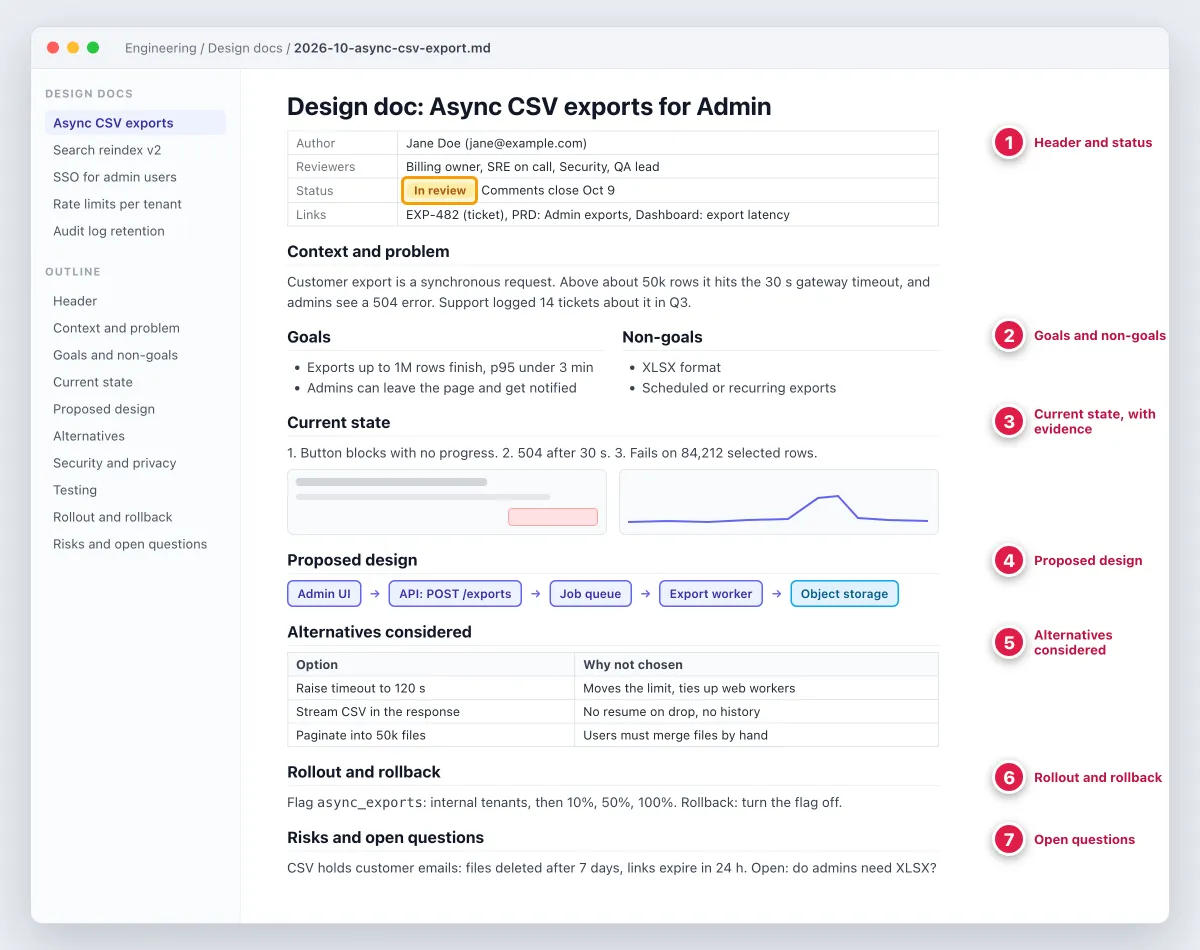
The numbers in the figure point at the sections that carry the most weight in review.
1. Header: title, author, reviewers, status, dates, links
Give the project a short name people can say out loud. List the author, the required reviewers, the dates, and links to the ticket, the PRD and related docs. Use one status field with fixed values: Draft, In review, Approved, Implemented or Superseded.
Common mistake: no status, so nobody knows if the doc is a proposal or a record of what shipped.
2. Context and problem statement
Explain what is broken or missing, who feels it, and why it matters now. Write it for a reader who missed every meeting. Two to four sentences plus links to evidence is usually enough.
Common mistake: describing the solution here. Context should make the reader want a fix before you show one.
3. Goals and non-goals
Goals describe results you can check, such as "exports of 1M rows finish in under 3 minutes." Non-goals list things a reader might assume are in scope but are not. They prevent more review fights than any other section.
Common mistake: goals written as tasks ("add a queue") instead of results.
4. Current state, with evidence
Show how the system works today and where it fails. This is where screenshots earn their place: the broken screen, the latency panel, the error dialog and the ticket count. Number the problems in a list and put the same numbers on the screenshots.
Common mistake: writing "exports are slow" with no capture, no metric and no ticket link.
5. Proposed design
Start with an architecture diagram, then cover the data model, APIs or interfaces, and UI changes. Explain the trade-offs you made, not every line of code. If a choice is easy to reverse later, leave it out.
Common mistake: a diagram with no link to its source file, so nobody can update it.
6. Alternatives considered
List the real options you rejected, including "do nothing," with one or two sentences on why each lost. Reviewers trust a design more when they see the author already weighed their favorite idea.
Common mistake: straw-man options that nobody would pick.
7. Security, privacy, performance and observability
Say what data the change touches, who can access it and how long it is kept. State the expected load, the limits, and the metrics, logs and alerts that will tell you it works.
Common mistake: "no security impact" with no reasoning.
8. Testing strategy
Describe unit, integration, load and manual tests, plus the test data you need. Name who signs off. QA engineers read this section first, so make it concrete.
Common mistake: "we will add tests" with no plan for the hard cases.
9. Rollout, migration and rollback
Explain how the change ships (feature flag, stages, percentages), how data moves, and the exact rollback steps. Name the signal that triggers a rollback.
Common mistake: a rollback plan that only works before the migration runs.
10. Risks, open questions and decision log
Track each risk or open question with an owner and a due date. Add a dated decision log as threads close, so later readers see what changed and why.
Common mistake: open questions with no owner, which stay open forever.

Tired of plain screenshots? Try ScreenSnap Pro.
Beautiful backgrounds, pro annotations, GIF recording, and instant cloud sharing, all in one app. Pay $34 once, own it forever.
See pricing and featuresSoftware design document template (copy-paste Markdown)
Copy this block into a new file. Replace or delete every prompt in square brackets.
# Design doc: [project name]

| Field | Value |
|---|---|
| Author | [name] |
| Reviewers | [one owner per dependency, plus SRE, security, QA] |
| Status | Draft / In review / Approved / Implemented / Superseded |
| Created | YYYY-MM-DD |
| Last updated | YYYY-MM-DD |
| Links | [ticket], [PRD], [dashboards], [related design docs] |

## 1. Context and problem statement
[What is broken or missing, who is affected, and why now. 2 to 4 sentences. Link the evidence.]

## 2. Goals
- [A result you can check, e.g. "exports of 1M rows finish in under 3 minutes"]

## 3. Non-goals
- [Something a reader might assume is in scope, and why it is not]

## 4. Current state
[How it works today. Add annotated screenshots, dashboard panels and log excerpts.]

Problems (numbers match the callouts on the screenshots):
1. [Problem 1]
2. [Problem 2]

## 5. Proposed design
### 5.1 Architecture
[Diagram, plus a link to its source file: Mermaid, draw.io or Excalidraw.]

### 5.2 Data model
[New tables, fields, indexes and retention.]

### 5.3 APIs and interfaces
[Endpoints or events, request and response shapes, error codes, limits.]

### 5.4 UI changes
[Current vs proposed screenshots or mockups, with the changes highlighted.]

## 6. Alternatives considered
| Option | Pros | Cons | Why not chosen |
|---|---|---|---|
| Do nothing | | | |
| [Option A] | | | |
| [Option B] | | | |

## 7. Security, privacy, performance and observability
- Security: [authentication, authorization, secrets, abuse cases]
- Privacy: [personal data touched, retention, deletion]
- Performance: [expected load, limits, SLOs]
- Observability: [metrics, logs, alerts, dashboards]

## 8. Testing strategy
[Unit, integration, load and manual tests. Test data. Who signs off.]

## 9. Rollout, migration and rollback
- Rollout: [feature flag, stages, percentages, dates]
- Migration: [backfill, dual writes, data moves]
- Rollback: [exact steps, and the signal that triggers them]

## 10. Risks, open questions and decision log
| # | Risk or open question | Owner | Due | Status |
|---|---|---|---|---|
| 1 | [risk or question] | [name] | YYYY-MM-DD | Open |

Decision log:
- YYYY-MM-DD: [decision] ([who], [link to thread])
Where the template can live:
- In the repo: save it as
docs/design/2026-10-feature-name.md, so the doc gets reviewed in a pull request and versioned with the code. - Google Docs: turn on Markdown under Tools > Preferences, then right-click and choose Paste from Markdown (Google Docs Help).
- Confluence or Notion: paste it into a new page, then check that the headings and tables came through.
- As a PDF: for stakeholders who only read PDFs, convert the Markdown with the free Markdown to PDF tool.
Software design document example: async CSV exports
Here is a condensed, filled-in design doc for a common feature. All names, numbers and data are demo values.
Header and problem
Design doc: Async CSV exports for Admin. Author: Jane Doe. Reviewers: billing owner, SRE on call, security, QA lead. Status: In review, comments close Oct 9.
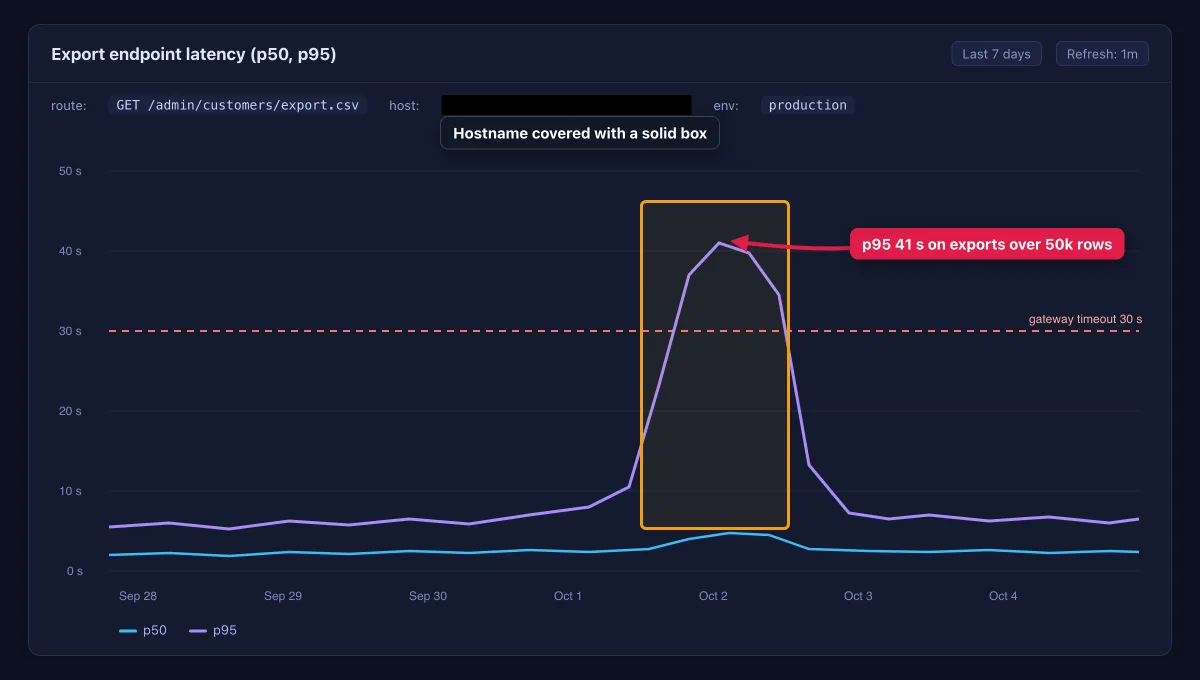

Problem: the Customers page builds its CSV export inside one web request. Above about 50,000 rows, the request hits the 30-second gateway timeout and admins see a 504 error. Support logged 14 tickets about it in Q3, and admins retry, which runs the same heavy query again.
Goals and non-goals
- Goal: exports of up to 1M rows finish, with p95 under 3 minutes.
- Goal: admins can leave the page and get a notice when the file is ready.
- Goal: an export history list that keeps files for 7 days.
- Non-goals: XLSX output, scheduled or recurring exports, and changes to which columns are exported.
Current state
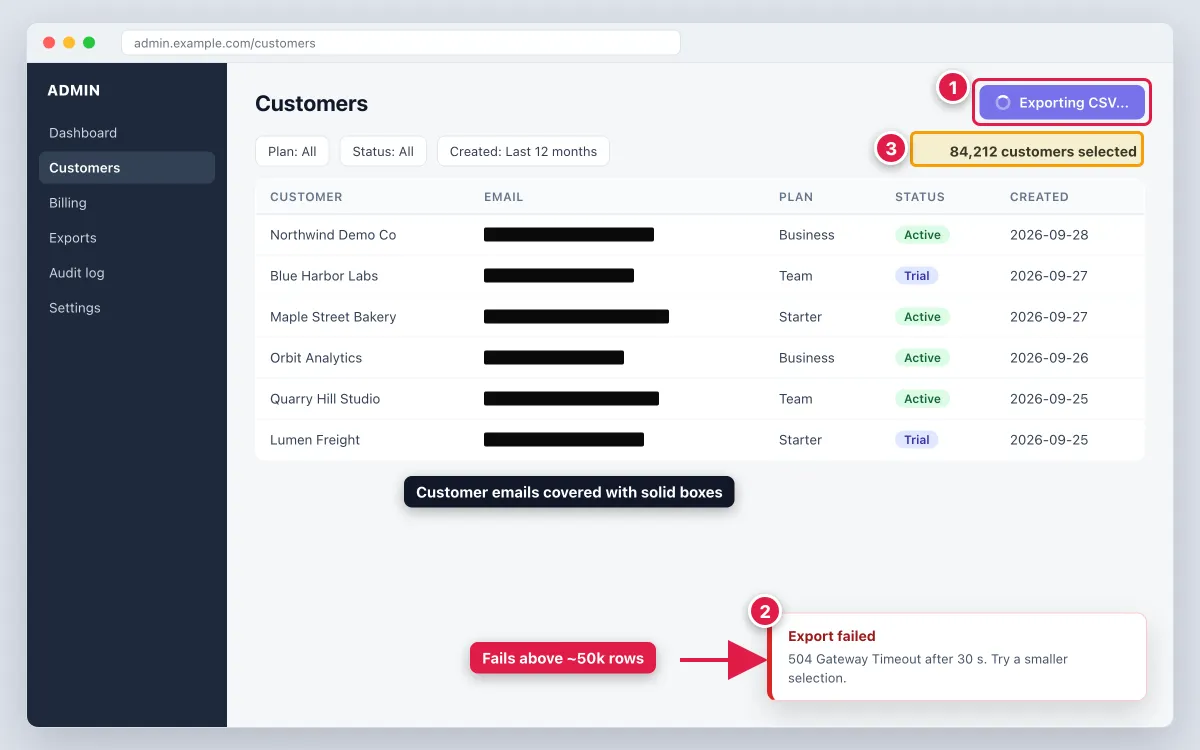
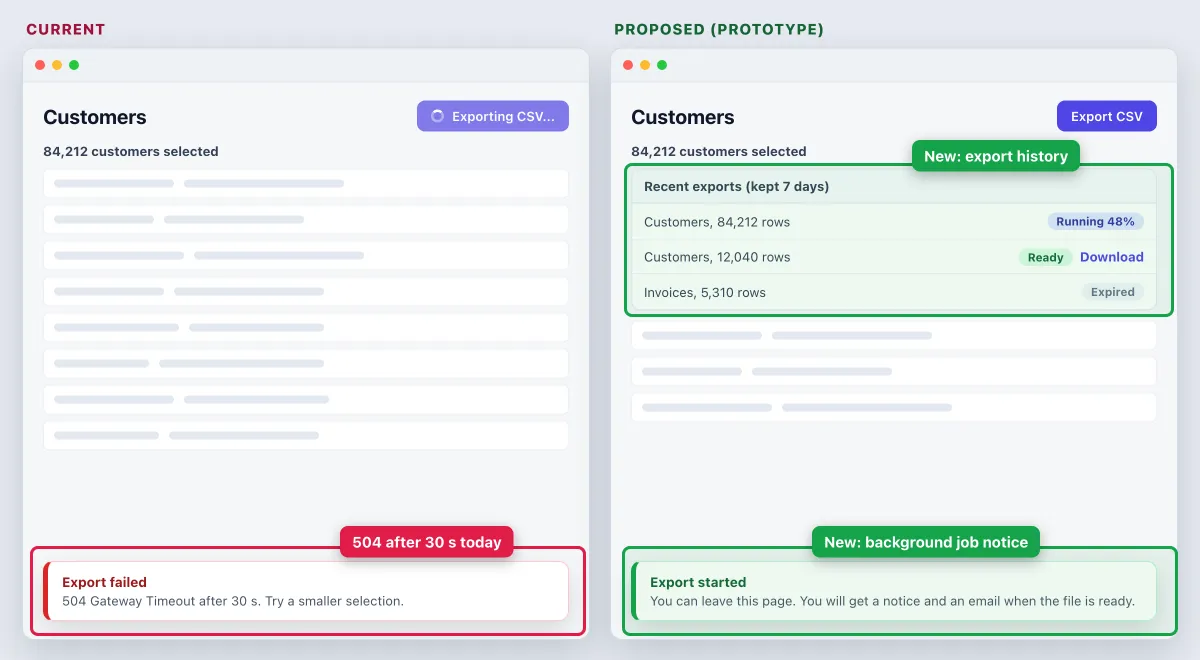
The capture below shows three problems, numbered to match this list:
- The Export button blocks with a spinner and shows no progress.
- After 30 seconds the gateway returns a 504, and the toast says the export failed.
- The failing selection is 84,212 rows, well above the 50k threshold.
The dashboard shows this is not a one-off. The p95 for the export route reaches 41 seconds on large selections, so the database keeps working after the gateway has given up.
Proposed design
The API stops building the file inside the request. It creates an export job and returns at once. The numbers match the diagram:
POST /exportscreates anexport_jobsrow and returns202with the job ID.- The API puts the job on a queue.
- A worker reads the customers table from the read replica, 5,000 rows per batch.
- The worker writes a gzip CSV to object storage. A lifecycle rule deletes files after 7 days.
- When the job is done, the notification service sends an in-app notice and an email.
- The admin downloads the file with a signed URL that expires in 24 hours.
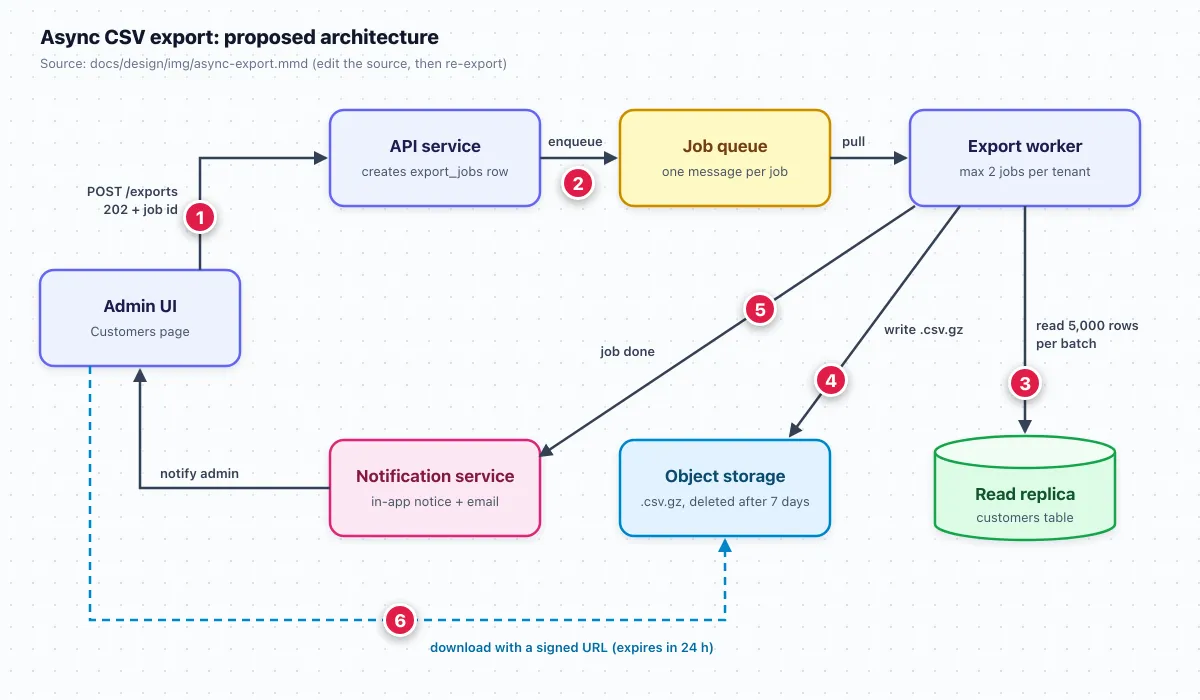
Keep the diagram as code next to the doc so anyone can edit it. GitHub renders Mermaid blocks in Markdown files, issues and pull requests, as GitHub Docs on creating diagrams explains:
flowchart LR
  UI[Admin UI] -->|1: POST /exports| API[API service]
  API -->|2: enqueue| Q[Job queue]
  Q -->|pull| W[Export worker]
  W -->|3: read 5,000 rows per batch| DB[(Read replica)]
  W -->|4: write .csv.gz| S3[(Object storage)]
  W -->|5: job done| N[Notification service]
  N -->|notify admin| UI
  UI -.->|6: signed URL, 24 h| S3
Alternatives considered
| Option | Why not chosen |
|---|---|
| Raise the gateway timeout to 120 s | Moves the limit instead of removing it, and holds web workers for minutes |
| Stream the CSV in the response | A dropped connection loses the whole file, and there is no history to retry from |
| Split into files of 50,000 rows | Admins must merge files by hand, which is what the tickets complain about |
Risks and rollout
- Privacy risk: the CSV holds customer names and emails. Files are deleted after 7 days, links expire in 24 hours, only admins with the export permission can start a job, and every download is logged.
- Load risk: batch reads could make the replica fall behind. Fix: at most 2 running jobs per tenant, plus a replica lag alert.
- Rollout: ship behind an
async_exportsfeature flag. Internal tenants go first, then 10%, 50% and 100% over two weeks. The old path stays for exports under 10k rows until the flag has been at 100% for two weeks. - Rollback: turn the flag off. Queued jobs finish, and there is no data migration to undo.
- Open question: do admins need XLSX? Owner: PM, due before general release.
For more real-world examples, designdocs.dev collects published design docs from engineering teams.
How to use screenshots and visuals in a design doc
Diagrams show structure. Screenshots prove the current state and show UI changes. A good design doc needs both, and each in its place.
Diagrams for structure, screenshots for evidence
Draw architecture, sequence and data-flow diagrams in a diagram tool such as Excalidraw, draw.io or Mermaid. Always link the source file, or keep the Mermaid code in the doc, so the next person can update it.
Annotate the current state so reviewers see the problem in 5 seconds
A plain screenshot makes reviewers hunt for the problem. Mark it up with a few tools:
- Counter numbers that match the numbered problem list in the doc.
- An arrow on the exact error or control.
- A highlight on the number that matters, such as the row count.
- A short text callout with the one fact a reviewer needs, like "p95 41 s."
The built-in shortcuts are enough to capture: ⌘ + Shift + 4 on Mac (Apple Support) or Win + Shift + S on Windows (Microsoft Support). Then add marks in any editor, or in the free image annotation tool. For consistent colors and callout sizes across a doc set, follow the annotation standards in the technical documentation screenshots guide. The same numbered callout method used in step-by-step instructions works for problem lists too.
Show proposed UI changes side by side
Put the current screen and the proposed screen next to each other at the same size, with the same demo data. Draw highlight boxes only around what changes. The proposed side can be a Figma frame or a prototype screenshot.
Redact before you paste
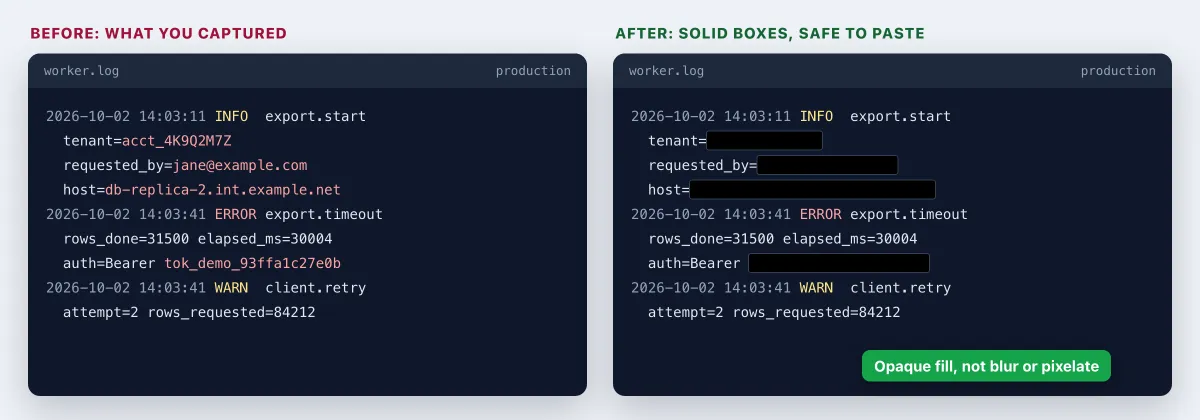
Design docs get shared widely and live for years. Before a capture goes in, cover customer emails, account IDs, tokens, internal hostnames and IP addresses with a solid, opaque box. Blur and pixelate can be partly reversed, as the guide to redacting text in screenshots shows. Keep them for low-risk details, like a background browser tab.
Keep text as text
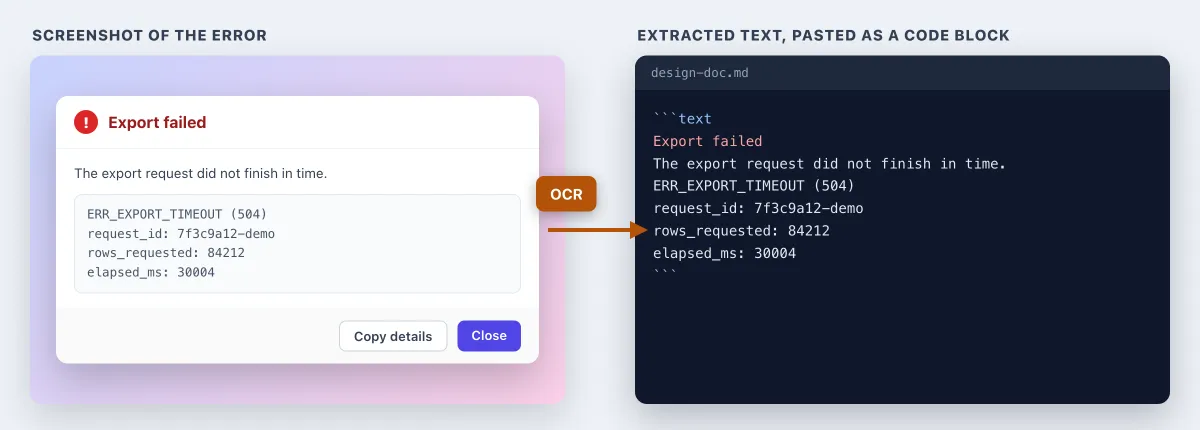
A screenshot of an error dialog or a log is not searchable, and nobody can copy the request ID out of it. Run OCR on the capture (the free extract text from image tool works) and paste the text into a code block. Keep the screenshot only if the layout matters.
Short GIFs for flows, and where images should live
For a flow that is hard to show in one frame, such as an export that hangs, record a 5 to 10 second GIF. There are guides for GIF capture on Mac and GIF capture on Windows.
Keep it small with the free GIF compressor before you attach it.
Store images with the doc. Embed the image files in Google Docs, Confluence or Notion, or commit them to the repo next to the Markdown file, for example in docs/design/img/. A cloud share link is fine for dropping a capture into a review thread or chat. It should never be the permanent image source in the doc, because hosted uploads can expire.
For prior art on public pages, such as another product's public docs or your own status page, a full-page capture shows the whole page in one image. See the guides for full-page screenshots on Mac and on Windows. For logged-in admin screens, staging and internal tools, use a region or window capture instead.
If you capture and mark up screenshots for docs every week, ScreenSnap Pro keeps that work in one app on Mac and Windows. It has counter, arrow, highlight and text tools, a solid rectangle for redaction, and OCR to copy error text out of a capture. Pin screenshot keeps the current-state capture floating on screen while you write the proposed design. It also records GIFs and captures full public web pages by URL. It does not draw architecture diagrams, so keep those in your diagram tool. See what it costs.
Getting your design doc reviewed
A design doc earns its keep in review. Run it in two passes: async comments first, then a short meeting for whatever is left.
Who to invite: one owner for each dependency the design touches, the SRE or on-call lead, security when personal data or login flows are involved, and the QA lead. Mark 3 to 6 people as required and everyone else as optional.
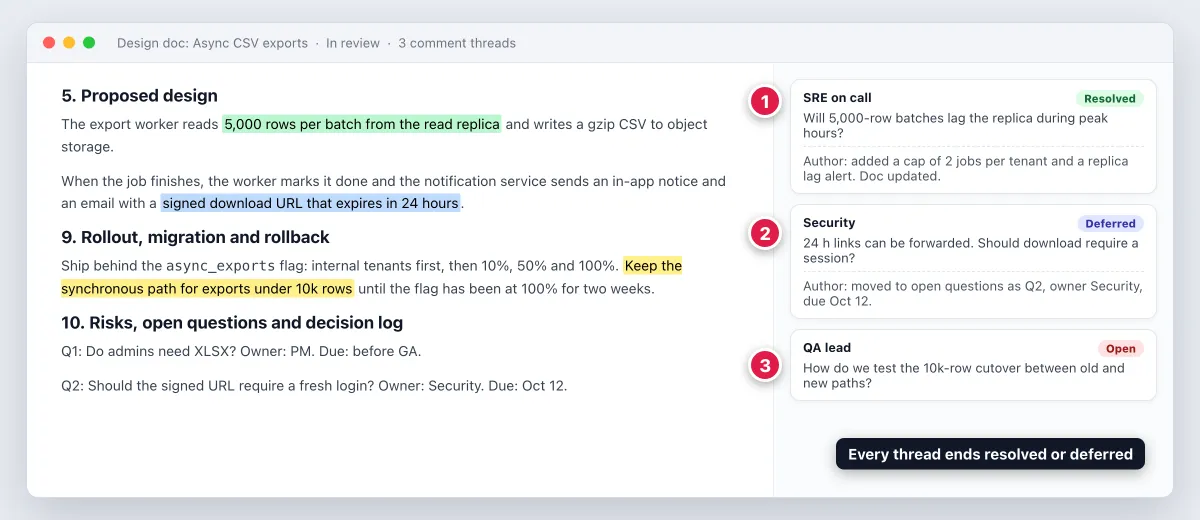
Async comments first: share the doc with a deadline two or three working days out. Ask for comments on specific lines. Google Docs supports this, and so does Confluence with inline comments. If the doc lives in the repo, the pull request review is the comment thread.
Resolve or defer every thread: each thread ends one of two ways. Either the doc changes and the thread is resolved, or the question moves to the open questions table with an owner and a due date.
A 30-minute review agenda:
- Five minutes: the author restates the problem, goals and non-goals.
- Fifteen minutes: open threads, biggest risk first.
- Five minutes: a check that the alternatives were real.
- Five minutes: the decision (approve, approve with changes, or rework) and next steps.
Reviewer checklist, the 8 questions reviewers ask:
- Can I state the problem in one sentence after reading the first page?
- Are the non-goals explicit, and do I agree with them?
- Does the current-state evidence match what I see in production?
- Were at least two real alternatives considered, with honest reasons for rejecting them?
- What happens when a dependency is slow or down?
- Where does personal or secret data flow, and how long is it kept?
- How will we know it works in production?
- Can we roll back, and how fast?
Why design docs fail review:
- No non-goals, so the meeting turns into a scope negotiation.
- No alternatives, so reviewers propose them live and the discussion restarts.
- An unclear current state, so people argue about facts instead of the design.
- A wall of text, with no diagram and no screenshots to anchor the discussion.
- Stale screenshots, where the UI changed after capture and reviewers stop trusting the rest.
Keeping the design doc useful after launch
Most design docs go stale the week the feature ships. Four habits keep yours useful:
- Update the status. Set it to Implemented, or to Superseded with a link to the newer doc.
- Record later decisions as ADRs. Each ADR links back to the design doc, so the reasoning stays connected. The internal documentation guide has a decision record template.
- Turn "current state" into "as built." Add a short section on what changed from the plan, and why.
- Link it from where people look. Add the doc to the README, to the pull requests that build it, and to the release notes for the launch.
Frequently Asked Questions
Start your next design doc from the template
Copy the template, write the problem and goals first, and get early agreement before you design anything. Add annotated screenshots for the current state, redact before you paste, and keep the doc updated after launch.
If you want one tool for the screenshot side of that work, ScreenSnap Pro is a one-time $34 purchase: 1 license, 2 seats (2 computers, Mac or Windows). See pricing.

Morgan
Indie DeveloperIndie developer, founder of ScreenSnap Pro. A decade of shipping consumer Mac apps and developer tools. Read full bio
@m_0_r_g_a_n_