Pull Request Template: 8 Examples for GitHub and GitLab
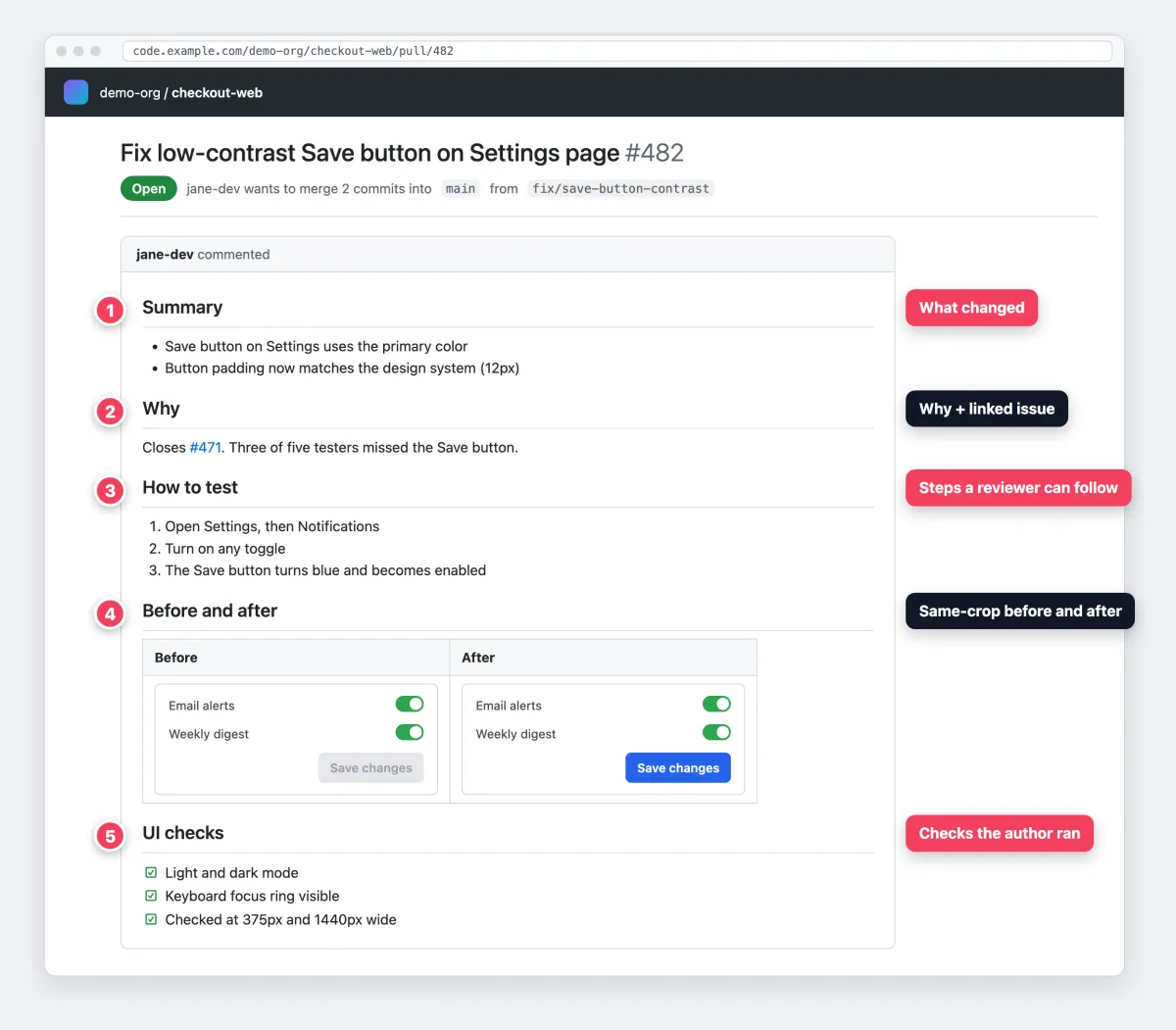
A pull request template is a Markdown file, usually .github/pull_request_template.md, that pre-fills the description of every new pull request. It prompts the author for a summary, the linked issue, the type of change, test steps, before and after screenshots and a checklist, so every reviewer gets the same context.
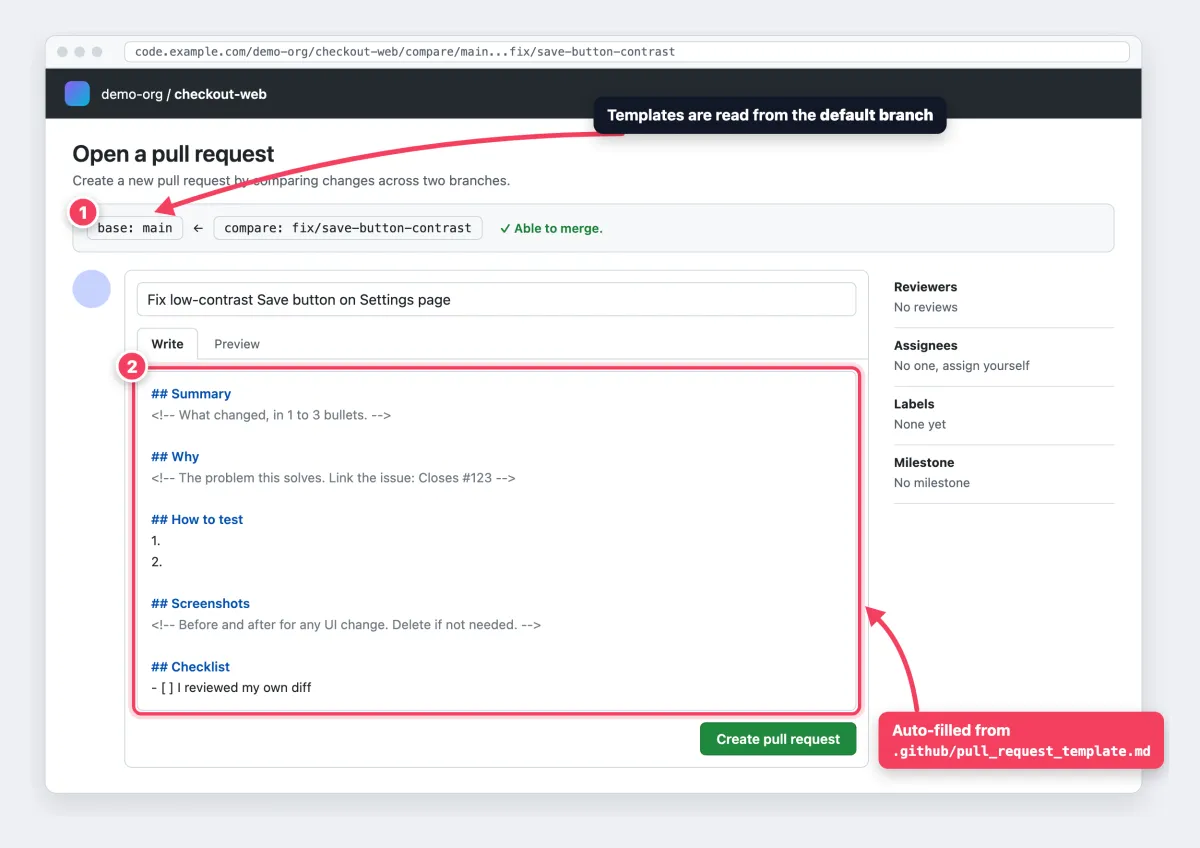
Here is a minimal template you can paste now. Save it as .github/pull_request_template.md on your default branch, and every new pull request on GitHub starts with it.
## Summary
<!-- What changed, in 1 to 3 bullets. -->

## Why
<!-- The problem this solves. Link the issue: Closes #123 -->

## How to test
1.
2.

## Screenshots
<!-- Before and after for any UI change. Delete if not needed. -->

## Checklist
- [ ] I reviewed my own diff
- [ ] Tests added or updated
- [ ] Docs updated, or not needed
Below: where the file goes on each platform, seven more templates, and how to attach screenshots reviewers can trust. Writing up the bug rather than the fix? Use a bug report template.
What a pull request template is (and what it is not)
A PR template is the starting text of a pull request description. It is written for reviewers and QA. The template file is committed to your repo, but the description it fills in lives on the code host, not in git history.
An issue template is different: someone fills it in to report a bug before any code exists. A commit message describes one commit, while a pull request covers the whole change. And a pull request (GitHub, Bitbucket, Azure DevOps) is the same thing as a merge request (GitLab).
Templates are advisory, so anyone can delete a section. To enforce rules, use protected branches with required reviewers and checks. Also note that GitHub pull request templates are plain Markdown: YAML forms work for issues only.
Where to save a pull request template on each platform
Most platforms read the template from the default branch. A template that only exists on your feature branch will not show up yet.
| Platform | Default file | Multiple templates | Picked by | Read from | Shared default |
|---|---|---|---|---|---|
| GitHub | .github/pull_request_template.md (or root, docs/) | PULL_REQUEST_TEMPLATE/ folder | ?template= URL | Default branch | Public .github repo |
| GitLab | .gitlab/merge_request_templates/Default.md | Any .md in that folder | "Choose a template" dropdown | Default branch | Group level (Premium, Ultimate) |
| Bitbucket Cloud | .bitbucket/pull_request_template.md | No | Not needed | Source branch | "Default description" setting |
| Azure DevOps | .azuredevops/pull_request_template.md (or .vsts/, docs/, root) | pull_request_template/ folder | "Add a template" dropdown | Default branch | Per repository |
GitHub pull request templates
Save pull_request_template.md in the root, docs/ or .github/, and merge it into the default branch (GitHub Docs). For several templates, add files like bugfix.md to .github/PULL_REQUEST_TEMPLATE/. There is no picker for pull requests, so you choose one with the template query parameter:
https://github.com/your-org/your-repo/compare/main...your-branch?quick_pull=1&template=bugfix.mdFor an organization-wide default, put the template in a public repository named .github. These default community health files apply to every repository without its own template. In the terminal, gh pr create --template bugfix.md starts from a named template, while --body or --fill replaces it (GitHub CLI manual).
GitLab merge request templates
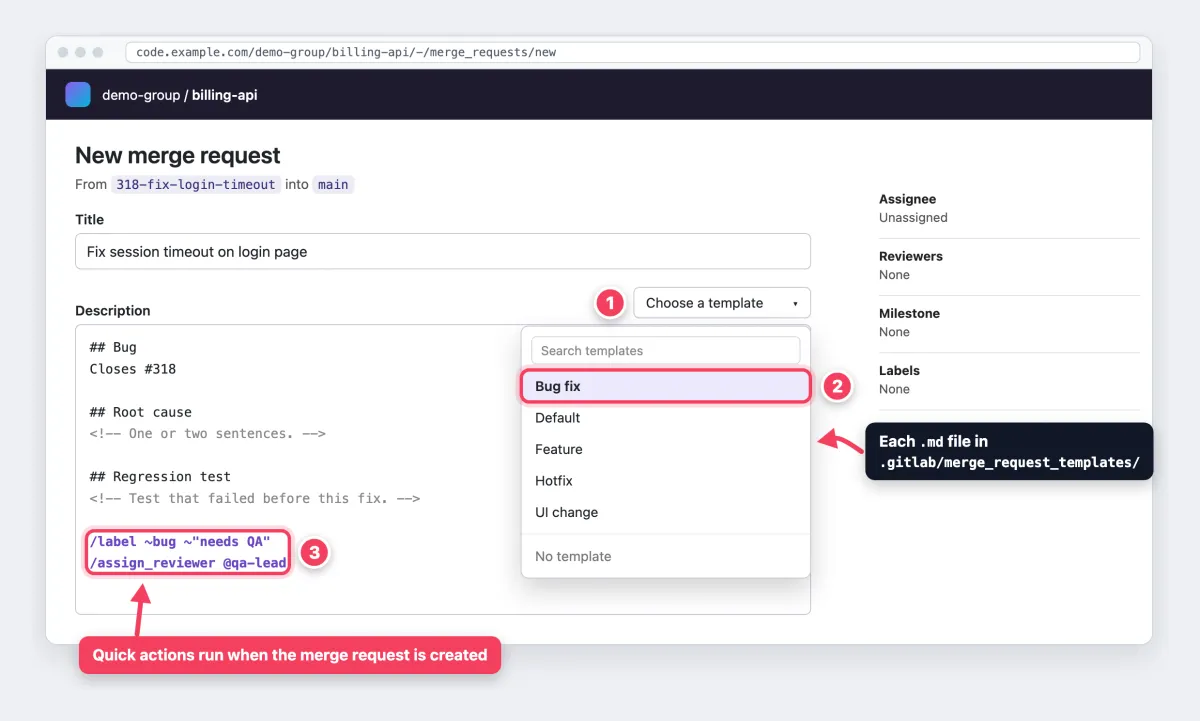
Save each merge request template as a .md file in .gitlab/merge_request_templates/ on the default branch. Each file appears by name in the Choose a template dropdown. To fill one in automatically (GitLab Docs):
- All tiers: name the file
Default.md. - Premium and Ultimate: set the default template under Settings > Merge requests. It wins over
Default.md. Groups can also share templates across projects.
Only the default template supports variables, which GitLab replaces when you first save the merge request:
| Variable | Becomes |
|---|---|
%{source_branch} | The branch being merged |
%{target_branch} | The branch it merges into |
%{all_commits} | Messages from all commits (up to 100) |
%{closes_issue} | An issue reference from the branch name, like Closes #123 |
Templates can also hold quick actions like /label ~bug, each on its own line. GitLab runs them when the merge request is created, if you have permission.
Bitbucket pull request templates
Bitbucket Cloud reads .bitbucket/pull_request_template.md (Atlassian Support). Unlike the others, it reads the source branch, so a branch cut before the template existed will not show it. Without the file, the repo's Default description setting applies. On Data Center, use Repository settings or Project settings > Description template.
Azure DevOps pull request templates
Azure Repos checks .azuredevops/, .vsts/, docs/ and the root, in that order, for pull_request_template.md or .txt (Microsoft Learn). A file at pull_request_template/branches/feature.md applies to pull requests into feature or feature/* and wins over the default.
Other files in pull_request_template/ appear in the Add a template dropdown, and ?template=name.md in the URL forces one. An applied template replaces the commit-message list, and Add commit messages restores it.
Anatomy of a good pull request template
A good template answers the questions a reviewer would otherwise ask in comments:
- Summary: what changed, in 1 to 3 bullets.
- Why and linked issue: the problem, plus
Closes #123. A closing keyword closes the issue when the pull request merges into the default branch. - Type of change: feature, fix, refactor, docs or breaking.
- How to test: numbered steps anyone can follow.
- Screenshots or recordings: before and after for anything visual.
- Risk and rollback: what could break and how to undo it.
- Checklist: what the author already checked.
For test steps, borrow a rule from Ashlee Boyer's PR template: each step is one action or one observation. "Click Save" is an action. "A green toast appears" is an observation.
Keep the template under about 25 lines, with guidance in HTML comments so it vanishes on render. Authors should delete sections that do not apply.
8 pull request template examples to copy
Each pull request template example stays under 25 lines. Copy the one that matches the change.
1. Minimal default template (any repo)
Use the template at the top of this page. It fits any change and is short enough that people fill it in.
2. Feature PR template
For new behavior that needs product context and a rollout note.
## What this adds
<!-- 1 to 3 bullets. -->

## Why
<!-- Closes #123. Link the spec. -->

## Type of change
- [ ] New feature
- [ ] Breaking change

## How to test
1.
2.

## Rollout
<!-- Feature flag, migration, or "none". -->

## Screenshots
<!-- Before and after, same crop. -->

## Checklist
- [ ] Tests cover the new path
- [ ] Docs and changelog updated
3. Bug fix PR template
Link back to the report, then prove the fix.
## Bug
Fixes #

## Root cause
<!-- One or two sentences. -->

## Fix
<!-- What changed and why this approach. -->

## Regression test
<!-- The test that failed before this change. -->

## Before and after
<!-- Repro GIF before, same steps after. -->

## Error text
<!-- Paste the error as text, not only as an image. -->

## Checklist
- [ ] Repro steps from the issue now pass
If the error only exists in a screenshot, OCR turns it back into text. See how to copy text from a screenshot on Mac or the OCR software for Windows roundup.
4. UI or front-end change template
Reviewers should see the change without checking out the branch.
## Summary
<!-- What looks or behaves different. -->

Closes #

## Before and after
| Before | After |
| --- | --- |
| <!-- drag image --> | <!-- drag image --> |

## Checked on
- [ ] Desktop 1440px
- [ ] Mobile 375px
- [ ] Dark mode
- [ ] Keyboard only (focus visible)
- [ ] Screen reader labels

## How to test
1.
2.
5. Hotfix or incident template
Speed matters, but so does a paper trail. Make the rollback explicit.
## Incident
<!-- Link the incident or alert. -->

## Impact
<!-- Who is affected, since when. -->

## Change
<!-- The smallest fix that stops the damage. -->

## Rollback plan
<!-- Exact revert command or flag. -->

## Verified in
- [ ] Staging
- [ ] Production

## Follow-up
<!-- Ticket for the full fix. -->
6. Documentation-only PR template
For docs, the rendered page is what gets reviewed. The technical documentation screenshots guide shows how to capture it cleanly.
## What changed
<!-- Pages added, moved, or rewritten. -->

## Preview
<!-- Screenshot or preview URL. -->

## Checks
- [ ] Links checked
- [ ] Code samples run as written
- [ ] Screenshots match the current UI
- [ ] No secrets or customer data in images
7. Open-source contributor template
Outside contributors do not know your process yet, so spell it out.
## Related issue
<!-- Link it. Unlinked PRs may be closed. -->

## What and why
<!-- Short description. -->

## Breaking change?
- [ ] Yes (describe the migration)
- [ ] No

## Tests
- [ ] I ran the test suite locally
- [ ] I added tests for this change

## Legal
- [ ] I signed the CLA, or my commits are signed off (DCO)
8. GitLab merge request template with quick actions and variables
Save this as .gitlab/merge_request_templates/Default.md so the variables fill in. The quick actions add a label, a milestone and a reviewer when the merge request is created.
## Summary
Merges %{source_branch} into %{target_branch}.

%{closes_issue}

## Commits
%{all_commits}

## How to test
1.
2.

/label ~"needs review"
/milestone %"Sprint 42"
/assign_reviewer @your-team-lead
Tired of plain screenshots? Try ScreenSnap Pro.
Beautiful backgrounds, pro annotations, GIF recording, and instant cloud sharing, all in one app. Pay $34 once, own it forever.
See pricing and featuresHow to add screenshots and recordings to a pull request
A diff shows what code changed. A screenshot shows what users will see.
Capture before and after with the same crop
Capture the "before" on main, then the same region at the same window size on your branch. On a Mac, press ⌘ + Shift + 4 (Apple Support). On Windows, press Win + Shift + S or use the Snipping Tool.
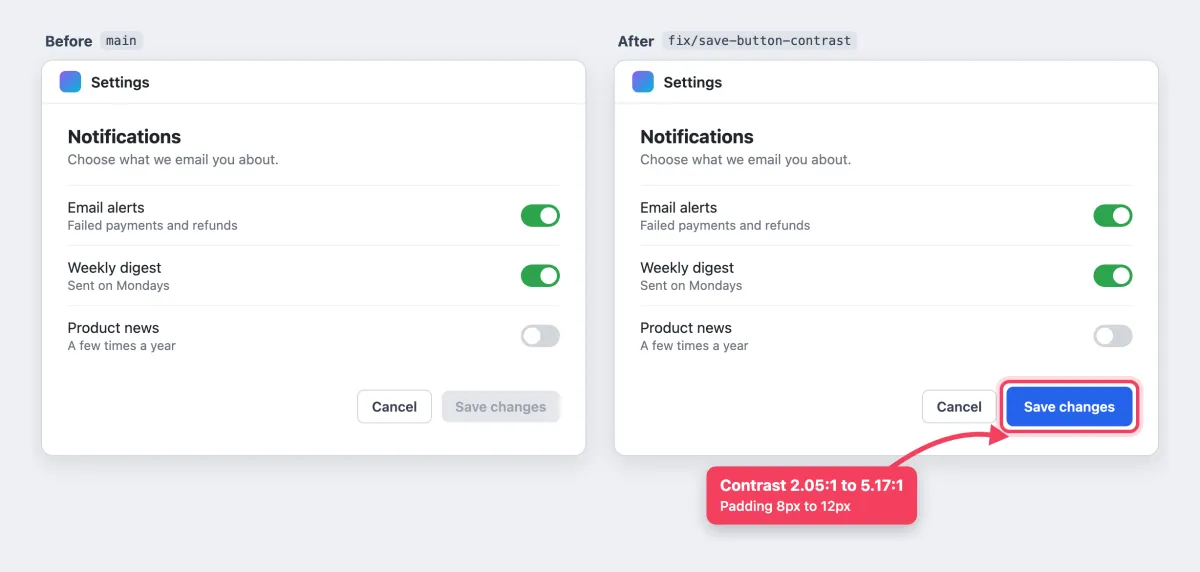
These shots show the change you meant to make. Visual regression testing catches the ones you did not.
Mark exactly what changed
Use one arrow and one highlight on the changed element. If several things changed, add numbered markers that match bullets in your Summary. A short callout covers changed values, like "padding 8px to 12px."
A free image annotation tool works in the browser, and Combine Images joins the pair into one file. For more options, see the best image annotation tools or how to annotate screenshots on Mac.
Redact personal data and secrets before you upload
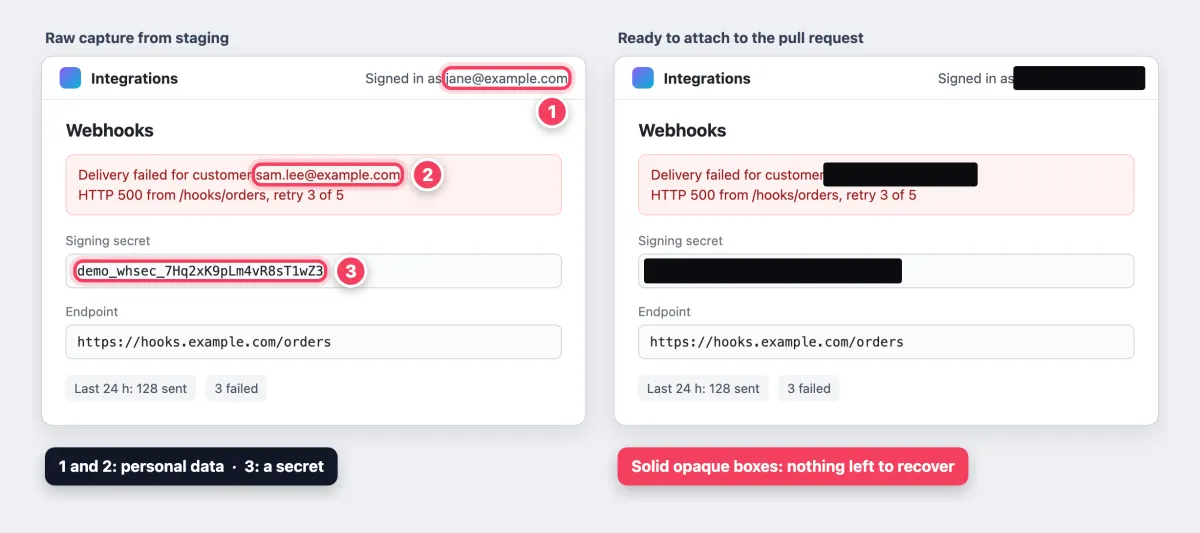
Staging screenshots leak customer emails, tokens and internal URLs. Cover secrets and personal data with a solid, opaque box. Never blur or pixelate them: both can be reversed on short strings, as the guide to redacting text explains.
Redact before you upload, and rotate any real token that was visible. On a public repo, anyone with the link can open an attachment. Removing the image from the description may not delete the file.
Record a short GIF or MP4 for interactions
Hover states and multi-step flows read better in motion, so record 5 to 10 seconds of one interaction. GitHub takes GIFs up to 10 MB, plus .mp4, .mov or .webm videos up to 10 MB on free plans or 100 MB on paid plans (GitHub Docs).

That demo is a 10-frame loop, 6.6 seconds long and 12 KB as a GIF. A real screen recording has many more frames, so check the file size before you drag it in. To make your own, see record GIFs on Mac or record your screen as a GIF on Windows. Prefer H.264 MP4 over MOV for browser playback (MOV vs MP4), and reduce the GIF file size if it runs large.
Capture a whole page from a deploy preview
Capture-by-URL tools work when the deploy preview opens without a login. Behind SSO or preview protection, run Capture full size screenshot from the Chrome DevTools Command Menu, or capture in sections. See full-page screenshots on Mac and on Windows.
Lay it out in Markdown
Drag files straight into the description so GitHub or GitLab hosts them with the pull request. Size images with an img tag and fold big sets into a collapsible block:
| Before | After |
| --- | --- |
| <img width="400" alt="Before" src="..."> | <img width="400" alt="After" src="..."> |

<details>
<summary>More screenshots</summary>
<img width="600" alt="Mobile view" src="...">
</details>
If you attach visuals to most pull requests, ScreenSnap Pro (Mac and Windows) keeps the loop in one app: region capture, arrows, counters and callouts, solid-fill redaction, and GIF or MP4 recording. It also captures full pages from public URLs, copies error text with OCR, and pins the "before" shot on screen while you set up the "after." Attach the saved files, since cloud share links suit a quick Slack ping, not the pull request record.
Pull request checklist for authors and reviewers
A template prompts the author. A checklist keeps both sides honest.
Author, before you request a review:
- Read your own diff from top to bottom
- Tests pass and cover the change
- Docs updated where behavior changed
- Screenshots attached for UI changes
- No secrets in the diff, logs or images
- One logical change per pull request
Reviewer, before you approve:
- The change does what the Summary says
- Tests would fail without the change
- Names are clear and match the codebase
- No new risks around input, auth or secrets
- The UI matches the screenshots when you run it
After merge, a good Summary feeds your changelog entries and release notes.
Why your pull request template is not showing up
Most cases come down to one of these:
- Not on the default branch yet. GitHub, GitLab and Azure DevOps only read the default branch, so merge the template first.
- Bitbucket reads the source branch. Older branches need a rebase to see the file.
- Wrong folder or filename. Check the path in the table above, including the leading dot.
- GitHub subfolder templates do not auto-fill. Files in
PULL_REQUEST_TEMPLATE/load only with?template=. Keep a separate default file. - An Azure branch template wins. A match in
pull_request_template/branches/replaces the default. - No GitLab default. Without
Default.mdor the project setting, the description starts empty. - The PR was opened with
gh pr create --bodyor--fill, the API or a bot. These send their own text, so the template never loads. Rungh pr createwithout those flags, or add--template.
Do AI-written PR descriptions replace templates?
Not quite. GitHub Copilot can create a pull request summary from the diff: a short overview plus a list of key changes. That covers the Summary section well.
But Copilot ignores what is already in the description, so its output will not follow your headings. Paste it under Summary yourself. And no model can supply your test evidence: it did not run the steps or take the screenshots.
Frequently Asked Questions
Start small and grow the template
Start with the minimal template for two weeks. Then add only the sections reviewers kept asking about. The best pull request template is the one people fill in.
If before and after screenshots become a habit, ScreenSnap Pro handles capture, annotation, redaction and GIF recording in one app. It is $34 once, with 1 license and 2 seats (2 computers, Mac or Windows).

Morgan
Indie DeveloperIndie developer, founder of ScreenSnap Pro. A decade of shipping consumer Mac apps and developer tools. Read full bio
@m_0_r_g_a_n_