What Is a Runbook? Definition, Template + Example (2026)
A runbook is a step-by-step guide for one operational task or alert, such as restarting a stuck service or renewing a certificate. It names the trigger, the exact commands and the expected output of each step. It also says how to confirm the fix, roll back and escalate, so anyone on call gets the same result.
Searching "what is a runbook" before an on-call shift? Copy the template and worked example below.
What is a runbook?
AWS gives the plainest runbook definition: "a documented process to achieve a specific outcome," at its simplest a checklist. One runbook covers one task or alert: restart a stuck service, renew a TLS cert, fail over a database or rotate a leaked API key.
Written steps give all on-call staff the same result, page the one expert less and get systems back faster. Google's SRE book credits a playbook with "roughly a 3x improvement in MTTR" over winging it.
As process documentation for systems work, runbooks live in a RUNBOOK.md beside the code or a wiki page, linked from the alert and the README. In Azure Automation and AWS Systems Manager, a runbook is the script or document that runs the steps.
Runbook vs playbook vs SOP
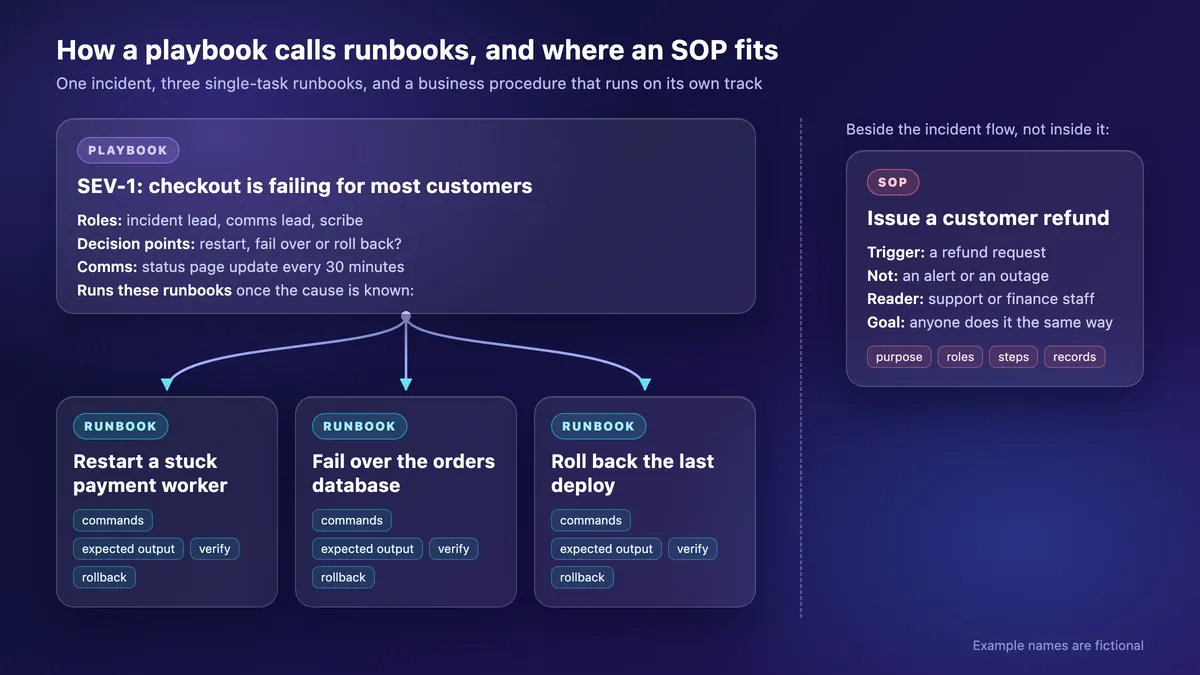
A runbook fixes one task, a playbook runs a whole incident, and an SOP makes a business task repeatable.
| Runbook | Playbook | SOP | |
|---|---|---|---|
| Question it answers | How do I do this one task? | How do we run this incident or investigation? | How does anyone do this business task the same way? |
| Reader | On-call engineer | Incident lead, responders | Any staff |
| Trigger | Alert, ticket or schedule | Declared incident | Refund request, new hire |
| What is inside | Commands, expected output, verify, rollback | Roles, comms, decisions, runbooks to run | Purpose, roles, steps, records |
| Automation | Often | Partly (scripted discovery; fully automated in SOAR tools) | Rarely |
| Example | Restart a stuck payment worker | SEV-1 checkout outage | Issue a customer refund |
The words overlap. AWS uses "playbook" to find a root cause and "runbook" to fix it (OPS07-BP04), while Google's SRE teams call per-alert docs playbooks. Pick one meaning and state it in your docs index.
Refunds, onboarding and other business tasks need an SOP template instead.
Runbook template (copy and paste)
Paste it into a wiki or RUNBOOK.md; Confluence, Notion, Google Docs and Word all work.
# Runbook: [Alert name or task, worded exactly as in the alert]
Owner: [team or rotation] · Last verified: [YYYY-MM-DD] · Applies to: [service, environment, version]

## When to use this
Trigger: "[exact alert text, ticket type or schedule]"
User impact: [what customers or staff notice] · Severity: [SEV level]

## Before you start
- Access: [cluster context, console role, break-glass account]
- Links: [dashboard] · [logs] · [provider status page]

## Diagnose (read-only)
1. [command or console step]
   Expected: [output, or the healthy-state screenshot]

## Fix
2. [command]
   Expected: [output]

## Verify
3. [metric or check that proves recovery]

## Roll back or stop
- If [condition]: [command], then escalate.

## Escalate
- Still failing after [N] minutes, or [condition]: page [rotation].

## Change log
- [YYYY-MM-DD] [who] [what changed]- Exact alert text makes the page findable. Copy it out of an alert screenshot with the free extract text from image tool.
- Owner and Last verified say who fixes the page and how far to trust it. The system's owner owns its internal documentation.
- Read-only steps come first, so a tired reader looks before touching anything.

Tired of plain screenshots? Try ScreenSnap Pro.
Beautiful backgrounds, pro annotations, GIF recording, and instant cloud sharing, all in one app. Pay $39 once, own it forever.
See pricing and featuresRunbook example: restart a stuck payment worker
The template, filled in for a fictional Kubernetes service (made-up names, real kubectl commands):
# Runbook: PaymentsQueueBacklog
Owner: Payments on-call · Last verified: 2026-11-03 · Applies to: payment-worker, prod

## When to use this
Trigger: "PaymentsQueueBacklog: payments-jobs queue depth above 5,000 for 10 minutes"
User impact: orders stuck in "Payment pending" (authorized, not captured) · Severity: SEV-2

## Before you start
- Prod kubectl context, queue dashboard, provider status page

## Diagnose (read-only)
1. kubectl -n payments get pods -l app=payment-worker
   Expected: all pods Running, RESTARTS not climbing
2. kubectl -n payments logs -l app=payment-worker --prefix --since=15m --tail=50
   Expected: lines from every pod (logs deployment/payment-worker reads only one); look for "db pool exhausted"
3. Provider outage on its status page? Do not restart. Escalate.

## Fix
4. kubectl -n payments rollout restart deployment/payment-worker
5. kubectl -n payments rollout status deployment/payment-worker --timeout=5m
   Expected: deployment "payment-worker" successfully rolled out

## Verify
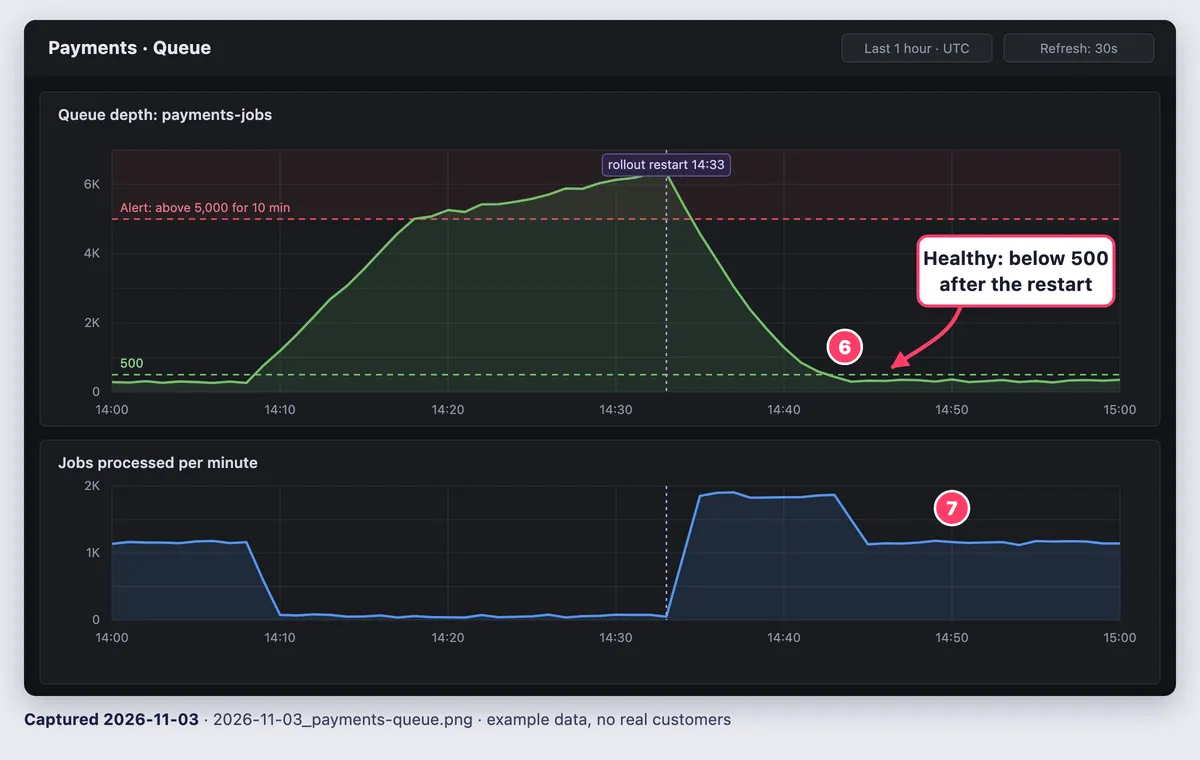
6. Queue depth below 500 within 10 minutes
7. Jobs per minute back to baseline; no new log errors for 5 minutes
8. Run the post-deploy smoke check; post results in the incident channel

## Roll back or stop
- A restart changes no code: nothing to undo.
- Stuck right after a deploy: kubectl -n payments rollout history deployment/payment-worker,
  then kubectl -n payments rollout undo deployment/payment-worker --to-revision=[N]
  (a bare undo only reverts the restart)
- Payments captured twice: kubectl -n payments scale deployment/payment-worker --replicas=0,
  then page payments on-call at once.

## Escalate
- Queue still growing 15 minutes after the restart, or database errors: page data-platform-primary.
Check steps 6 and 7 against a marked-up healthy state. The free image annotation tool adds arrows, shapes and a filled rectangle in your browser, no install needed.
Roll back steps often come from the rollback plan in your software design document. For real public runbooks, see GitLab's (#7 in these technical documentation examples) and the kube-prometheus runbooks.
Types of runbooks: manual, semi-automated and automated
Runbook automation comes in three levels:
- Manual: a person reads each step and runs it.
- Semi-automated: the doc starts scripts or one-click jobs (Rundeck, Azure Automation or AWS Systems Manager), and a person approves risky steps.
- Fully automated: an alert triggers the fix; the runbook stays as spec and fallback.
AWS advises proving a manual process before you code it. Automate short, frequent runbooks first, and keep judgment calls (fail over? declare an incident?) with a person. AI agents need what a tired human needs: exact commands, expected output and stop conditions.
How to create a runbook that works at 3 a.m.
Build it from real pages, test it with someone else, and keep it current.
- Start with what pages most: top alerts and fixes from recent postmortems.
- Fill in the template: read-only steps first, commands as text (never only as an image), expected output after each step.
- Add the exits: verify (say, with a post-deploy smoke check), roll back and escalate.
- Link it from the alert (a Grafana
runbook_urlannotation, for example) and name it after the alert. - Drill it: someone else runs it. Fix each step where they stall and update Last verified, as ops acceptance testing does before go-live.
Visuals for step 2: show only what text cannot. That means click paths with no CLI command, and the healthy panel, cropped, with counters matching step numbers and one threshold callout. Record the fix as an asciinema cast or a GIF under 30 seconds (terminal recording guide).
Put solid boxes over account IDs, tokens, connection strings and emails, since blur and pixelate can be reversed. Prefer a staging account, and follow the usual docs screenshot rules.
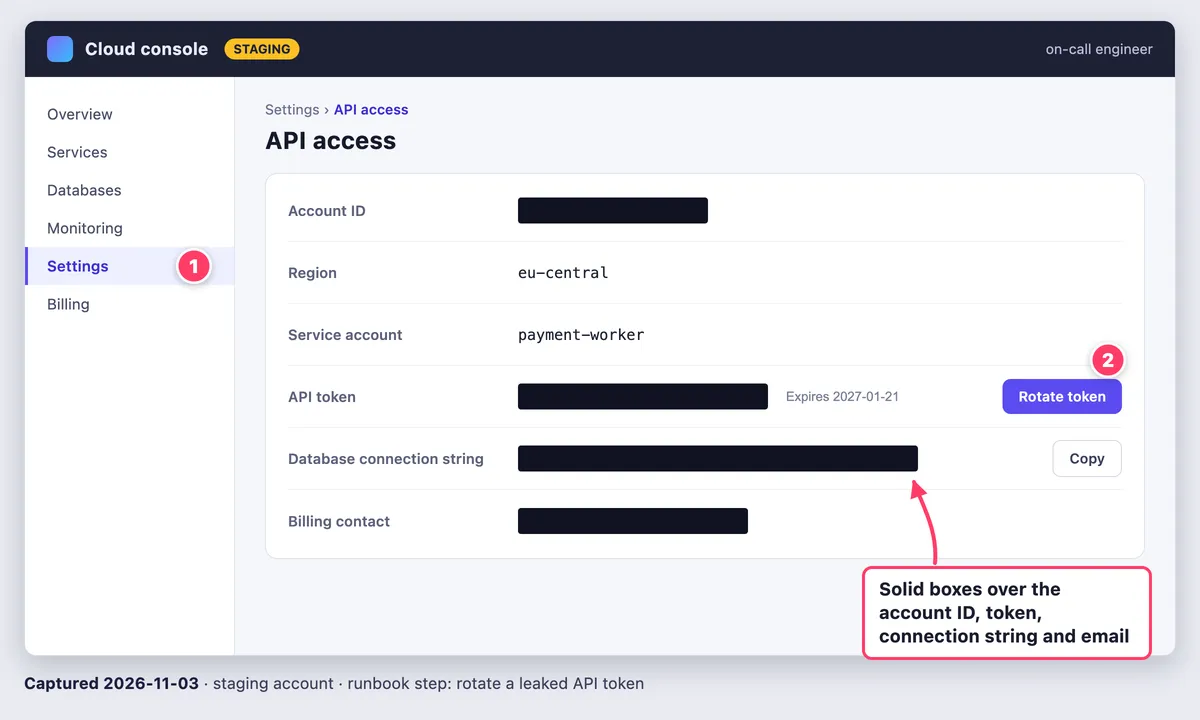
Keep them fresh (step 5): date each capture in its filename and caption (2026-11-03_payments-queue.png, "Captured 2026-11-03") and retake it on every drill and UI change. Google's SRE workbook notes playbook details go stale as fast as production changes. Keep image files with the doc, never as share links.
Built-in tools handle one panel: Screenshot and Markup on Mac, Snipping Tool on Windows, which also copies text and redacts emails and phone numbers. ScreenSnap Pro keeps the routine in one app: numbered counters and callouts, a solid Filled Rectangle for secrets and a pinned capture of the healthy panel beside your terminal. Video recordings are trimmed in its editor and exported as MP4 or GIF.
Frequently Asked Questions
Write your first runbook this week
If capturing and marking up runbook screenshots and recordings is the slow part, ScreenSnap Pro is a one-time $39 purchase: 1 license, 2 seats (2 computers, Mac or Windows). See pricing.

Morgan
Indie DeveloperIndie developer, founder of ScreenSnap Pro. A decade of shipping consumer Mac apps and developer tools. Read full bio
@m_0_r_g_a_n_