Acceptance Criteria Examples: 24 Examples + Template (2026)
Acceptance criteria are the pass or fail conditions a user story must meet before the product owner accepts it. Good ones are specific and testable: a cart of $25.00 or more ships free, and a $24.99 cart pays $5.99 shipping. Teams write them as rule checklists, Given/When/Then scenarios, or UI states shown in an annotated screenshot.
The 24 acceptance criteria examples below are grouped by format. Each criterion then becomes at least one test case, and release-level user acceptance testing (UAT) comes later. All of them use fake products and data, so copy them and swap in your own numbers.
| Format | Use it for | Examples |
|---|---|---|
| Checklist | Rules, limits and permissions | 1. Account lockout, 2. Password rules, 3. Search filters, 4. CSV export, 5. Upload limits, 6. Role permissions, 7. Notification settings, 8. API rate limit |
| Checklist (non-functional) | Speed, accessibility and privacy | 9. Search speed, 10. Keyboard-only checkout, 11. Card data privacy |
| Given/When/Then | Flows, states and edge cases | 12. Expired reset link, 13. Expired saved card, 14. Sold-out item, 15. Session timeout, 16. Seat limit, 17. Cursor pagination, 18. Webhook retries, 19. Free shipping boundary |
| UI and annotated screenshot | Layout, copy and screen states | 20. Invoices empty state, 21. Inline email error, 22. Responsive orders table, 23. Save feedback, 24. Dark mode |
What are acceptance criteria?
The ISTQB glossary defines acceptance criteria as "the criteria that a work product must satisfy to be accepted by the stakeholders." On an agile team, that work product is usually a user story, and the product owner (PO) is the one who accepts it.
Criteria live on the story: the PO drafts them in backlog refinement, before sprint planning, then reviews them with a developer and a tester. Together, those three are the three amigos. Each criterion gets an ID, such as AC-1, so tests, bugs and evidence can point at it.
The idea goes back to the three Cs of a user story that Ron Jeffries described in 2001: Card, Conversation, Confirmation. The card holds the story, and the conversation fills in the details. The confirmation is the acceptance test the customer uses to check that the story is done, and teams now write it down as acceptance criteria that acceptance tests then verify.
About 3 to 7 criteria per story is a common rule of thumb, not a standard. A story that needs more than about 7 is usually two stories. Stories and their criteria often start in a product requirements document (PRD).
Criteria matter because they set one pass or fail bar before work starts. Developers build to it and testers check against it, so rework drops and the PO can accept a story without a meeting. The user story says who wants what and why, and the criteria say how everyone will know it works.
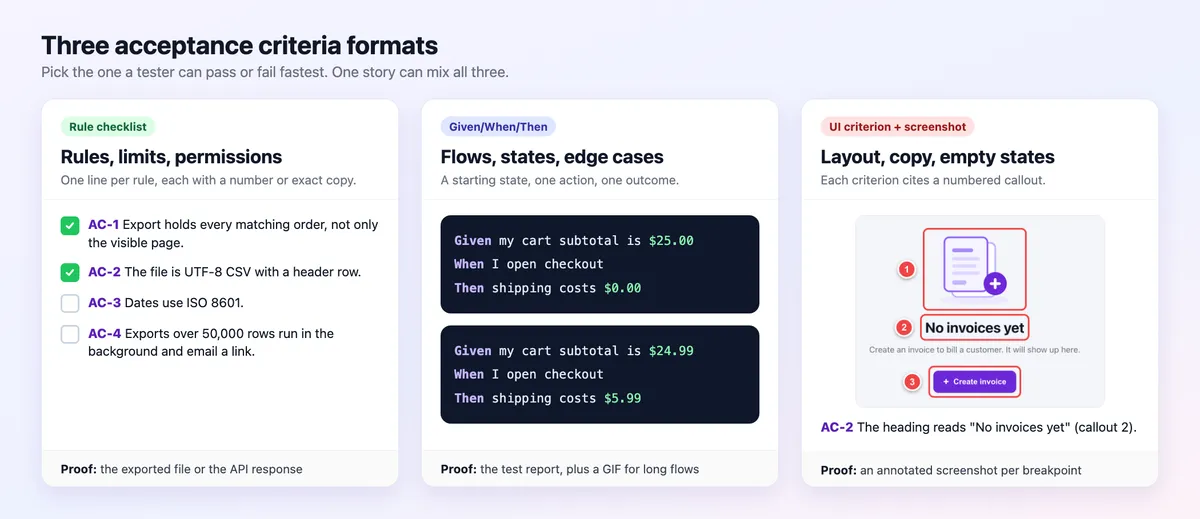
The three acceptance criteria formats
Pick the format a tester can pass or fail fastest. One story can mix all three.
| Format | Best for | Sample line | How QA verifies | Automation fit |
|---|---|---|---|---|
| Rule checklist or If/Then rule | Limits, rules, permissions | If a key sends a 101st request within a minute, then the API returns 429 with a Retry-After header. | One check per line, proved by the end state or API response. | High for APIs. |
| Given/When/Then | Flows, states, edge cases | Given my cart subtotal is $25.00, when I open checkout, then shipping costs $0.00. | Runs the scenario by hand or in Cucumber. | High, since the text is the test. |
| UI criterion with an annotated screenshot | Layout, copy, empty and error states | AC-2: the heading reads "No invoices yet" (callout 2). | Compares the build with the marked-up expected state. | Medium, with screenshot checks. |
How to write acceptance criteria for a user story
- Start from the story's "so that". The benefit tells you what must be true for the story to be worth shipping.
- Write one behavior per criterion. If a line joins two outcomes with "and", split it so each one can fail on its own.
- Put a number or exact copy in each one. "Under 1 second", "10 MB" and "No invoices yet" give a tester something to compare against.
- Cover the unhappy path. Wrong input, an empty state, a timeout and a missing permission are where most bugs hide.
- Describe the outcome, not the build. Leave out tables, libraries and endpoints unless they are the requirement. Skip words like "should", "etc." and "user-friendly", which give a tester nothing to fail.
- Name the evidence, then review the set. Say what proves each criterion, such as a screenshot, an API response or a report. Then read the set with a developer and a tester before the story enters a sprint.
Acceptance criteria vs definition of done vs requirements vs acceptance tests
All of these describe "done", just at different levels.
| Term | Scope | Written by | When | Example | Verified by |
|---|---|---|---|---|---|
| User story | One slice of value | Product owner | Before refinement | As a shopper, I want free shipping on bigger orders. | Its criteria |
| Acceptance criteria | One story | PO, developer and tester | Refinement | A $25.00 cart ships free. | Acceptance tests |
| Definition of done | Every item | Scrum team | Set once, revised in retros | Code reviewed, tests pass, docs updated. | Team check |
| Requirements | A feature or system | Product manager or BA | Discovery | Orders over a set amount ship free. | Traced to stories and tests |
| Acceptance tests | One criterion | Tester or developer | During the sprint | Set a $25.00 subtotal and expect $0.00 shipping. | Pass or fail |
| UAT | A release | Business users | Before go-live | Finance runs a month-end export. | Sign-off |
- Definition of done. The Scrum Guide calls it "a formal description of the state of the Increment" and never mentions acceptance criteria. The DoD covers every item, criteria cover one story, and a story is done only when it meets both.
- Requirements describe the feature or the whole system, and criteria turn one requirement into checks for one story.
- Acceptance tests check criteria. Each criterion becomes at least one test case with steps and an expected result.
- UAT is the release-level check by business users, covered in the UAT testing guide. Acceptance testing is not acceptance criteria: one is an activity, the other is the bar it checks.
- Entry and exit criteria belong to the test plan, not to a story.
Checklist acceptance criteria examples
Use this format when a story is a set of rules, limits or permissions that each pass or fail on their own. Each example has a one-line story and 3 to 5 criteria with IDs.
1. Account lockout after failed sign-ins
Story: As a B2B admin, I want accounts to lock after repeated failed sign-ins, so that password guessing stops.
- AC-1: 5 failed sign-ins within a rolling 15-minute window lock the account for 15 minutes.
- AC-2: The lockout message names the wait in minutes, but not which field was wrong.
- AC-3: Each lockout writes an audit log entry with account ID, time and IP address.
- AC-4: A successful sign-in resets the failed-attempt counter to 0.
Test case LOGIN-003 in the test case template checks this lockout, so AC-1 traces straight to a test.
2. Password rules at sign-up
Story: As a new user, I want clear password rules, so that I pick a strong password on the first try.
- AC-1: The password needs at least 12 characters.
- AC-2: Passwords on the common-password list are rejected.
- AC-3: Each rule that fails is named inline under the field, before the form is sent.
- AC-4: Pasting into the password field works.
3. Catalog search filters
Story: As a shopper, I want to combine filters, so that I only see products I might buy.
- AC-1: Filters combine with AND. Color Blue plus Size M shows only items that match both.
- AC-2: The result count updates within 1 second of any filter change.
- AC-3: Each active filter shows as a chip that removes it in one click.
- AC-4: The URL holds the filters, so a shared link opens the same results.
- AC-5: "Clear all" removes every filter and restores the full count.
4. CSV export of filtered orders
Story: As an ops manager, I want to export the orders I filtered, so that I can match them in a spreadsheet.
- AC-1: The file holds every order that matches the filters, not only the visible page.
- AC-2: The file is UTF-8 CSV with a header row.
- AC-3: Dates use ISO 8601, such as
2026-11-03T14:05:00Z. - AC-4: Exports over 50,000 rows run in the background and email a link when the file is ready.
- AC-5: The file name follows the pattern
orders_YYYY-MM-DD_HHMM.csv.
5. Attachment upload limits
Story: As a support agent, I want to attach files to a reply, so that customers see what I mean.
- AC-1: PNG, JPG and PDF files up to 10 MB upload.
- AC-2: Other file types, or files over 10 MB, are blocked with a message naming the allowed types and the limit.
- AC-3: A progress bar shows while the file uploads.
- AC-4: A failed upload can be retried without picking the file again.
6. Role permissions for Viewer, Editor and Admin
Story: As a workspace owner, I want three roles, so that people can only change what they own.
- AC-1: Viewers can open and comment on projects but cannot edit them.
- AC-2: Editors can create and edit projects but cannot invite people.
- AC-3: Admins can do everything Editors can, plus invite people and manage billing.
- AC-4: Buttons for actions a role cannot take are not rendered for that role.
- AC-5: A forbidden action sent through the API returns 403 and changes nothing.
7. Notification preferences in a mobile app
Story: As a mobile user, I want to choose which alerts I get, so that I only hear about what matters.
- AC-1: Settings shows one toggle per event: Mentions, Comments and Weekly digest.
- AC-2: The unsubscribe link in an email turns off the same toggle in the app.
- AC-3: Receipts and password resets cannot be turned off, and the screen says so under the list.
- AC-4: A change applies within 1 minute on every device signed in to the account.
8. API rate limit per key
Story: As a developer who uses the API, I want a clear rate limit, so that my code can back off instead of failing.
- AC-1: Each API key can send 100 requests per minute.
- AC-2: If a key sends a 101st request within a minute, then the API returns 429 Too Many Requests.
- AC-3: Every 429 response has a Retry-After header with the seconds until the next window.
- AC-4: Limits apply per key, so one busy key never slows another.
The next three are non-functional: they describe how well the system works, not what it does. Telling functional vs non-functional requirements apart is a topic of its own. The point here is narrow: a non-functional criterion still needs a number, a tool or a standard to test against.
9. Search speed under load (non-functional)
Story: As a shopper, I want fast search results, so that I keep browsing.
- AC-1: Search returns results in under 1 second for 95% of queries at 200 concurrent users on staging data.
- AC-2: The test runs for 15 minutes with a query mix taken from last month's search logs.
- AC-3: The error rate stays below 0.1% during the test.
10. Keyboard-only checkout (non-functional)
Story: As a shopper who uses a keyboard, I want to finish checkout without a mouse, so that I can buy on my own.
- AC-1: Every checkout step works with Tab, Shift+Tab, Enter and Space alone (SC 2.1.1 Keyboard).
- AC-2: The focused element always shows a visible focus ring (SC 2.4.7 Focus Visible).
- AC-3: Every field has a visible label that screen readers announce.
- AC-4: Error messages are announced as they appear.
- AC-5: Body text has a contrast ratio of at least 4.5:1 (SC 1.4.3 Contrast).
These success criteria come from WCAG 2.2. New to the standard? Start with what WCAG is and how it works.
11. Card data privacy (non-functional)
Story: As a cardholder, I want my card data kept out of logs, so that a leaked log file can't expose it.
- AC-1: Logs show at most the last 4 digits of a card number.
- AC-2: Session cookies are set with the Secure and HttpOnly flags.
- AC-3: The card security code (CVV) is never stored, in logs or in the database.
Given/When/Then acceptance criteria examples
Use this format when the outcome depends on a starting state and a trigger: flows, timeouts and edge cases. Given sets the context, When is the action, and Then is the result you can see. Martin Fowler explains where the style comes from, and the Agile Alliance glossary defines the template.
12. Reset link opened after it expires
A reset link that never expires turns an old email into a way into the account.
Feature: Password reset links

  Scenario: Reset link opened after 30 minutes
    Given I requested a password reset at 10:00
    When I open the reset link at 10:31
    Then I see "This link has expired"
    And I can request a new link from the same page
    And my password is unchanged
13. Checkout with an expired saved card
Here the unhappy path is the point: nothing is created, and nothing is lost.
Feature: Checkout with a saved card

  Scenario: Saved card has expired
    Given my saved card ending 4242 expired in 10/2026
    When I place the order with that card
    Then no order is created
    And my cart is unchanged
    And the card field shows "This card has expired. Choose another card."
14. Item sells out while in the cart
Stock can change between cart and payment, so the check runs again before any charge.
Feature: Stock check before payment

  Scenario: Last unit sells out before I pay
    Given my cart holds the last "Trail Jacket" in size M
    And another shopper buys it first
    When I go to the payment step
    Then the item is flagged "Sold out" before I can pay
    And my card is not charged
15. Session timeout with unsaved changes
Two scenarios cover the warning and the timeout itself.
Feature: Session timeout in the editor

  Scenario: Extend the session from the warning
    Given I have unsaved changes in a draft
    And my session ends in 2 minutes
    When I click "Stay signed in" on the timeout warning
    Then my session is extended by 30 minutes
    And my changes are still in the editor

  Scenario: Session times out with unsaved changes
    Given I have unsaved changes in a draft
    When my session times out
    Then my changes are saved as a draft
    And the draft opens with my changes after I sign in again
16. Invite a teammate with a seat limit
A Background holds the steps that both scenarios share, so each scenario adds only what is different.
Feature: Team invites

  Background:
    Given I am an admin of the "Design" workspace
    And the plan includes 5 seats

  Scenario: Invite while a seat is free
    Given 4 seats are in use
    When I invite "sam@example.com"
    Then an invite email is sent to sam@example.com
    And the seat count shows 5 of 5

  Scenario: Invite when every seat is taken
    Given 5 seats are in use
    When I try to invite "lee@example.com"
    Then no invite is sent
    And I see "All 5 seats are in use. Add a seat to invite more people."
17. API cursor pagination
APIs need acceptance criteria too. The user is a developer, and the outcome is a response.
Feature: Orders API pagination

  Scenario: Follow the cursor to the last page
    Given 120 orders exist
    When I page through GET /v1/orders?limit=50 with each "next" cursor
    Then I receive 3 pages with 50, 50 and 20 orders
    And no order appears twice
    And "next" is null on the last page
18. Webhook retries with backoff
Endpoints fail, so the criteria spell out how hard the system tries and what the user sees when it gives up.
Feature: Webhook delivery

  Scenario: Endpoint keeps failing
    Given a webhook endpoint that returns 500
    When an "invoice.paid" event fires
    Then delivery is retried with exponential backoff
    And the event is attempted 5 times within 24 hours
    And after the 5th failure the dashboard shows "Failed" with a "Resend" button
19. Free shipping boundary (Scenario Outline)
Story (STORY-142): As a shopper, I want free shipping on orders of $25.00 or more, so that I add one more item instead of paying for shipping.
A Scenario Outline runs once for each row of its Examples table. So one scenario covers the value just below the threshold, the threshold itself and just above it, and a tag on each Examples block ties its rows to an AC ID.
Feature: Free shipping threshold

  Scenario Outline: Shipping cost around the $25.00 threshold
    Given my cart subtotal is <subtotal>
    When I open checkout
    Then shipping costs <shipping>

    @AC-1
    Examples: Below the threshold
      | subtotal | shipping |
      | $24.99   | $5.99    |

    @AC-2
    Examples: At or above the threshold
      | subtotal | shipping |
      | $25.00   | $0.00    |
      | $25.01   | $0.00    |
Say which number the rule reads. Here it is the subtotal after discounts and before tax. Write that into the story, or two testers will check two different totals.
Gherkin syntax in 60 seconds
Gherkin is the plain-text language behind Given/When/Then. The Cucumber Gherkin reference lists every keyword, and these cover most stories:
- Feature: names the capability, one per
.featurefile. - Rule: groups the scenarios for one business rule (Gherkin 6 and later).
- Scenario (or Example): one concrete behavior.
- Given, When, Then, And, But: context, action and outcome. And and But continue the step before them.
- Background: Given steps shared by every scenario in the file, as in example 16.
- Scenario Outline with Examples: one template that runs once per table row, as in example 19.
- Tags: labels such as
@AC-2or@smokethat filter runs and trace scenarios to criteria.
Two habits keep scenarios readable. Test one behavior per scenario, and write declarative steps ("When I sign in") rather than UI scripts ("When I click #btn-3"). The Cucumber reference also suggests 3 to 5 steps per example.
UI acceptance criteria with an annotated expected-state screenshot
Use this format when a criterion is about what the screen shows: layout, copy, and empty, error or loading states.
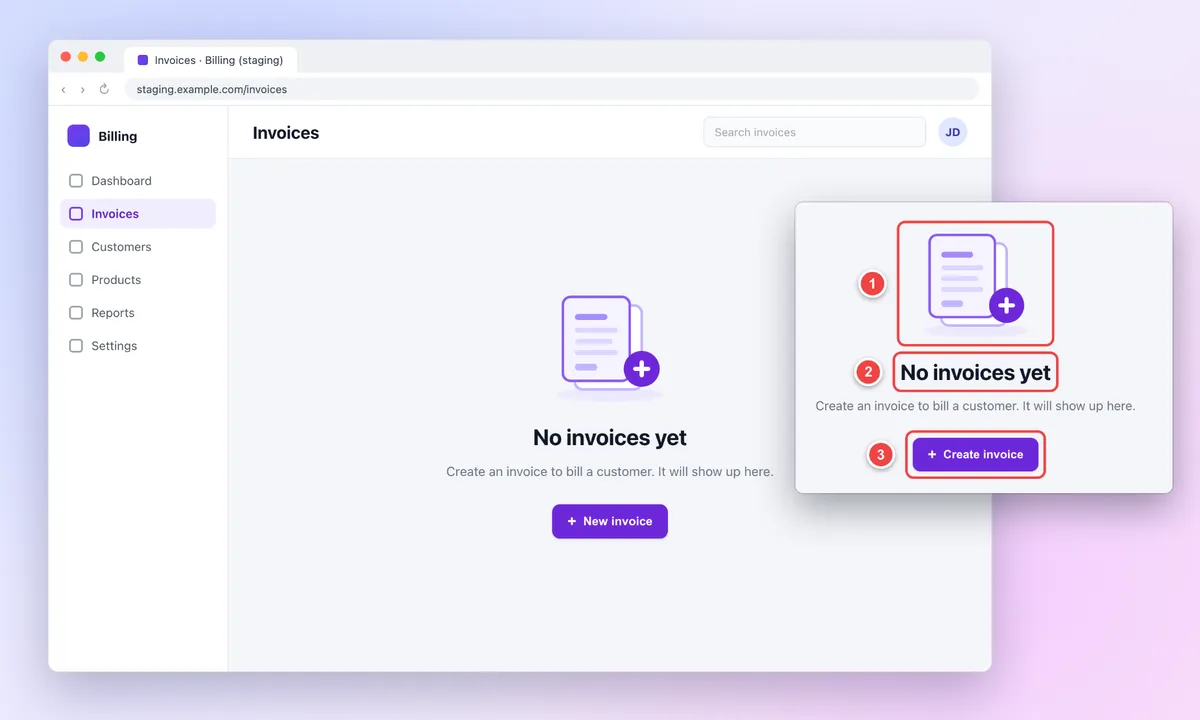
Attach an annotated screenshot or mockup of the expected state to the story, with numbered callouts on the parts that matter, and have each criterion cite its callout. The text still has to stand alone, because search, screen readers and test scripts read the words, not the image. So write each criterion in full, with the exact copy.
The guide to annotating a website covers callouts and arrows, and you can annotate a mockup in the browser with arrows, text labels and filled boxes.
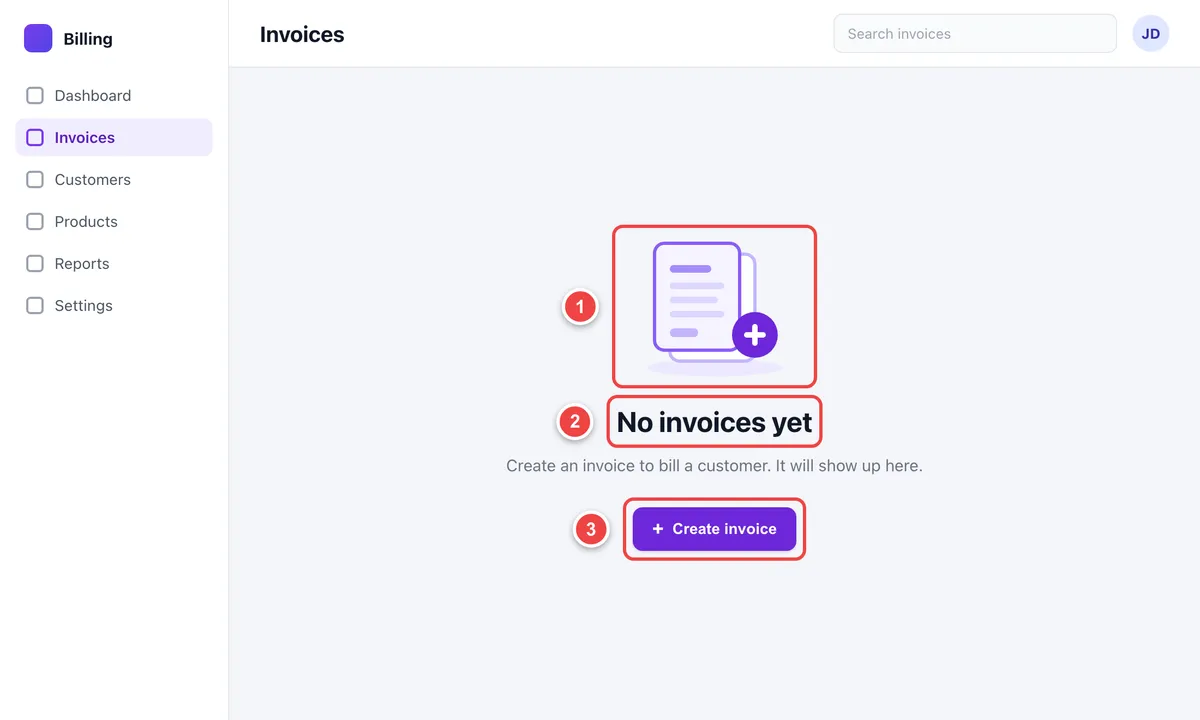
20. Empty state for invoices
Story: As a new account owner, I want a helpful empty invoices page, so that I know how to start.
- AC-1 (callout 1): An illustration shows above the heading.
- AC-2 (callout 2): The heading reads "No invoices yet".
- AC-3 (callout 3): A primary button reads "Create invoice" and opens the new invoice form.
- AC-4: No table headers or empty rows render until the first invoice exists.
21. Inline email error
Story: As someone signing up, I want to see what is wrong with my email right away, so that I can fix it before I submit.
- AC-1: When an invalid email field loses focus, the text "Enter an email address like name@example.com" appears right under the field.
- AC-2: The field gets a red border and an error icon, so the error never relies on color alone.
- AC-3: On submit with errors, focus moves to the first invalid field.
- AC-4: The message clears as soon as the email is valid.
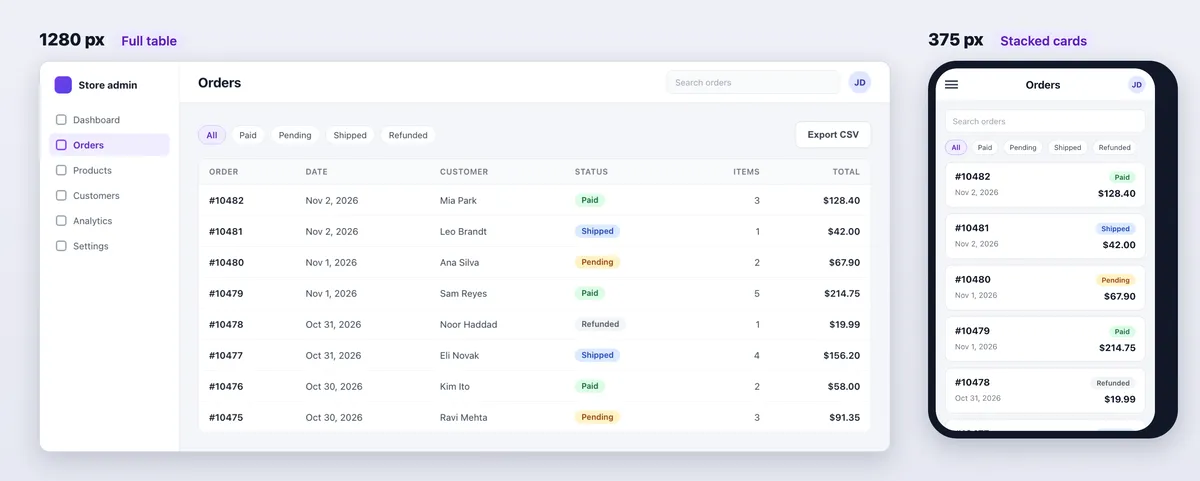
22. Responsive orders table at 375 px and 1280 px
Story: As a store owner on my phone, I want to read my orders without scrolling sideways, so that I can check them anywhere.
- AC-1: At 375 px wide, each order shows as a stacked card with order number, status and total.
- AC-2: At 375 px, the page has no horizontal scroll.
- AC-3: At 1280 px, orders show as a full table with every column: order, date, customer, status, items and total.
The evidence is one screenshot per width. In your browser's device mode, set the width to 375 px and take a region capture, then repeat at 1280 px.
23. Save feedback with a skeleton and a toast
Story (STORY-188): As an editor, I want clear feedback when I save, so that I know my changes are stored.
- AC-1: Within 100 ms of clicking Save, a skeleton replaces the preview card.
- AC-2: After a successful save, a "Saved" toast shows for 4 seconds and then fades out.
- AC-3: Nothing on the page moves during the save. The skeleton and the loaded card are the same size.
- AC-4: If the save fails, the toast reads "Couldn't save. Try again." and stays until dismissed.
A still image can't prove timing, so attach a short GIF or MP4 with the AC ID in the file name and the story comment, such as STORY-188_AC-2_pass.gif. The GIF shows the order of states, and the browser's performance panel gives the exact 100 ms figure.
If you need a callout, annotate a still screenshot of that state, not the recording.
24. Dark mode colors, logo and charts
Story: As someone who works at night, I want a dark theme that is easy to read, so that my eyes don't tire.
- AC-1 (callout 1): Body text on the dark background has a contrast ratio of at least 4.5:1.
- AC-2 (callout 2): The header shows the light version of the logo.
- AC-3 (callout 3): Charts switch to the dark palette, and their gridlines stay visible.
- AC-4: The theme follows the system setting until the user picks one in Settings.
Put callouts on all 3 elements of one dark mode screenshot. To measure AC-1, run the color pair through a contrast checker, as the guide to WCAG color contrast shows.

Tired of plain screenshots? Try ScreenSnap Pro.
Beautiful backgrounds, pro annotations, GIF recording, and instant cloud sharing, all in one app. Pay $39 once, own it forever.
See pricing and featuresBad-to-good acceptance criteria rewrites
Most weak criteria share one flaw: no tester can fail them. Here are 6 common ones, each with a rewrite.
| Weak criterion | Why it fails | Rewrite |
|---|---|---|
| "Show an appropriate error message." | No exact copy, place or trigger, so any message passes. | When an invalid email field loses focus, show "Enter an email address like name@example.com" under it (example 21). |
| "The user can log in." | Happy path only. | AC-1: a valid email and password open the dashboard. AC-2: a wrong password keeps you on the sign-in page with an error. AC-3: 5 failures in 15 minutes lock the account (example 1). |
| "Supports large files." | No limit, so nobody knows when it fails. | PNG, JPG and PDF files up to 10 MB upload. Larger files show a message with the limit (example 5). |
| "Handle errors gracefully." | "Gracefully" can't be measured. | If the payment service doesn't answer within 10 seconds, show "Payment is taking longer than usual" and keep the cart. No charge is made. |
| "Admin can manage users." | Three behaviors hide behind one vague verb. | Split it. AC-1: an admin can invite a user by email. AC-2: an admin can change a user's role. AC-3: an admin can deactivate a user, who is signed out within 1 minute. |
| "Use a Redis cache for the dashboard." | It sets the build, not the outcome. | The dashboard loads in under 2 seconds for 95% of visits with 12 months of data. |
How QA verifies acceptance criteria with evidence
General rules for capturing, redacting, naming and storing proof live in the evidence section of the test case template and in the UAT guide. This section covers what acceptance criteria add to QA testing: an ID on every check and one piece of proof per criterion.
One criterion, one check, one piece of evidence
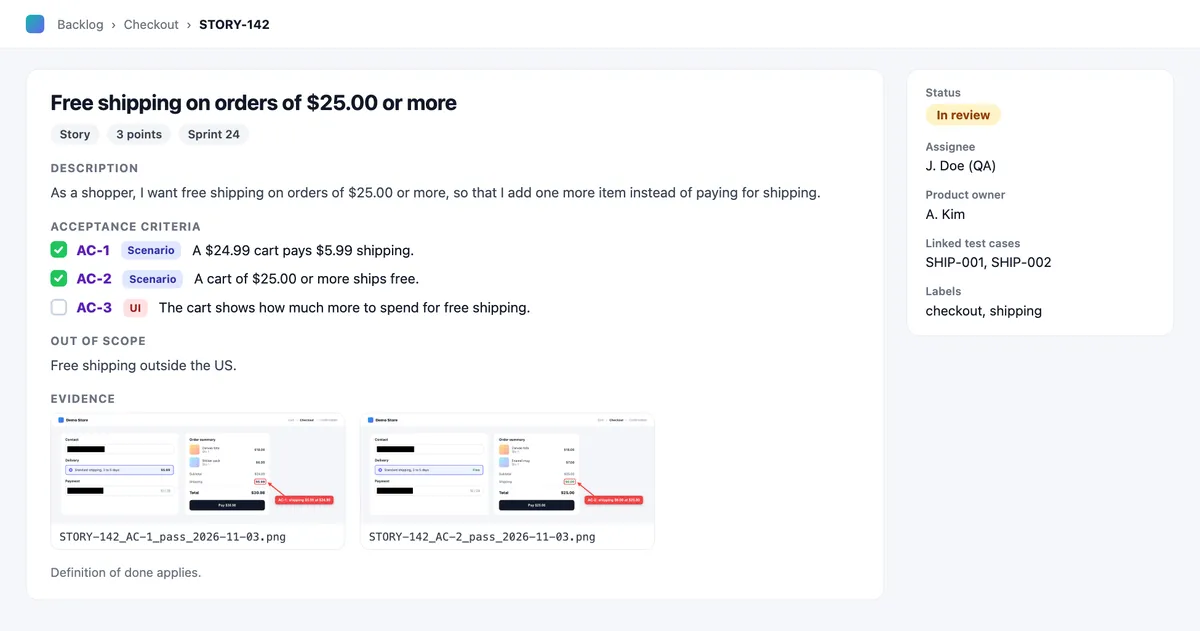
Trace each AC ID to a test case and to the file that proves it. When the PO asks "is AC-2 done?", the answer is a link, not a meeting.
| Story | Criterion | Test case | Evidence | Result |
|---|---|---|---|---|
| STORY-142 | AC-1: a $24.99 cart pays $5.99 shipping. | SHIP-001 | STORY-142_AC-1_pass_2026-11-03.png | Pass |
| STORY-142 | AC-2: a $25.00 cart ships free. | SHIP-002 | STORY-142_AC-2_pass_2026-11-03.png | Pass |
A requirements traceability matrix does the same job for a whole release.
Evidence by criterion type
| Criterion type | Examples | Best evidence |
|---|---|---|
| Rule | 4, 6, 8 | An end-state screenshot or the raw API response. |
| Scenario | 12 to 19 | The test report, plus a GIF for multi-step flows. |
| UI state | 20 to 24 | An annotated screenshot, with counters that match the AC IDs on a mockup that covers several criteria. Take one shot per breakpoint, so example 22 needs two. |
| Timing or animation | 23 | A short GIF or MP4 with the AC ID in the file name. |
| Performance | 9 | The load test report, with the percentile and user count. |
| Accessibility | 10 | A scan report plus a screenshot of the focus order. |
| Privacy | 11 | A log excerpt, with any other values covered. |
Capture and annotate the proof
Capture the end state as a region, not the whole screen. Cover personal data and tokens with solid boxes, because blur and pixelate can be reversed. Name files like STORY-142_AC-2_pass_2026-11-03.png.
A cloud share link is fine for a quick ping in chat, but on the lifetime license uploads expire after 30 days, so attach the file itself to the story as the record. Then add what criteria need:
- Several criteria on one mockup: click numbered counters in AC order, so 1, 2 and 3 line up with AC-1, AC-2 and AC-3.
- Proof for one criterion: write the AC ID in a text label or callout, with an arrow to the value that proves it, such as "AC-2: shipping $0.00 at $25.00".
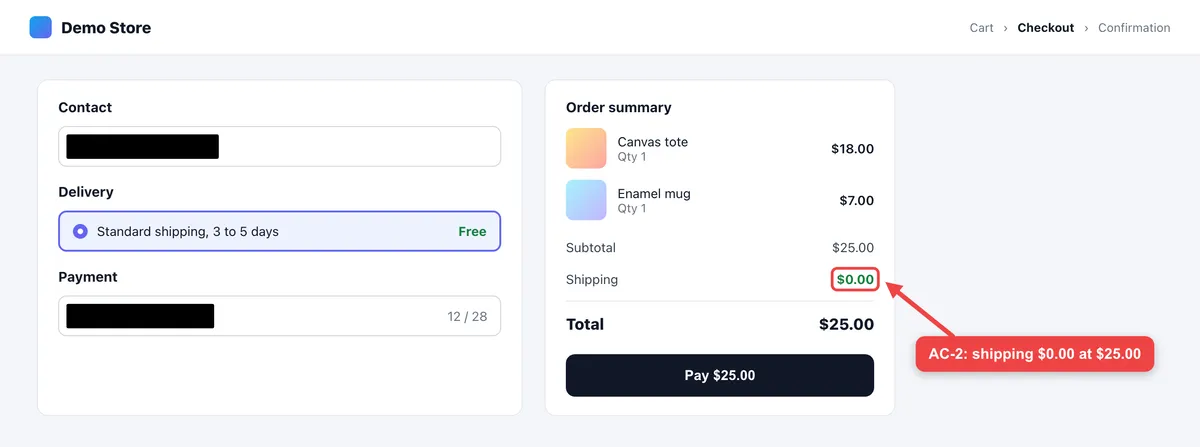
- Exact copy: OCR the text on screen and diff it against the criterion in a free text compare tool. It catches a curly quote or a missing period that eyes skip, as in example 21.
- Visual match: capture the expected-state mockup, pin the capture and park it beside the build, so you compare in place. Here is how to keep a window always on top on Mac and on Windows.
- Long pages on staging: for a page behind a login, use a scrolling capture that you scroll by hand. URL-based page capture only sees public pages.
Built-in tools cover some of this. On Windows 11, Snipping Tool marks up a snip, and its Text actions copy the words out of it. On a Mac, Markup draws on a screenshot, and Live Text in Preview copies its text.
ScreenSnap Pro (Mac and Windows) covers the capture side in one app: numbered counters for the callouts on a mockup, arrows, text labels and callouts for AC IDs, a black Filled Rectangle for PII, GIF and screen recording for flows, OCR for on-screen copy, and pin to keep a captured mockup on top. Its Scrolling Capture works in any app, including a logged-in staging build: select the area, click Start Capture, scroll down by hand, then click Finish. Its Website Capture renders public URLs only.
Automate the repeatable ones
Gherkin scenarios like examples 12 to 19 can run as tests through Cucumber, so the criterion and the test share one text. UI states like examples 20 to 24 can become Playwright toHaveScreenshot assertions that fail when the page drifts from the approved image.
The Playwright screenshot guide and the visual regression testing guide cover the setup. Keep manual checks for copy tone, motion and anything a pixel diff can't judge.
When a criterion fails
File a bug that quotes the failed criterion as its Expected line, such as "Expected (STORY-142, AC-2): $0.00 shipping at a $25.00 subtotal. Actual: $5.99." The bug report template has the other fields, and most bug reporting tools can attach the evidence for you.
Criteria only cover what someone thought of. Run short exploratory testing sessions to find what they missed, then add a criterion for each real gap.
Acceptance criteria template you can copy
Copy this Markdown block into a story and fill in the brackets. The format tag on each line tells testers what proof to expect.
## STORY-000 · [Short title]

**Story:** As a [role], I want [capability], so that [benefit].

### Acceptance criteria
- [ ] AC-1 [checklist] [One rule with a number or exact copy]
- [ ] AC-2 [scenario] [Given/When/Then summary; full scenario in the .feature file]
- [ ] AC-3 [UI] [Expected state; see callout 1 on the mockup]

### Out of scope
- [What this story will not do]

### Evidence required
- AC-1: [screenshot, API response or report]
- AC-2: [test report or GIF]
- AC-3: [annotated screenshot at each breakpoint]

Definition of done applies.
For BDD teams, this .feature file holds the same story with a Background and a Scenario Outline:
@STORY-000
Feature: [Capability]
  As a [role]
  I want [capability]
  So that [benefit]

  Background:
    Given [shared starting state]

  @AC-1
  Scenario: [One behavior]
    Given [context]
    When [action]
    Then [outcome you can see]

  @AC-2
  Scenario Outline: [One rule checked at several values]
    Given [context with <input>]
    When [action]
    Then [outcome with <result>]

    Examples:
      | input             | result   |
      | [below the limit] | [result] |
      | [at the limit]    | [result] |
      | [above the limit] | [result] |
Paste the Markdown as is into a GitHub issue, where each criterion line becomes a checkbox. In Jira Cloud, paste it into the work item's Description. In Azure Boards, use the Acceptance Criteria field (Scrum process items have one) or the Description, after you convert that field to Markdown, a switch that is opt-in per field and one-way.
Acceptance criteria checklist
Run these 8 checks before refinement ends:
- Every criterion has an ID, such as AC-1.
- Each one tests a single behavior.
- Each one has a number, a limit or exact copy.
- At least one covers an unhappy path.
- None names a table, library or endpoint unless that is the requirement.
- None uses "should", "etc." or "user-friendly".
- Each one names its evidence.
- A developer and a tester have read them, and there are 7 or fewer.
Where to put acceptance criteria in Jira and GitHub
Jira Cloud does not ship a built-in acceptance criteria field. You have three options: an "Acceptance criteria" heading in the work item's Description, a Paragraph custom field with rich text, or a checklist app from the Atlassian Marketplace. A Jira admin creates the custom field from the field types admins can add.
Attach the evidence files to the same work item. The Jira screenshot guide shows a fast way to do it.
On GitHub, write criteria as a task list in the issue body, one checkbox per AC ID, and tick each box as its check passes, as GitHub Docs explains. A GitHub issue template can add the section to every story, and a pull request template can ask which AC IDs a change covers.
Azure Boards is the exception. Its Scrum process items have a built-in Acceptance Criteria field.
Frequently Asked Questions
Make every criterion easy to prove
Good acceptance criteria are short, numbered and testable, and each one has its proof waiting. Start from the template, pick the format that fits each criterion, and attach the evidence to the story as you test.
ScreenSnap Pro is a one-time $39 purchase: 1 license, 2 seats (2 computers, Mac or Windows). See pricing.

Morgan
Indie DeveloperIndie developer, founder of ScreenSnap Pro. A decade of shipping consumer Mac apps and developer tools. Read full bio
@m_0_r_g_a_n_