Test Plan Template: Free Copy-Paste Format + Example
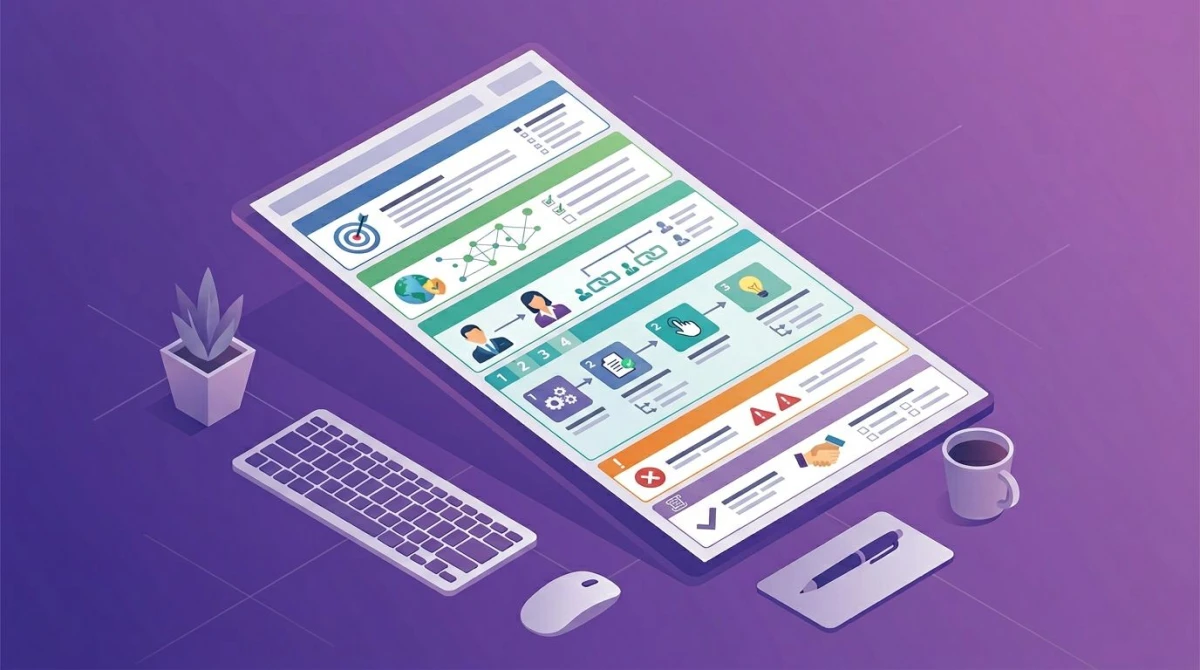
A test plan template is a reusable document for planning how one release or project will be tested. It records objectives, scope, approach and test levels, environments, entry and exit criteria, schedule, roles, risks, deliverables and the evidence testers must attach. You fill it in once per release and update it when scope changes.
For one test, use a test case template; for business sign-off, use a UAT plan.
What is a test plan?
A test plan in software testing says what gets tested in one release, and how. It also names where, by whom, by when, and which result lets the release ship. The ISTQB glossary calls it "documentation that describes test objectives, means and schedule for achieving test coordination."
Teams write one to agree on one scope and exit bar. It names risks before testing starts and leaves a record a client or auditor can check.
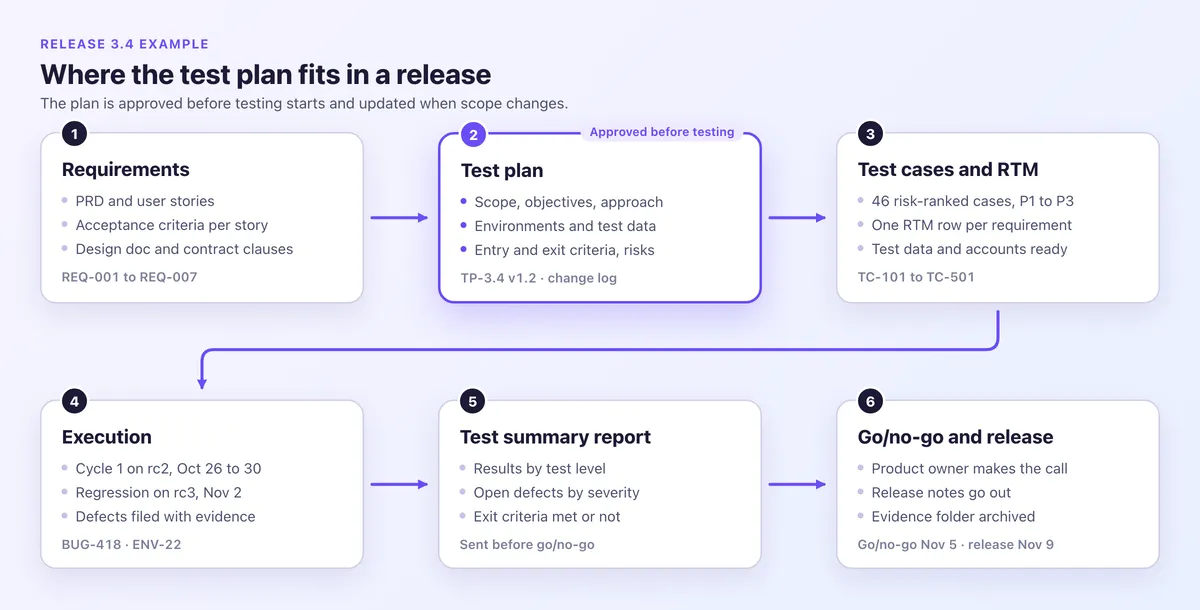
Big projects put level plans under a master plan, but most web teams need one QA test plan per release. The QA lead writes it after requirements are agreed and before test design. The engineering manager and product owner approve it, and a change log tracks versions.
Test plan vs test case: a case checks one behavior, while the plan decides which cases run, where and when. It is one of the core technical documentation examples, and the QA testing guide covers the wider process.
Test plan vs test strategy
A test strategy sets how a company tests across projects, while a test plan applies it to one release.
| Aspect | Test plan | Test strategy |
|---|---|---|
| Scope | One release or project | Many projects |
| Owner | QA lead | Head of quality |
| Lifespan | Weeks | Years |
| Contents | Scope, dates, criteria, risks | Principles, levels, tools, metrics |
ISTQB describes a test strategy as how to test to reach test objectives in given circumstances. ISO/IEC/IEEE 29119-3:2021 keeps company-wide rules in a test policy and organizational test practices, and puts the project's test strategy inside the test plan.
Test plan template (copy and paste)
Copy this software test plan template into a wiki, repo or doc. Replace each bracketed prompt, and delete sections that do not apply.
# Test plan: [product] [release]
ID, version, status: [TP-3.4 · v1.0 · draft]
Release and builds: [version · build IDs]
Author and approvers: [QA lead · engineering manager, product owner]
Change log: [date · version · change · who]

## 1. Purpose and objectives
- Objectives: [2 to 4 measurable outcomes]
- References: [PRD, stories, design doc]

## 2. Scope
- In: [features under test] · Out: [item · reason]
- Assumptions and dependencies: [what must stay true]

## 3. Approach
- Per level: [what it covers · manual or automated · owner · tool]
- Levels: unit, API, E2E, manual, exploratory, accessibility, security, performance, visual, UAT
- Risk priorities and test data: [P1 to P3 · seeded or masked]

## 4. Environments and test data
- Environments: [URL · build · data · sandboxes]
- Matrix: [browser and version · OS · viewport]
- Accounts and masking: [one per role · rule]

## 5. Entry, exit, suspension and resumption criteria
- Entry: [what must be true to start]
- Exit: [measurable bar to finish]
- Suspension: [when testing pauses]
- Resumption: [what must be true to restart]

## 6. Schedule and effort
- [Activity · dates · tester-days]

## 7. Roles and communication
- [Role · name · duties] · Reports: [who, how often]

## 8. Risks
- [Risk · likelihood · impact · mitigation · owner]

## 9. Defect management
- Severity: Critical, Major, Minor, Low · Triage: [when, who] · Fix targets: [per severity]

## 10. Evidence and reporting
- Owner and folder: [name · location]
- Attach per result: [failures, P1 passes]
- Metrics: [executed, pass rate, open defects by severity, coverage]

## 11. Deliverables
- [Plan, cases, RTM, reports, defect log, evidence]

## 12. Approvals
- [Name · role · decision · date]
How the sections map to IEEE 829 and ISO/IEC/IEEE 29119-3
The sections follow IEEE 829-1998's 16-part outline, which most templates still copy. They also match the 29119-3:2021 test plan headings.
| Template | IEEE 829-1998 section | ISO/IEC/IEEE 29119-3:2021 |
|---|---|---|
| Header, approvals | Test plan identifier, approvals | Common information (identifier, approval authority, change history) |
| 1 to 2. Purpose, scope | Introduction, test items, features to be tested and not tested | Context of testing, assumptions and constraints |
| 3 to 5. Approach, environments, criteria | Approach, item pass/fail criteria, suspension and resumption, environmental needs | Test strategy |
| 6. Schedule | Testing tasks, schedule | Testing activities and estimates, schedule |
| 7. Roles | Responsibilities, staffing and training needs | Stakeholders, testing communication, staffing |
| 8. Risks | Risks and contingencies | Risk register |
| 9 to 11. Defects, evidence, deliverables | Test deliverables | Test strategy, plus separate incident and completion reports |
IEEE 829-2008 later split the plan into master and level test plans, and IEEE lists it as superseded by the 29119 series. Cite the current standard, ISO/IEC/IEEE 29119-3:2021, when a client asks which format you follow.
One-page test plan for small releases
For sprint releases and hotfixes, a one-page test plan fits in 10 lines.
# One-page test plan: [release]
1. Release and objectives: [version · measurable goals]
2. Scope: in [features] · out [item · reason]
3. Top 3 risks: [risk · mitigation]
4. Levels and owners: [unit, API, E2E, manual]
5. Environments: [URL · build · browsers]
6. Entry: [build deployed, smoke green]
7. Exit: [all P1 passed · no open Critical]
8. Dates: [test window · go/no-go · release]
9. Evidence: [what to attach · folder]
10. Approver: [name · role · date]
For business acceptance, use a UAT plan instead.
Use it in Word, Google Docs, Excel or Confluence
This test plan format is plain Markdown, which Notion, GitHub and Confluence Cloud format on paste. In Google Docs, turn on Tools > Preferences > Enable Markdown and right-click > Paste from Markdown (Google's steps). File > Download > Microsoft Word then gives you a .docx file.
Save the example's CSV blocks as .csv files for Google Sheets (File > Import > Upload) or Excel (Data > From Text/CSV).
Test plan example: release 3.4 of a B2B invoicing web app
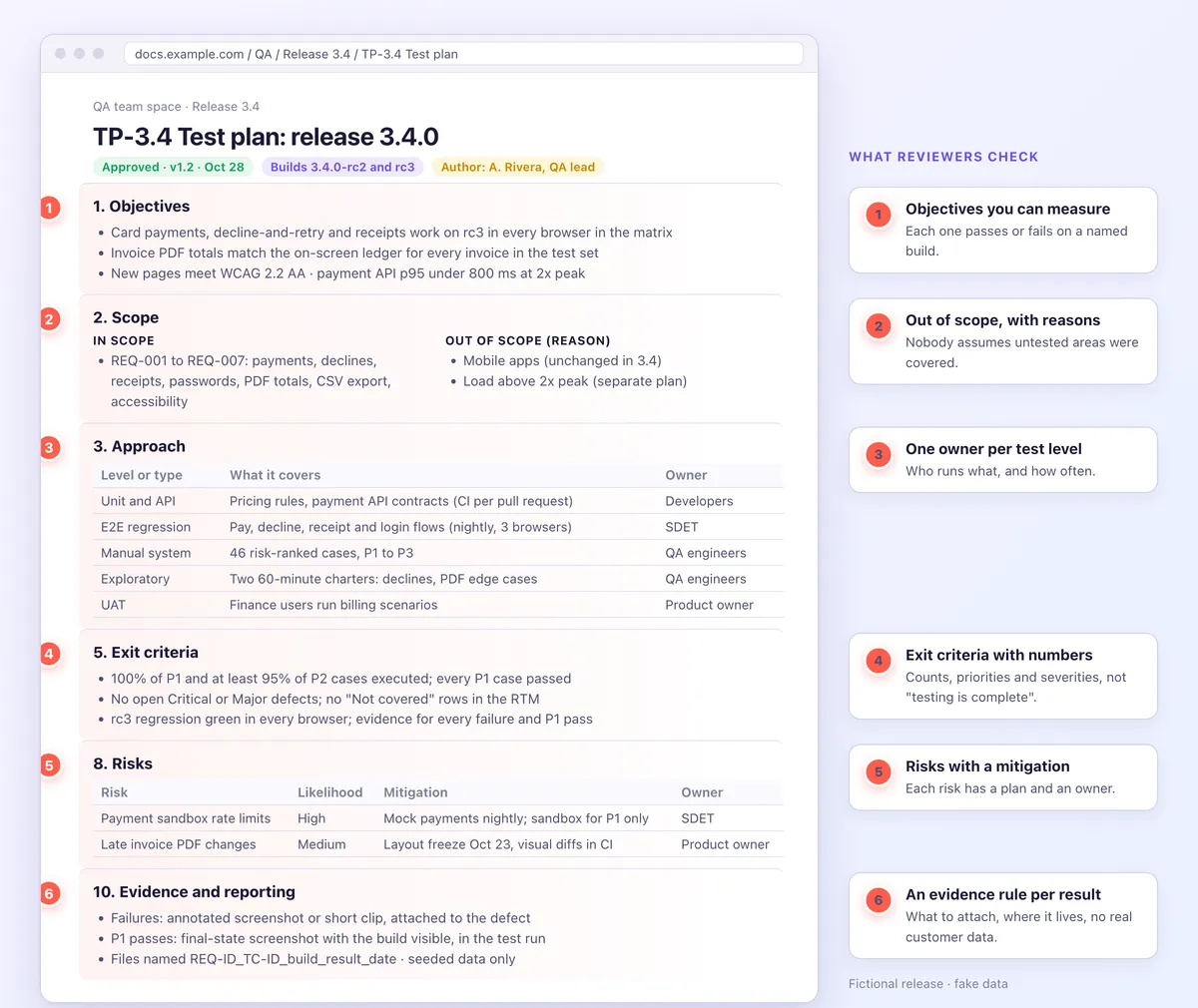
This sample test plan covers a fictional release 3.4 with fake data. It adds card payments, a decline-and-retry message, emailed receipts, invoice PDF totals, an admin CSV export, 12-character passwords and accessible new pages.
Header, objectives and scope
- Header: TP-3.4 v1.2 for release 3.4.0 by A. Rivera (QA lead), approved by M. Chen (engineering manager) and S. Patel (product owner). v1.2 (Oct 28) raised passwords to 12 characters.
- Objectives: payments, declines and receipts work on rc3 in each browser. PDF totals match the ledger. New pages meet WCAG 2.2 AA. The payment API p95 stays under 800 ms at 2x peak.
- Scope: REQ-001 to REQ-007 are in. Out: mobile apps and bank transfers (unchanged in 3.4), plus load above 2x peak (separate plan).
- Dependencies: the payment sandbox, the email catcher and the Oct 23 PDF layout freeze.
Approach and environments
| Level | What it covers | Owner |
|---|---|---|
| Unit and API | Pricing rules and payment API contracts, in CI. | Developers |
| E2E regression | Pay, decline, receipt and login flows, nightly. | SDET |
| Manual system | 46 risk-ranked cases from the test case template. | QA engineers |
| Exploratory | Two 60-minute exploratory testing charters. | QA engineers |
| Accessibility | Keyboard, contrast and screen reader checks for WCAG 2.2 AA. | QA lead |
| Security | Selected OWASP ASVS Level 1 checks. | Security champion |
| Performance | Payment API load at 2x peak. | SDET |
| Visual | Invoice PDF diffs in CI (visual regression testing). | SDET |
| UAT | Finance users run billing scenarios (UAT plan). | Product owner |
- Priorities: P1 puts money, data or access at risk. P2 harms a core flow. P3 is cosmetic.
- Environments: staging.example.com runs rc builds with seeded, masked data, the payment sandbox and an email catcher. Outages get IDs, such as ENV-22 (email sandbox down).
- Accounts: one per role: owner, admin, member and billing-only.
Browsers are pinned at the rc2 cut on Oct 23 (environments.csv):
ID,Browser,OS or device,Viewport,Runs
B1,Chrome 156,Windows 11,1440 px,All cases
B2,Edge 156,Windows 11,1440 px,P1 and E2E
B3,Firefox 158,Windows 11,1440 px,P1 and E2E
B4,Safari 27,macOS 27,1440 px,All cases
B5,Chrome 156,macOS 27,1440 px,P1
B6,Safari 27,iOS 27,390 px,P1
B7,Chrome 156,Android 17,390 px,P1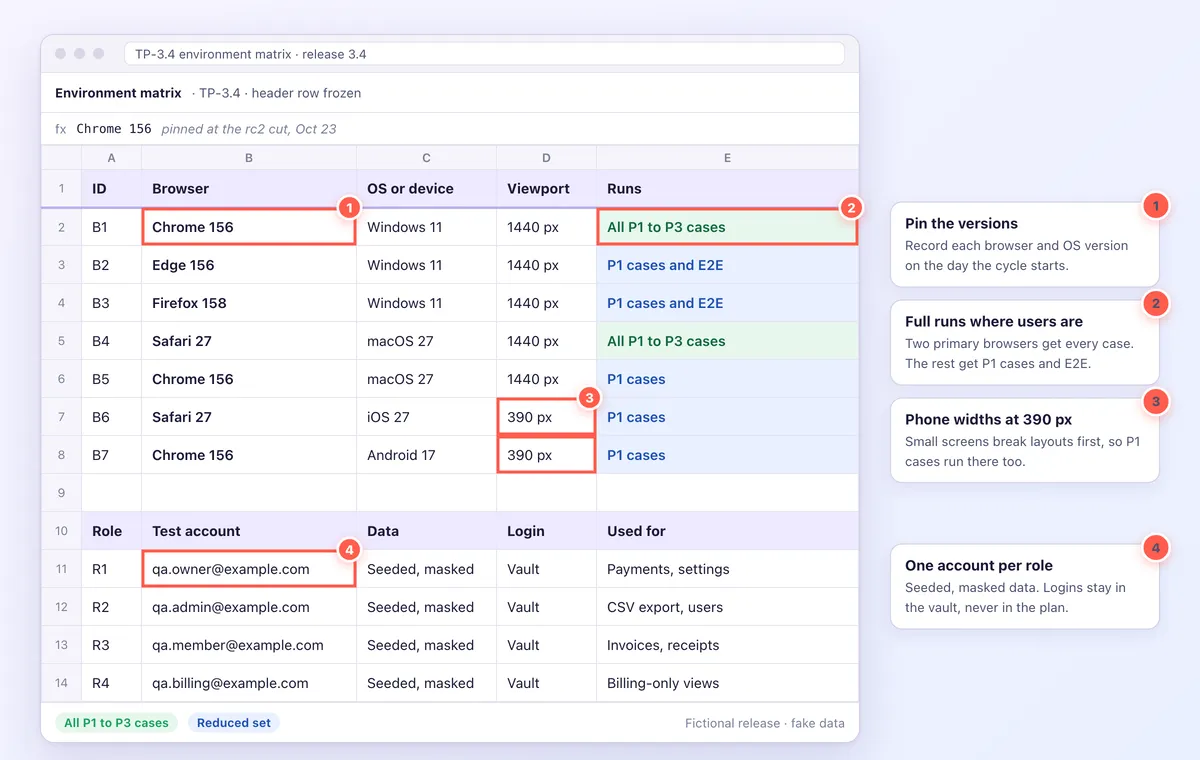
Entry, exit, suspension and resumption criteria
Each criterion is a yes or a no.
- Entry criteria: rc2 is on staging and passes smoke. Stories meet acceptance criteria, P1 cases are reviewed, and each requirement has a row in the requirements traceability matrix (RTM). Data and sandboxes are ready, with no Critical left from 3.3.
- Exit criteria: every P1 case passed, and at least 95% of P2 cases ran. No Critical or Major defects are open, and the RTM has no "Not covered" rows. The rc3 regression is green in each browser, and accessibility and performance targets are met. Every failure and P1 pass has evidence, UAT is signed off and the summary report is sent.
- Suspension: testing pauses if staging or the payment sandbox is down for over 2 hours, smoke fails, or 3 or more Critical defects are open.
- Resumption: a new build passes smoke and the blockers are verified fixed. Affected cases rerun first.
Schedule, roles and risks
- Schedule: Oct 19 to 23 design and data. Oct 26 to 30 cycle 1 on rc2, with an optional 90-minute bug bash on Oct 28. Nov 2 rc3 regression, Nov 3 to 4 UAT, Nov 5 go/no-go and Nov 9 release.
- Effort: 6 tester-days for design, 10 for cycle 1 and 3 for the regression.
- Roles: a QA lead, 2 QA engineers, an SDET, developers, the product owner (UAT, go/no-go) and a security champion. Status goes out daily at 17:00.
The risk register (risks.csv):
ID,Risk,Likelihood,Impact,Mitigation,Owner
R1,Sandbox rate limits,High,Medium,Mock payments nightly,SDET
R2,Late PDF changes,Medium,High,Freeze plus visual diffs,Product owner
R3,One tester knows billing,Medium,Medium,Pair on day 1,QA lead
R4,Flaky E2E tests,Medium,Medium,Quarantine after two flaky runs,SDET
R5,Customer data in screenshots,Low,High,Seeded data and solid boxes,QA lead
Defects, deliverables and approvals
- Triage: daily at 16:00. Critical fixes land within 1 business day, and Major fixes before rc3.
- Filing: each defect uses the bug report template and names its case and requirement, such as BUG-418 for REQ-002 and TC-103. GitHub teams can require this with an issue form.
- Error text: copy it from the screenshot with a free extract text from image tool.
- Deliverables: the plan, cases, RTM, reports, defect log, evidence folder, summary report and go/no-go record, plus a link to the deploy and rollback runbook. Approvals carry a name, role and date.

Tired of plain screenshots? Try ScreenSnap Pro.
Beautiful backgrounds, pro annotations, GIF recording, and instant cloud sharing, all in one app. Pay $39 once, own it forever.
See pricing and featuresHow to write a test plan in 8 steps
Write it in this order, since each step builds on the last.
- Gather the test basis. Collect the PRD, user stories with acceptance criteria, and the design doc, which ISTQB calls the test basis. A software design document often has a testing section to reuse.
- Set scope and goals. List what is in and out, with a reason for each item left out, and write 2 to 4 goals you can measure.
- Rank product risks. Ask what would hurt most if it broke: money, data, security or the main flow.
- Pick test levels per risk. Use unit and API tests for logic, E2E tests for key flows and manual sessions for judgment. Add smoke tests as a build gate, plus tests for non-functional requirements.
- Pin environments and data. Name each environment, its build and data, the accounts and the browser versions. These Playwright viewport examples automate size checks.
- Write criteria anyone can check. Use numbers, priorities and severities, as below.
- Add the schedule, roles and evidence rules. Include effort, deliverables and metrics.
- Get approval and keep it current. Name the approver, keep a change log, and update the plan when scope changes.
| Criterion | Weak | Strong |
|---|---|---|
| Exit | Testing is complete. | All P1 cases passed on 3.4.0-rc3, and no Critical or Major defects are open. |
| Suspension | Stop if unstable. | Stop if staging is down for over 2 hours. Resume when a new build passes smoke. |
Evidence and reporting rules for your test plan
A Pass is only as good as its proof. The plan sets what testers attach, where it lives and who checks it.
| Result | What to attach | Required for | Where |
|---|---|---|---|
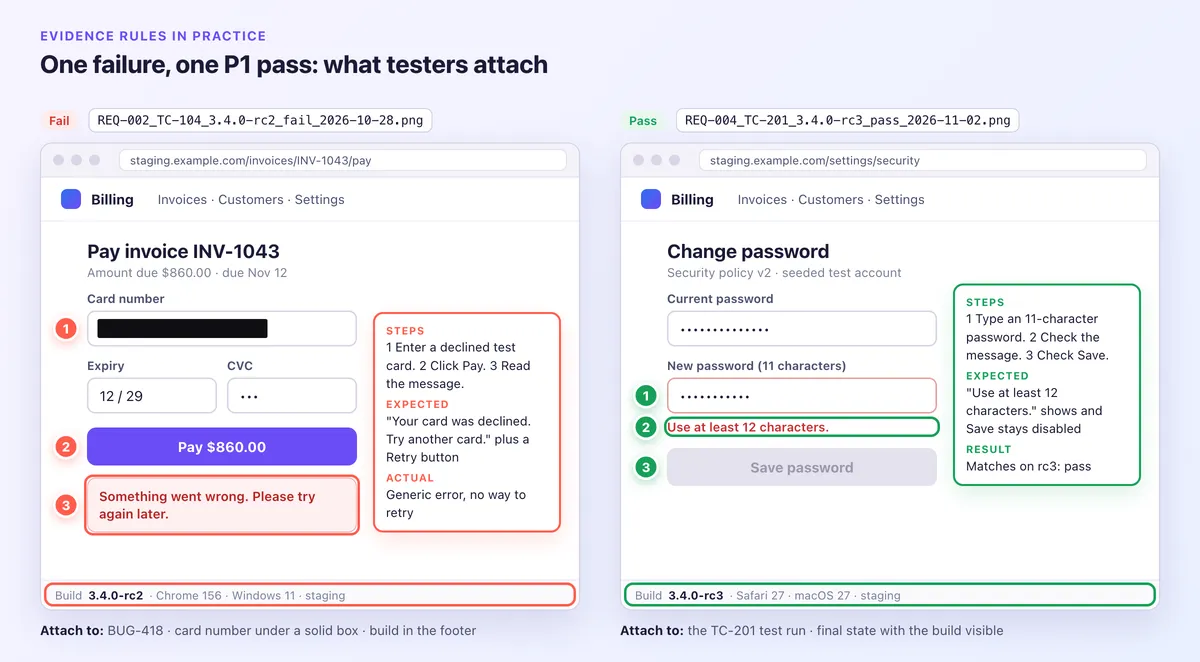
| Failed UI test | Annotated screenshot: numbered steps, an arrow, an "Expected · Actual" callout, build visible. | Every failure | Defect |
| Flow or timing failure | A 5 to 15 second GIF or a trimmed MP4. | Failures a still can't show | Defect |
| Passed P1 or contract item | Final-state screenshot, build visible. | P1 and contract passes only | Test run |
| Layout change | Full-page capture or CI diff. Behind a login, use a scrolling screenshot on Mac or Windows. | Every changed page | Test run |
| API or CLI failure | Response body, log excerpt or a terminal transcript. | Every failure | Defect |
| Performance | Load test report. | Each target | Evidence folder |
| Accessibility | Checker report plus a screenshot per failure. | Every new page | Defect |
- Owner and folder: the QA lead owns one folder per release, in the test tool or a team-only drive.
- File names: REQ-ID_TC-ID_build_result_date.ext, such as
REQ-002_TC-103_3.4.0-rc2_fail_2026-10-27.gif. - Defects: attach the file to the Jira work item, as the Jira screenshot guide shows.
- Retention and review: keep files as long as your contract requires. The QA lead spot-checks P1 pass evidence before go/no-go.
Seed fake data first. If real data slips in, cover card numbers, emails, tokens and customer data with a solid, opaque box and save a flat PNG. Blur and pixelate can be reversed, so never use them for secrets (how to redact text).
Treat recordings as unredactable: record seeded data only, keep sensitive panels out of the frame and mute chat and email alerts.
Share links are for quick heads-ups in chat, never the record. Anyone with the link can forward it, and it stops working once the upload is deleted, which happens automatically after 30 days on the lifetime license. Attach the file itself, turn off auto-upload around real data, and redact before you share.
For single-run capture steps, see the test case evidence guide. To mark up screenshots online, use a free image annotation tool.
Snipping Tool on Windows and the macOS screenshot tools with Markup cover the basics.
For daily evidence, ScreenSnap Pro keeps it in one app on Mac and Windows: numbered counters that match repro steps, arrows and callouts, a Filled Rectangle for anything sensitive, and OCR for exact error text. Scrolling Capture handles long pages behind a login (select an area, click Start Capture, scroll down by hand, click Finish), and video recordings are trimmed in the built-in editor and exported as MP4 or GIF.
Daily status and the test summary report
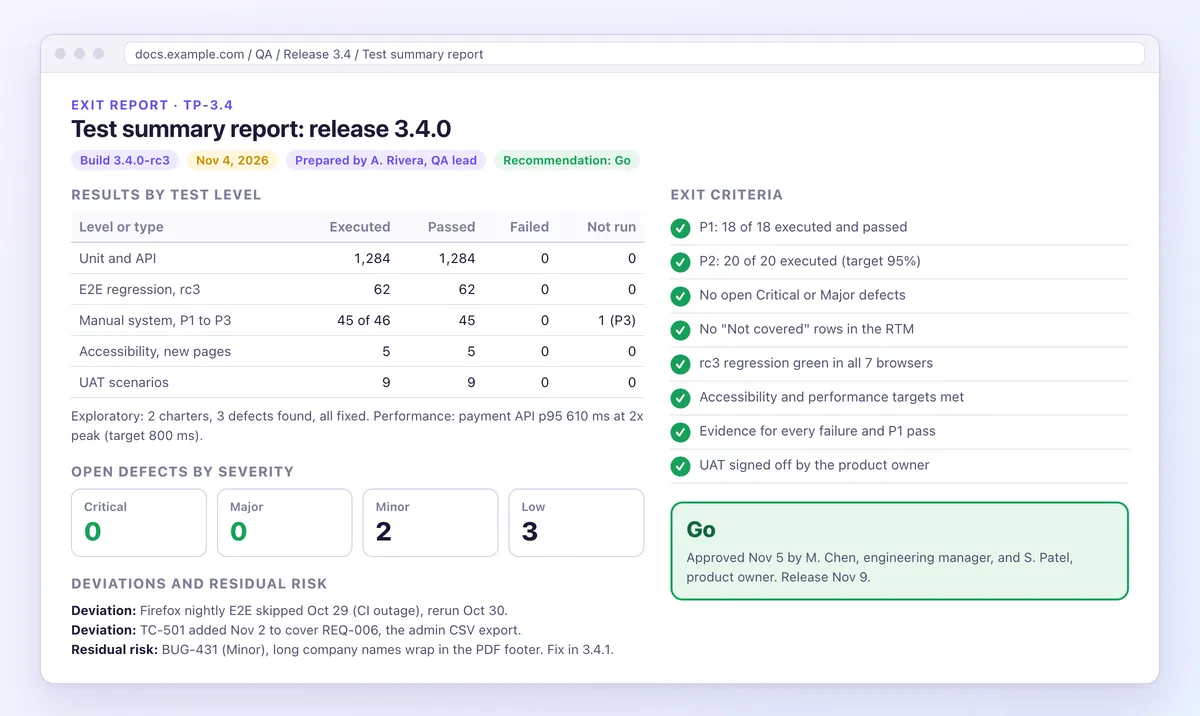
Reporting turns evidence into a go/no-go decision.
- Daily status: executed, passed, failed, blocked and not run, plus new defects by severity, top risks and blockers.
- Metrics: progress, pass rate, open defects by severity, requirement coverage and fix time.
- Test summary report: scope and build, results by level, open defects, deviations, exit criteria met or not, residual risks, a recommendation and approvers. ISO/IEC/IEEE 29119-3 and ISTQB call it a test completion report.
Common test plan mistakes
Most weak plans fail in the same eight ways.
- Sections that do not apply. Delete them.
- Exit criteria nobody can measure. "Testing is complete" is not a bar.
- No out-of-scope list. Unlisted gaps become surprise bugs.
- Environments without versions or data. "Chrome" is not a version.
- No suspension rule. Testers log bugs against a broken build.
- A plan that never changes. It drifts from the release.
- No named approver. A team cannot sign off, but a person can.
- No evidence rules. Customer data in screenshots and chat links as proof both fail audits.
Frequently Asked Questions
Ship the plan before the first test runs
A test plan earns its keep when it is approved before testing and updated when scope moves. After go/no-go, write clear release notes for your users.
If you capture test evidence every day, ScreenSnap Pro is a one-time $39 purchase: 1 license, 2 seats (2 computers, Mac or Windows). See pricing.

Morgan
Indie DeveloperIndie developer, founder of ScreenSnap Pro. A decade of shipping consumer Mac apps and developer tools. Read full bio
@m_0_r_g_a_n_