Bug Bash: How to Run One (Agenda, Roles + Template)
A bug bash is a time-boxed testing event where people from across the company test the same build at the same time, log every issue in one shared place, and triage the results before release. It works because support, design and sales staff use your product in ways your test suite never will.
How to run a bug bash in 7 steps:
- Scope it. Pick one feature or flow, and write down what is out of scope.
- Freeze the build. Everyone tests the same version, with the build number visible.
- Prep accounts and data. Create test logins and fake data before anyone shows up.
- Assign roles. A facilitator, a live triager and a developer on standby.
- Share the filing standard. One filled-in example report shows what "good" looks like.
- Bash and triage live. Test in rounds, and merge duplicates while reporters are still around.
- Dedupe, assign and report back. Every confirmed bug gets an owner, and every tester hears the outcome.
For the format of a single report, see the bug report template. This guide covers the event around those reports.
What is a bug bash?
A bug bash is an event, not a testing technique. Three traits define it:
- Time-boxed. 60 to 120 minutes in a room, or a 24 to 48 hour window if async.
- Cross-functional. The value comes from people who rarely test: support, design, product, sales engineers and tech writers.
- One scoped build. Everyone hits the same version and areas, so findings can be reproduced and compared.
Nobody has documented where the practice started. In a June 2008 guest post on the Google Testing Blog, Microsoft test director Ross Smith already called it "one of the more famous test techniques," complete with prizes and pizza. You will also see it spelled "bugbash."
Bug bash vs exploratory testing vs UAT vs dogfooding
| Method | Who tests | When | How long | Output |
|---|---|---|---|---|
| Bug bash | Whole team, many non-testers | Before a release or beta | 60 to 120 minutes | A triaged list of bugs |
| Exploratory testing | Usually one tester | Any time, often daily | 60 to 90 minute sessions | Session notes and bugs |
| UAT | Business users or the client | Last, before sign-off | Days to weeks | A go or no-go decision |
| Dogfooding | Staff using the product for real work | Ongoing, on internal builds | Weeks or months | A steady trickle of feedback |
Exploratory testing is the method most people use during a bash. The bash puts 20 people on that method at once, on one build.
When to run a bug bash (and when not to)
Good moments:
- Feature-complete, one to two weeks before a major release. There is still time to fix bugs and to write accurate release notes.
- Before a beta or pilot, so outside users do not meet the obvious bugs first.
- After a redesign or migration that touched many screens.
Postpone it when:
- The build crashes on launch. You will get 60 reports of one crash. Run a smoke test first.
- Nobody can fix bugs this cycle. Finding 40 issues that no one touches kills goodwill.
- The scope is "the whole product." Everyone tests login, and the new feature goes untouched.
- It is your only testing. A bash finds what structured testing missed. It does not replace it.
Bug bash variations
- Design bash. Designers and front-end devs hunt visual polish: spacing, empty states, dark mode and breakpoints. Ask for each bug next to the reference design. GitLab runs a similar UX Bash.
- Accessibility bash. People test with a keyboard only, a screen reader and 200% zoom. Hand out the WCAG quick reference and a primer on what WCAG is. A color contrast checker settles "is this too light?" in seconds.
- Docs bash. People follow the user docs step by step on a clean account and flag wrong steps and outdated screenshots. The technical documentation screenshots guide covers fixing what they find.
Before the bash: planning checklist
Work through this a week out:
- [ ] Goal in one sentence: "find checkout blockers before 4.2"
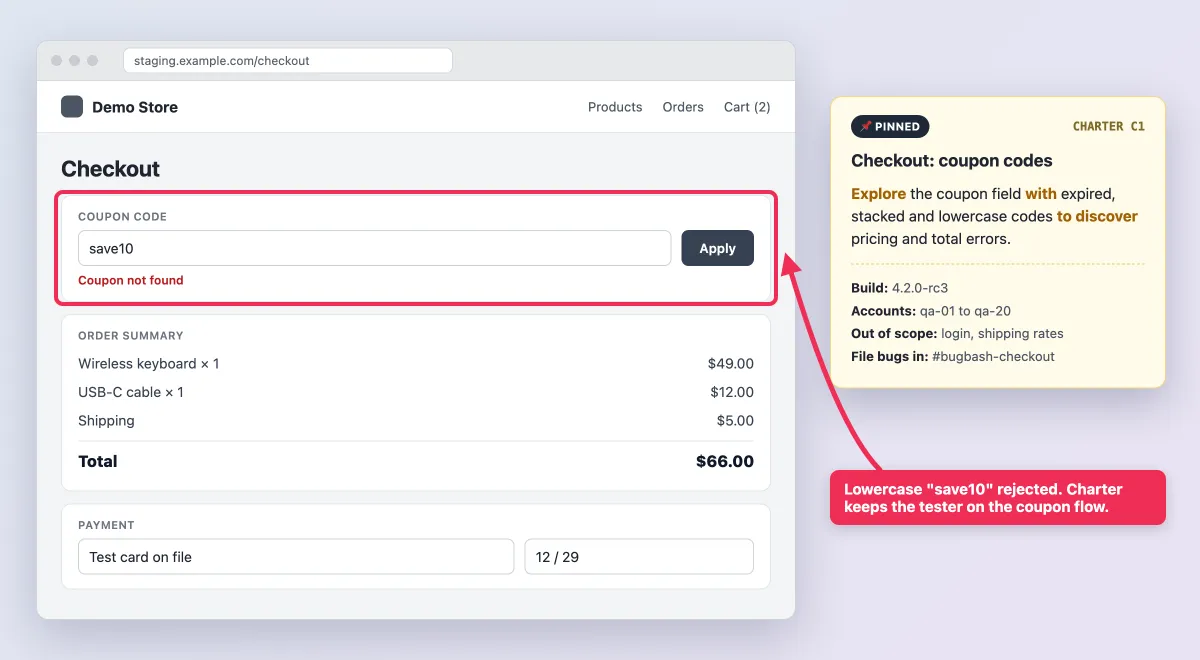
- [ ] In scope and out of scope, pinned in the channel
- [ ] Frozen build with the version number visible in the UI
- [ ] Test accounts for everyone, with roles preset (admin, member, guest)
- [ ] Device and browser matrix, one combo per person
- [ ] Test charters, one per person or pair
- [ ] Roles assigned
- [ ] One logging channel: a board, a sheet or a chat channel
- [ ] A pinned example bug report with an annotated screenshot
- ] Labels and severity scale ready (reuse the levels in your [bug report template)
- [ ] Prizes announced
- [ ] Calendar invite with the agenda, build link and channel link
On GitHub, create the label (say, bug-bash) before the day. Otherwise you get five spellings by noon.
Write test charters
A charter tells a tester where to look and why, without scripting every click. Elisabeth Hendrickson's format from Explore It! fits on a sticky note:
Explore [area] with [resources] to discover [information].
- UI: Explore the coupon field at checkout with expired, stacked and lowercase codes to discover pricing errors.
- API: Explore
POST /v1/invoiceswith missing fields, wrong types and a 10 MB payload to discover how validation errors are reported.
Keep a "free explore" slot for people who like to wander. Charter design goes deep in exploratory testing, but for a bash, one line each is enough.
Assign roles
| Role | Before | During | After |
|---|---|---|---|
| Facilitator | Writes scope, charters, invite | Keeps time, rules on scope | Sends the recap |
| Live triager | Sets up labels and sheet | Merges duplicates, asks for evidence | Sets severity and owners |
| Developer on standby | Confirms the build is stable | Answers "is this expected?" | Takes first fixes |
| Scribe | Prepares the results sheet | Logs spoken findings | Exports the final list |
| Participants | Read scope and filing card | Test and file bugs | Answer follow-ups |
Under 10 people, the facilitator can also triage. Over 25, add a second triager.
Seed test data that is safe to screenshot
Every screenshot in a shared channel is a possible data leak. Seed the environment with fake customers like jane@example.com, fake addresses and your payment provider's test card numbers. Then anyone can capture the whole screen safely.
If you must test with a copy of production data, the redaction rule below becomes mandatory.
The 60-second bug filing standard (give participants this card)
Most people in the room have never filed a bug. Pin this card at the top of the channel:
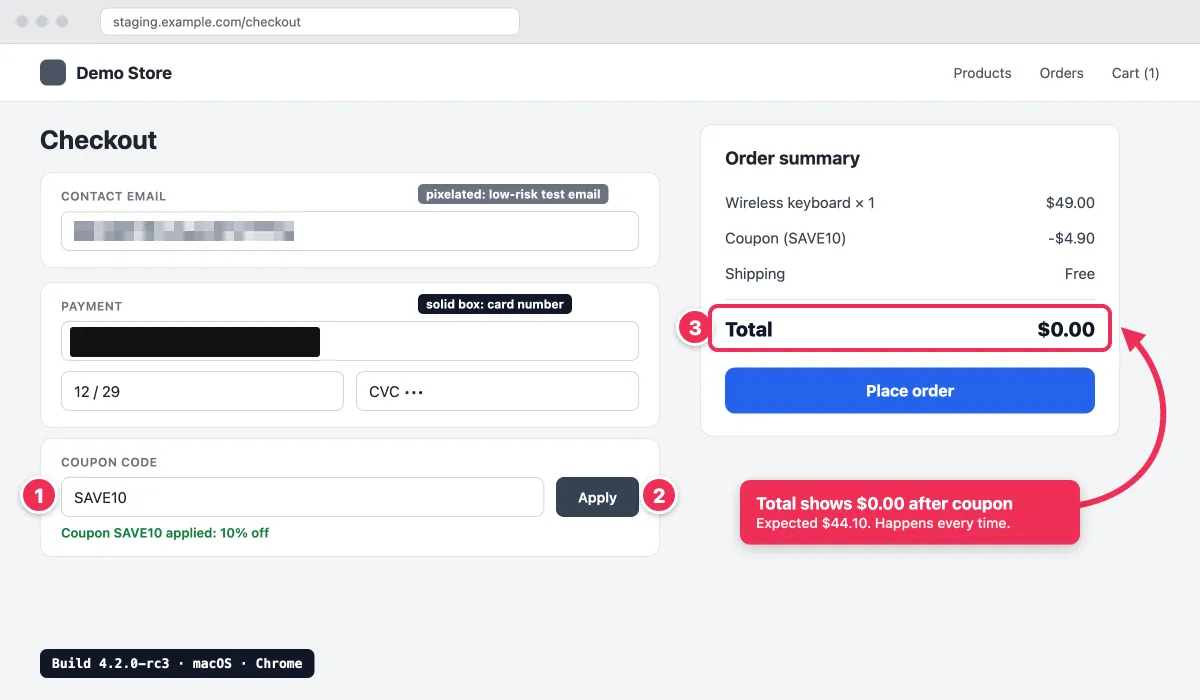
- Capture the region. On a Mac, press
Shift + Command + 4, orShift + Command + 5for the toolbar with screen recording (Apple's guide). On Windows, pressWin + Shift + Sfor Snipping Tool, orWin + Shift + Rfor video on Windows 11. - Number the repro steps. Put counter markers (1, 2, 3) on the screen in click order.
- Point at the problem. One arrow plus a short callout: "Total shows $0.00 after coupon."
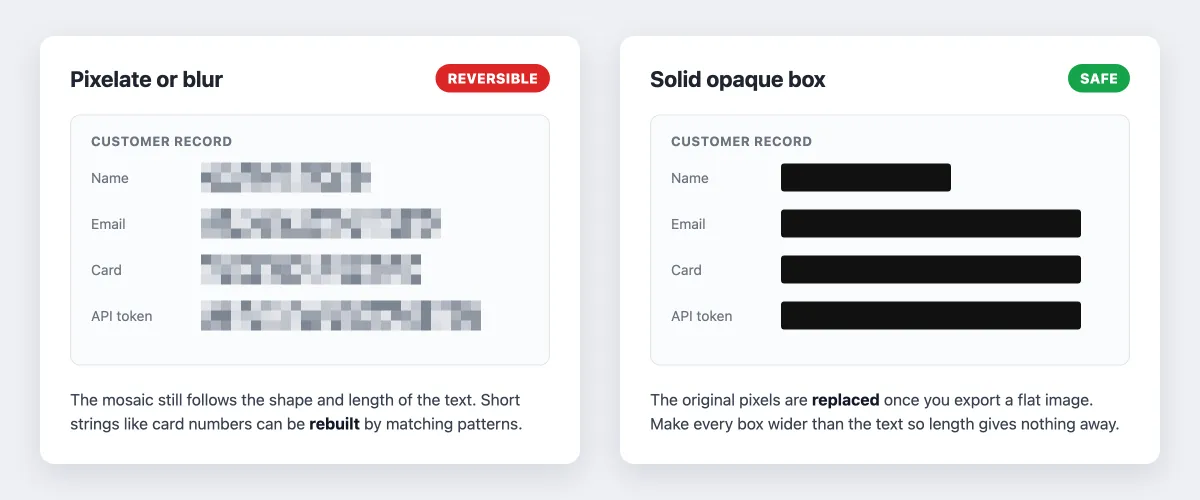
- Hide anything real. Cover secrets, tokens, card numbers and real customer data with a solid opaque box. Blur and pixelation can be reversed, as the guide on how to redact text shows. Blur only low-risk details, like an avatar.
- Record a GIF if it moves. Hover, animation and timing bugs need motion.
- Paste it into the shared list with the build number plus your device, OS and browser.
For more depth, see annotating screenshots on Mac, editing screenshots on Windows, GIF capture on Mac and recording a GIF on Windows. People with no markup tool can use this free image annotation tool. For layout bugs on long pages, a browser's built-in full-page capture grabs everything below the fold (Mac, Windows).
If you run bashes often, one tool for all six steps saves time. ScreenSnap Pro (Mac and Windows) has a counter tool, arrows, text, a highlighter and a solid-fill rectangle for redaction.
It also records GIFs, plus screen recordings with mic audio for async testers who want to talk through a flow. Its OCR copies exact error text into the ticket title, so duplicates are easy to search.
A sample 90-minute bug bash agenda
| Time | Block | Owner | What happens |
|---|---|---|---|
| 0:00 to 0:10 | Kickoff | Facilitator | Goal, scope, build, accounts, example report |
| 0:10 to 0:35 | Round 1 | Participants | Test assigned charters, file as you go |
| 0:35 to 0:45 | Live triage | Triager and dev | Merge duplicates, request missing screenshots |
| 0:45 to 0:50 | Rotate | Facilitator | Swap charters or devices |
| 0:50 to 1:15 | Round 2 | Participants | Fresh eyes on another area |
| 1:15 to 1:25 | Final triage | Triager and dev lead | Severity, owner and duplicate link per row |
| 1:25 to 1:30 | Recap and prizes | Facilitator | Counts, top finds, next steps |
60-minute session: 5 minutes of kickoff, two 20-minute rounds with a 5-minute rotation, then 10 minutes of triage. Finish detailed triage the next morning.

Tired of plain screenshots? Try ScreenSnap Pro.
Beautiful backgrounds, pro annotations, GIF recording, and instant cloud sharing, all in one app. Pay $34 once, own it forever.
See pricing and featuresRunning a remote or async bug bash
Replace what the room gave you:
- The room becomes an open call. Keep a video call running so people can drop in with questions.
- One channel is the logging place. Pin the filing card and example at the top, with one thread per bug.
- "Come look at my screen" becomes a recording. A 5-second GIF replaces walking over to a desk. Quick share links work in the live channel (see the cloud screenshot sharing guide), but attach the file to the ticket.
- Async gets a 24 to 48 hour window, so charters and the filing card must stand on their own.
- Hand off across time zones. Each triager passes open questions to the next region.
Microsoft runs its yearly neurodiversity bug bash this way. Per Microsoft Inside Track, testers worked through scenarios on their own time, recorded their screens while talking through pain points, then filled in a survey.
Bug bash template (copyable)
Plan doc template
# Bug bash: [feature or release], [date]

## Goal
Find [blockers / UX issues / accessibility gaps] in [area] before [release].

## Build
- Version: [e.g. 4.2.0-rc3] (shown in Settings > About)
- Link: [staging URL or install link]
- Known issues (do not file): [list or link]

## Scope
In scope: [flow 1], [flow 2]
Out of scope: [area that is not ready]

## Accounts and test data
- Test accounts and test cards: [link]
- Never use real customer data in screenshots.

## Charters
| ID | Charter | Assigned to | Device / browser |
|----|---------|-------------|------------------|
| C1 | Explore [area] with [resources] to discover [information] | [names] | [combo] |
| C2 | Free explore | [names] | [combo] |

## Roles
Facilitator: [name] | Triager: [name] | Dev on standby: [name] | Scribe: [name]

## How to file a bug
- Log every bug in: [channel or board link], label: bug-bash
- Include: steps, expected vs actual, annotated screenshot or GIF, build, OS / browser / device
- Cover secrets and real data with a solid box. Do not blur them.

## Prizes
Most critical, best repro, best annotated screenshot, weirdest bug, first bug
Results sheet columns
Paste this into a sheet. The second row is an example:
ID,Title,Charter/Area,Steps,Expected vs actual,Evidence,Build,OS/Browser/Device,Reporter,Severity,Duplicate of,Owner,Status
BB-12,Total shows $0.00 after coupon,C1 Checkout,"1. Add keyboard 2. Apply SAVE10 3. View total",Expected $44.10 but got $0.00,bb-12-coupon.png,4.2.0-rc3,macOS / Chrome,jane@example.com,Critical,,Sam,Confirmed
This is not your ongoing tracker. Compared with the tracking spreadsheet in the bug report template, it adds three bash-only columns: charter/area, build and duplicate of. The reporter column doubles as the prize tally.
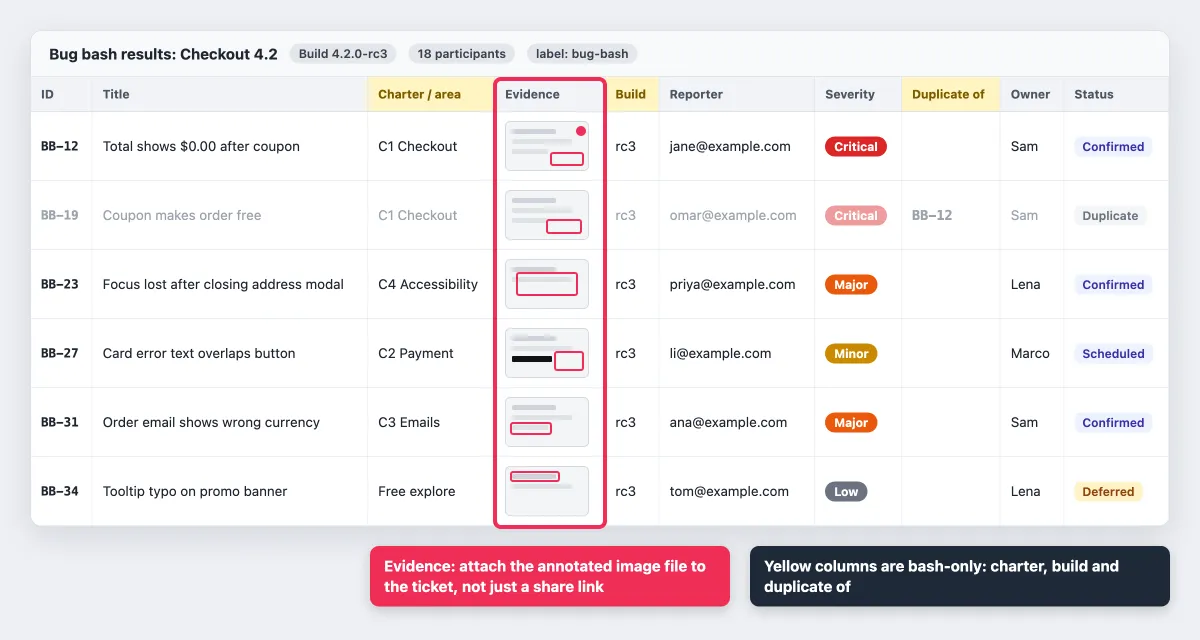
Share links are fine for evidence during the bash. For the permanent record, attach the image file to the tracker ticket, since share links are not long-term hosting. The guide to screenshots in Jira shows how.
After the bash: dedupe, triage and report back
This is standard bug triage (some teams say defect triage), done in order:
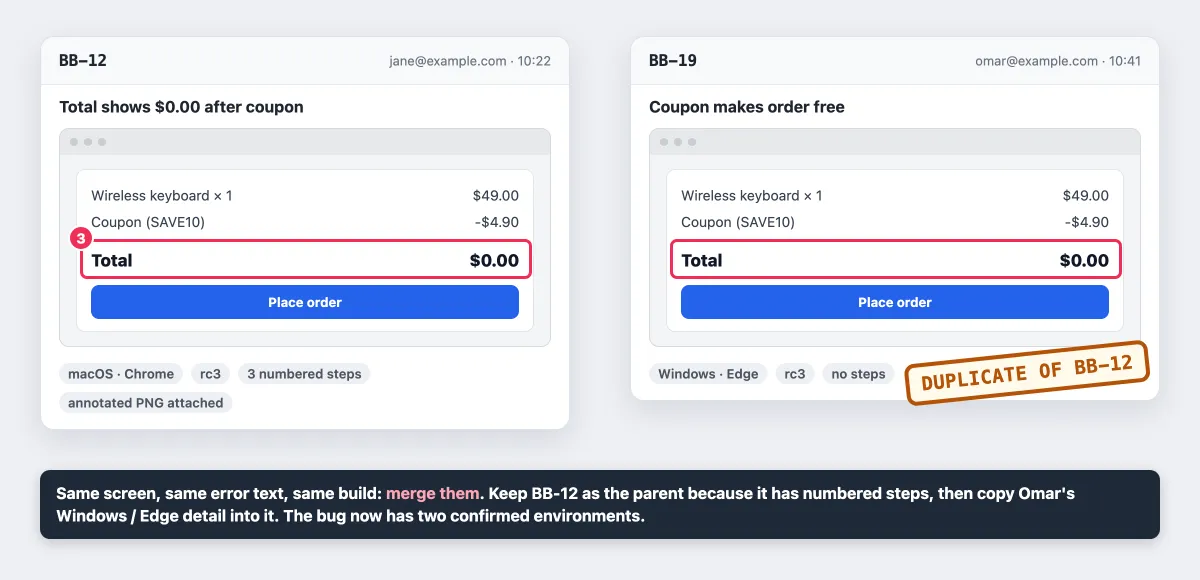
- Dedupe first. Group rows that show the same screen and error text. Comparing screenshots side by side beats reading steps. Keep the best-documented report as the parent.
- Set severity, owner and milestone. GitLab's issue triage handbook is a good model: each bug gets type, severity and group labels, and is not fully triaged until it has a milestone and priority. Keep the
bug-bashlabel on every issue. - Turn repeatable bugs into tests while the steps are fresh. Layout bugs fit well into visual regression testing.
- Report back within 48 hours. People who gave up 90 minutes deserve to know what happened.
A recap can be this short:
Bug bash recap: Checkout 4.2
Found 47 | Confirmed 31 | Duplicates 12 | Not a bug 4
Fixed 9 | Scheduled for 4.2: 14 | Deferred 8
Top finds: BB-12 coupon total (Critical), BB-23 focus lost in modal
Thanks to all 18 of you. Prize winners below.
Track these across events:
- Confirmed bugs per participant hour
- Duplicate rate, which should fall as scoping improves
- Share of Critical and Major findings
- Fix rate before release
- Escaped bugs that users later reported in a bashed area
Prizes and engagement ideas
Reward quality, not volume:
- Most critical bug
- Best repro (steps a developer could follow cold)
- Best annotated screenshot
- Weirdest bug
- First bug filed
A live leaderboard keeps energy up. Skip prizes for raw bug count: they reward splitting one issue into five tickets. Cheap prizes work fine, like a trophy that moves desk to desk.
Common bug bash mistakes and fixes
| Mistake | Fix |
|---|---|
| Everyone tests login | Assign charters and devices. Put login out of scope. |
| 60 duplicates of one crash | Smoke test before kickoff and pin known issues. |
| Build changes mid-session | Freeze it and show the version number in the UI. |
| Bugs reported out loud | Rule: not in the channel, not a bug. |
| "It broke" with no evidence | Pin the filing card. The triager asks for a screenshot. |
| Blurred but readable data in a shared channel | Seed fake data, require solid boxes, delete leaked images. |
| No owners after the event | Final triage assigns an owner to every confirmed row. |
| No report-back | Send the recap within 48 hours. |
Run your first bug bash this sprint
Pick one flow, freeze a build, copy the plan doc and book 90 minutes. The filing card does most of the quality work: it turns 20 non-testers into people who file clear, safe, reproducible reports.
For that card, ScreenSnap Pro handles region capture, numbered counters, arrows, solid-box redaction, GIFs and screen recording on Mac and Windows. It is a one-time $34 purchase: 1 license, 2 seats (2 computers, Mac or Windows). See pricing.
Frequently Asked Questions

Morgan
Indie DeveloperIndie developer, founder of ScreenSnap Pro. A decade of shipping consumer Mac apps and developer tools. Read full bio
@m_0_r_g_a_n_