Functional vs Non-Functional Requirements (With Examples)
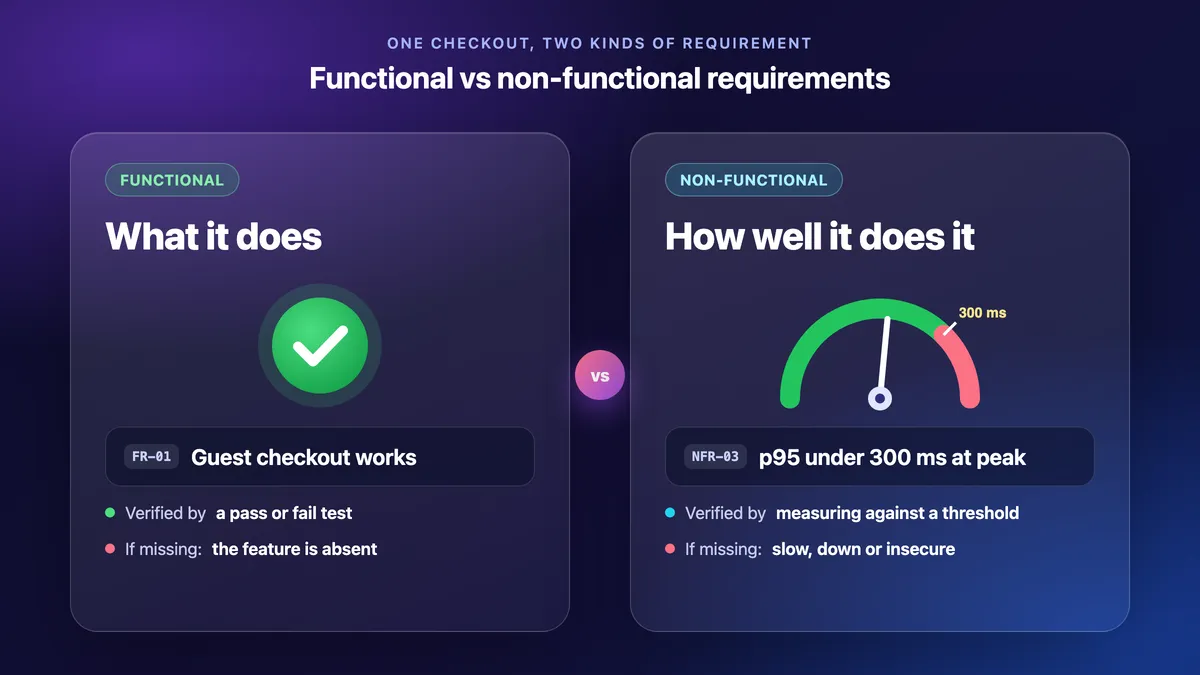
Functional vs non-functional requirements comes down to "what" versus "how well." Functional requirements describe what a system does, such as "shoppers can check out as a guest." Non-functional requirements (NFRs) describe how well it does it. They are measurable qualities like speed, availability, security and accessibility. Example: "checkout responds in under 300 ms for 95% of requests at peak load."
This guide is for anyone who writes NFRs for a design doc or an RFP and must prove them at release. It covers NFR types, thresholds, testable wording and evidence.
Functional vs non-functional requirements: the difference
The table compares both on one web store checkout, the running example.
| Aspect | Functional | Non-functional |
|---|---|---|
| Question | What does the system do? | How well does it do it? |
| Example | Shoppers can check out as a guest. | Checkout p95 stays under 300 ms at peak load. |
| Scope | One feature or behavior. | A quality of one feature or the whole system. |
| Design impact | Adds a feature, screen or endpoint. | Drives the architecture: caching, replicas, queues, regions. |
| Who states it | Users and the product owner, out loud. | Architects, ops, security and legal. Often unstated. |
| How to check | A pass or fail test. | A measurement against a threshold: load test, scan, audit. |
| Evidence | A test run plus an expected-result screenshot. | A report plus a dashboard panel or marked-up screenshot. |
| Cost of missing it | The feature is absent. | It works, but slow, down, insecure or unusable. |
Miss a functional requirement and a test case fails. Miss an NFR and it often comes back after launch as an outage, a security finding or a performance bug.
Rule of thumb: a yes or no from one click-through means functional. A number, a load or a measuring tool means non-functional.
Functional or non-functional? 4 borderline cases
- "Email the receipt within 5 minutes." Split it. Sending is functional; "within 5 minutes for 99% of orders" is the NFR.
- "Back up orders every night." Functional: you can check that the job ran. "Lose at most 24 hours of orders (RPO 24 h)" is the NFR.
- "Works in the latest two versions of Chrome, Safari, Firefox and Edge." Non-functional: it is browser support.
- "Admins can refund an order." Functional. "Refunds post within 1 minute" is the NFR.
When one line mixes both, split it into two IDs.
What are functional requirements? Examples from a checkout
Functional requirements define what the system does with each input. That covers the behavior, the output, and the business rules and data behind it. A user or another system can trigger each one and see the result.
Five functional requirements examples for the checkout:
- FR-01: Shoppers can check out as a guest with only an email address.
- FR-02: A valid discount code applies to eligible items and shows the saving before payment.
- FR-03: Shoppers can pay by card or PayPal.
- FR-04: After payment, the shopper gets a receipt email with the order number.
- FR-05: Admins can issue a full or partial refund.
Each one becomes test cases with expected results, and running them is functional testing. Give each one a positive and a negative case, such as an expired discount code rejected with a message. Run the stable ones in CI.
Non-functional requirements examples by category
Non-functional requirements are the qualities and limits a system must meet, the "-ilities." They rarely add a screen, but they shape how the system is built.
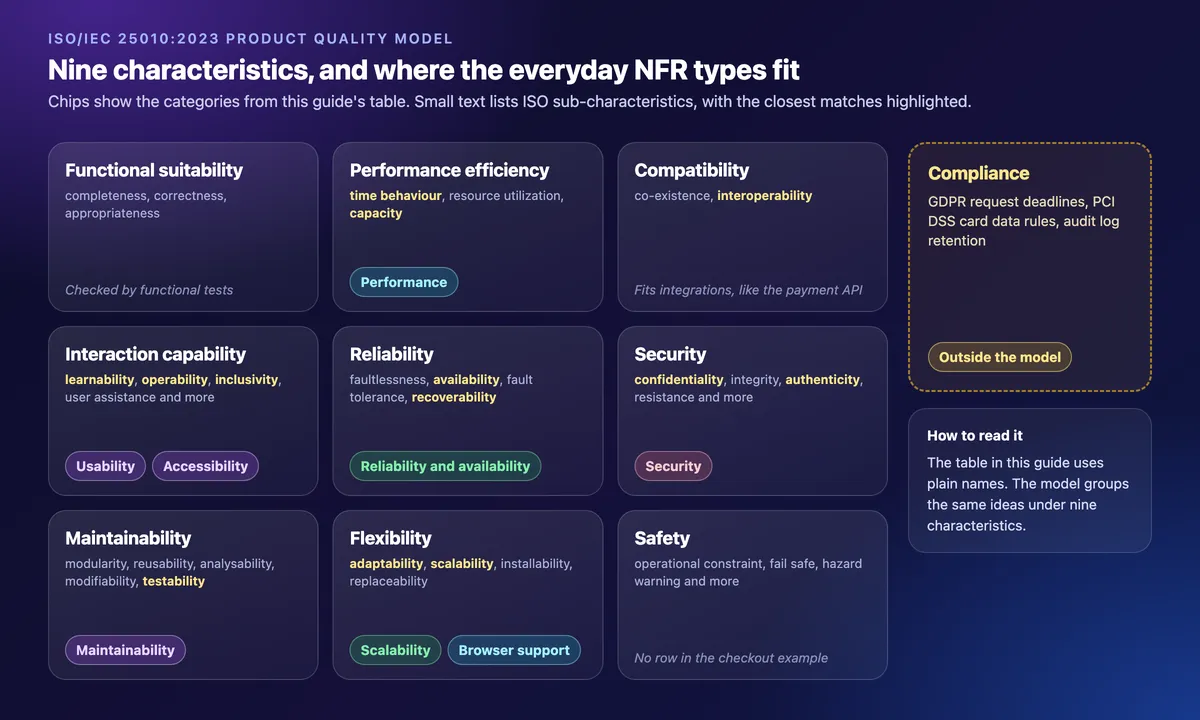
The reference model is ISO/IEC 25010:2023. It sorts product quality into nine characteristics: functional suitability, performance efficiency, compatibility, interaction capability, reliability, security, maintainability, flexibility and safety. The table uses everyday types of non-functional requirements instead. Availability sits under reliability, scalability under flexibility and accessibility under interaction capability, while compliance is outside the model.
| Type | Example NFR | Verify with | Proof to attach |
|---|---|---|---|
| Performance | Checkout API p95 under 300 ms and p99 under 800 ms at 200 requests/s for 30 min. Errors under 0.1%. | Load test (k6, JMeter, Gatling) in a production-like setup, plus field data. | Load-test summary and a dashboard panel with threshold, time range and environment. |
| Scalability | 3x last year's peak (1,500 concurrent checkouts) at p95 under 500 ms. New instances serve traffic within 5 min. | Step or stress test, plus an autoscaling drill. | Throughput-by-instance chart marked at the target. |
| Reliability and availability | 99.9% a month (at most 43.2 min down per 30 days) from 1-minute synthetic checks in 3 regions. RTO 1 hour. | Uptime monitoring plus a failover drill. | Monthly uptime report and the drill timeline. |
| Security | TLS 1.2 or higher everywhere. Card data tokenized, never stored. MFA for admins. Zero critical or high findings before release. | Dependency and DAST scans, an OWASP ASVS checklist, a pen test. | Scan summary with severity counts. |
| Usability | 8 of 10 first-time shoppers finish guest checkout unaided in under 2 min. | Moderated test with 5 to 10 people. | Task table plus marked-up screenshots of where people paused. |
| Accessibility | Checkout meets WCAG 2.2 AA. House rule: text contrast 4.5:1 or more, targets 24 by 24 CSS px or larger, keyboard-only use, visible focus. | axe or Lighthouse scan, the contrast checker for ratios, a manual keyboard and screen-reader pass. | Marked-up focus-order and contrast screenshots, plus a keyboard-only GIF. |
| Maintainability | At least 80% unit-test coverage on changed code. A new engineer runs the service locally in under 30 min from the README. | CI quality gates and a timed onboarding dry run. | The CI report and the dry-run time. |
| Compliance | Data access requests answered within one month (GDPR Art. 12). Card verification codes never stored after authorization (PCI DSS). Audit logs kept 12 months. | Compliance checklist and config review. | Redacted config screenshots and the audit sign-off. |
Page targets often come from Core Web Vitals: LCP at most 2.5 s and INP at most 200 ms, at the 75th percentile.
The accessibility row maps to WCAG 2.2 success criteria 1.4.3 (contrast), 2.1.1 and 2.4.7 (keyboard, visible focus) and 2.5.8 (target size). For mobile checkout, add 1.4.10 (reflow at 320 CSS px). The house rule is stricter than AA. AA allows 3:1 for large text, and smaller targets if a 24 px circle centered on each one touches no other target.
The numbers are examples: set yours from today's baseline and the business impact. Recovery steps behind an uptime target belong in a runbook.

Tired of plain screenshots? Try ScreenSnap Pro.
Beautiful backgrounds, pro annotations, GIF recording, and instant cloud sharing, all in one app. Pay $39 once, own it forever.
See pricing and featuresHow to write testable non-functional requirements
Write each NFR with one formula. It doubles as a non-functional requirements template.
[Quality] of [function or flow] must be [threshold + unit] at [percentile]
under [load or conditions] over [time window], verified by [method].
Filled in: "Response time of checkout must be under 300 ms at p95 under a load of 200 requests/s over 30 min, verified by a k6 load test."
- Numbers, not adjectives. Ban "fast," "secure," "user-friendly" and "scalable."
- Percentiles, not averages. Averages hide the slow requests users feel, as the Google SRE book notes.
- State the conditions: load, device, network and data size.
- Name the method and an owner who signs it off.
- Give each NFR an ID tied to its function, such as NFR-03: checkout.
| Vague | Testable |
|---|---|
| "Fast site" | Checkout p95 under 300 ms at 200 requests/s. |
| "Secure app" | MFA for admins. Zero high findings. |
| "Scales for big sales" | 1,500 concurrent checkouts at p95 under 500 ms. |
| "Highly available" | 99.9% a month from 3-region checks. |
For failure cases, use the EARS unwanted-behavior pattern.
If <trigger>, then the <system> shall <response>.Example: "If the payment provider times out, then the checkout service shall show a retry message within 2 seconds." Showing the message is functional. "Within 2 seconds" is the NFR, so give it its own ID.
Load tools can enforce the number. A k6 threshold such as p(95)<300 fails the run on a miss, so CI checks the NFR on each build.
Common NFR mistakes
- Written after the design is fixed, though NFRs drive it: caching, replicas, regions.
- Several qualities in one line, such as "fast and secure," instead of one ID per quality per flow.
- Numbers copied from another product, not measured from today's baseline.
- Tests run in a setup unlike production, with less data, a faster network or another region.
- No evidence kept, so nobody can show the passing run at the release review.
How to test and prove a non-functional requirement is met
Checking an NFR is non-functional testing. You measure a quality against its threshold. Then you keep the proof: a test or scan report, a dashboard panel, a marked-up screenshot or a short GIF.
Dashboard panels: keep the context in frame
Keep the time range, environment and threshold line in frame. A cropped chart looks cherry-picked. Add an arrow and a callout: "p95 212 ms · target 300 ms."
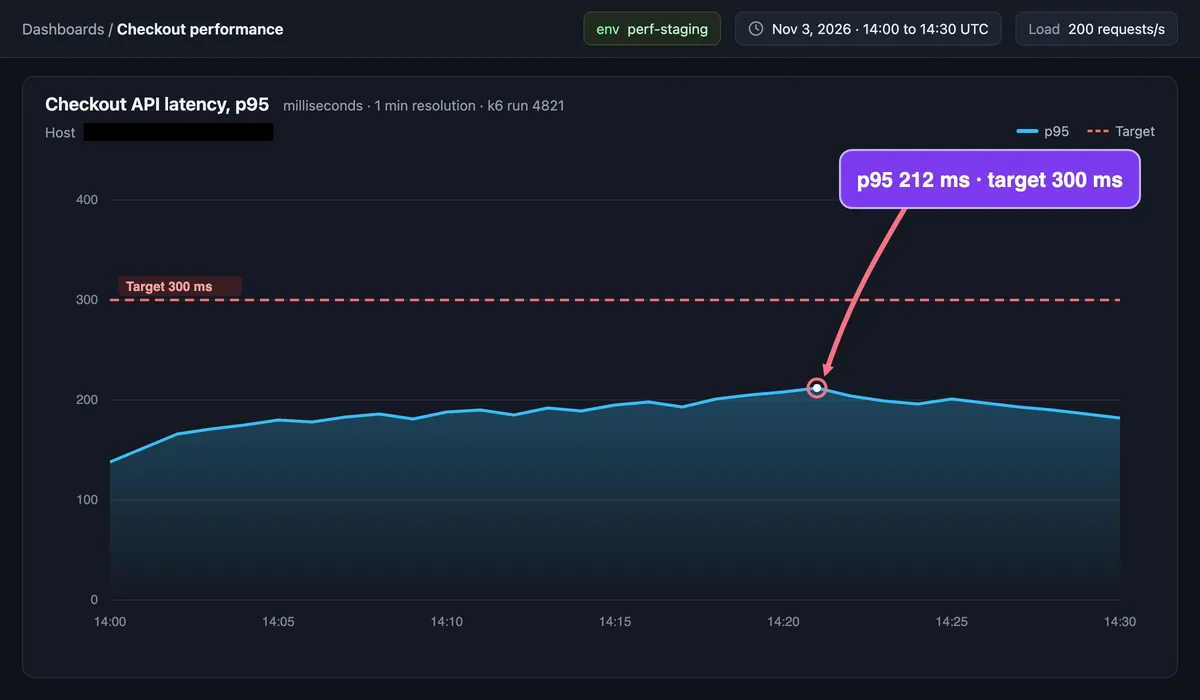
Copy exact numbers with OCR, such as the free extract text from image tool, instead of retyping them. Cover hostnames, tokens and customer IDs with solid boxes. Blur and pixelate can be reversed.
For a dashboard longer than the screen, take a scrolling screenshot of your logged-in browser window (how on Mac, how on Windows). The fixed header with the time picker stays outside, so add the time range and environment as a callout at the top.
Accessibility and usability: measure, then mark
Measure first. DevTools shows an element's size in CSS px, axe flags small targets, and the contrast checker gives the ratio. Then mark it up: numbered markers for focus order, a magnifier with a "20 by 20 CSS px · needs 24" callout on the small target, and a "3.1:1 · needs 4.5:1" contrast callout.
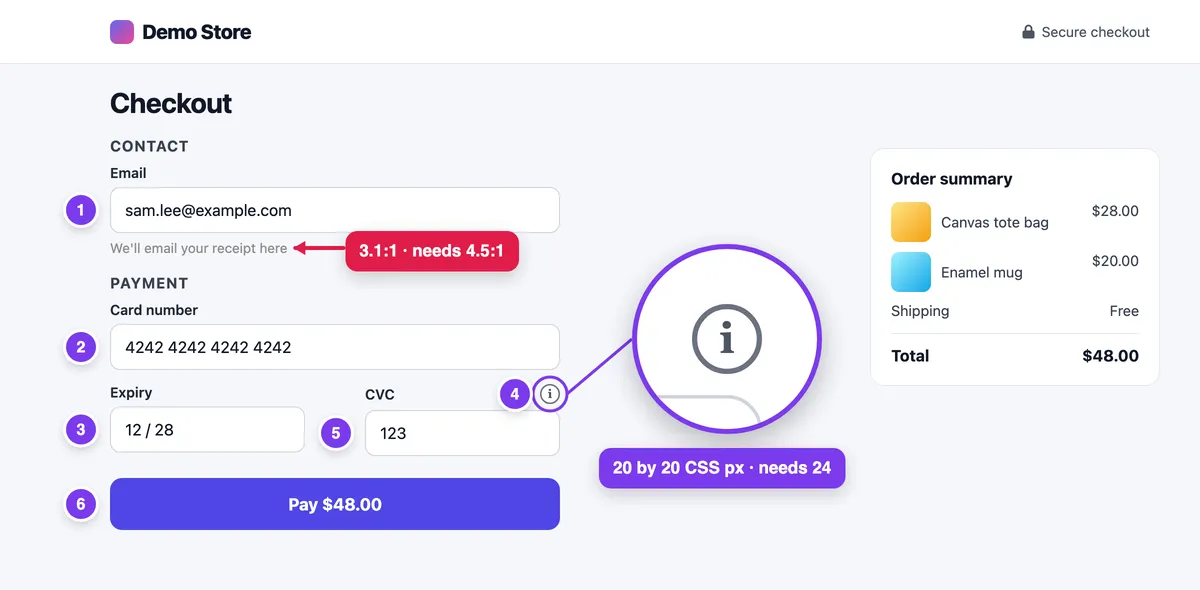
Record a 5 to 10 second keyboard-only GIF (on Mac, on Windows). Write the keys in the ticket: "Tab 6 times, then Enter." A GIF shows focus moving, not the keys you pressed.
Trim usability clips to the hesitation, with the webcam off and demo data.
Capture and file the evidence
When evidence is part of each release, ScreenSnap Pro covers the capture side on Mac and Windows. It has callouts for the measured value, counter markers for focus order, a magnifier for small targets and a filled rectangle for redaction. It also records GIFs, plus screen recordings you can trim in its video editor. Its Scrolling Capture handles long logged-in dashboards while you scroll down by hand. Its Website Capture reaches public URLs only, such as a status page.
For a one-off capture, ⌘ + Shift + 4 on Mac or Win + Shift + S on Windows is enough (Apple Support, Microsoft Support). The free Image Annotation tool on this site adds arrows, text and a filled box.
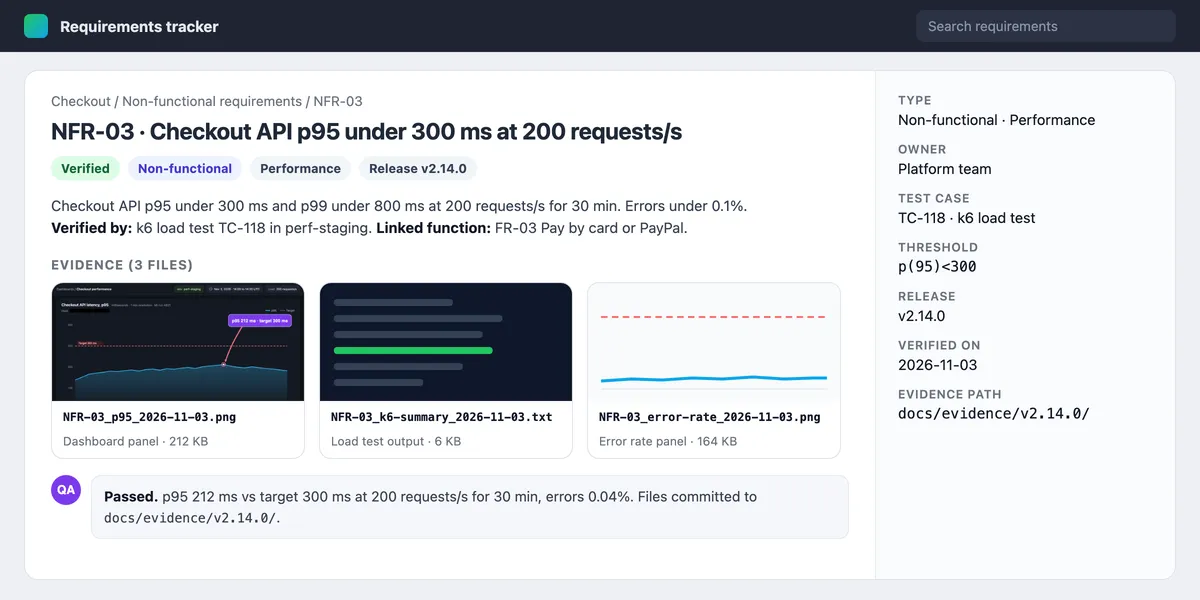
Attach the file to the requirement or test case (Jira, Azure DevOps, TestRail), or commit it under docs/evidence/ with the release tag. Name it by ID, such as NFR-03_p95_2026-11-03.png. A share link is for a review thread, never the evidence of record. Keep requirement, test and evidence IDs together in a traceability matrix.
Where functional and non-functional requirements live
- PRD: lists both for each feature.
- Acceptance criteria: story-level checks. An NFR becomes one when it applies to one story: "the payment step responds in under 300 ms at p95."
- SRS: the full formal spec for contract or regulated work.
- Design doc: architects restate the NFRs and record the trade-offs. MFA adds friction to admin sign-in. Stronger consistency costs latency.
- Test plan: QA plans the NFR test runs.
- Ops sign-off: ops signs off uptime and recovery time in operational acceptance testing.
The same order works in system design interviews and reviews. First, state the functional requirements: 3 to 5 core features. Then state the NFRs: scale, latency, availability and consistency. Only then draw boxes, because the NFRs pick the design.
Frequently Asked Questions
Write the number, then keep the proof
Functional requirements say what to build. NFRs say how well, in numbers you can test. Write the threshold first and keep the proof.
If you capture and annotate NFR evidence each release, ScreenSnap Pro is a one-time $39 purchase: 1 license, 2 seats (2 computers, Mac or Windows). See pricing.

Morgan
Indie DeveloperIndie developer, founder of ScreenSnap Pro. A decade of shipping consumer Mac apps and developer tools. Read full bio
@m_0_r_g_a_n_