README Examples 2026: 10 READMEs Worth Copying + Template
A good README tells a newcomer what the project does in one sentence, shows it working in a screenshot or short GIF, and gets them running in three commands. The README examples below, from bat, lazygit, FastAPI and more, add per-OS install steps, a minimal usage example, and links to contributing, license and full docs.
These ten add to the Starship teardown in these technical documentation examples. Examples 1 to 8 are live GitHub READMEs; 9 and 10 use fictional data. GitHub profile READMEs are a different job.
| # | Project | Type | Standout element | Copy this |
|---|---|---|---|---|
| 1 | bat | CLI | Screenshot per feature | Proof for every claim |
| 2 | lazygit | Terminal UI | Clip per feature | Keys beside each clip |
| 3 | gum | CLI | Scripted GIFs | Demos you can re-record |
| 4 | FastAPI | Web framework | Create, run, check | Show the output |
| 5 | Ruff | Dev tool | Light and dark chart | Theme-aware visuals |
| 6 | PowerToys | Desktop app | Collapsible installs | A short install section |
| 7 | Supabase | Platform | Architecture diagram | How it works, drawn |
| 8 | React | UI library | Signpost README | Link the docs site |
| 9 | invoice-sync (worked example) | Internal service | Owner and on-call | Visible ownership |
| 10 | Tree survey (worked example) | Dataset | Variables with units | Plain text |
What a good README file includes (section checklist)
GitHub Docs says a README should cover what the project does, why it's useful, how to start, where to get help and who maintains it.
README.md and README.rst render on GitHub and GitLab; README.txt stays plain, which suits datasets. GitHub looks in .github, the root, then docs, truncates past 500 KiB, and builds a table of contents from your headings, so a manual one is optional.
README file structure: section checklist by project type
| Section | Library | CLI | App | Internal service | Dataset |
|---|---|---|---|---|---|
| Name + one-line description | Required | Required | Required | Required | Required |
| Hero screenshot or GIF | Optional | Recommended | Required | Optional | n/a |
| Badges | Recommended | Recommended | Optional | Optional | n/a |
| Features | Recommended | Recommended | Required | Optional | n/a |
| Requirements | Required | Recommended | Required | Required | Optional |
| Install or quick start | Required | Required | Required | Required | n/a |
| Usage example + output | Required | Required | Recommended | Recommended | n/a |
| Configuration | Recommended | Recommended | Optional | Required | n/a |
| Project structure | Optional | Optional | Optional | Recommended | Required |
| How it works or methods | Optional | Optional | Optional | Required | Required |
| Tests | Recommended | Recommended | Optional | Required | n/a |
| Files, variables and units | n/a | n/a | n/a | n/a | Required |
| Contributing | Recommended | Recommended | Recommended | Optional | n/a |
| Maintainers or owner team | Optional | Optional | Optional | Required | Required |
| License | Required | Required | Required | Optional | Required |
| Support | Recommended | Recommended | Required | Required | Recommended |
| Status or roadmap | Optional | Optional | Optional | Optional | Optional |
Other docs get their own files: CHANGELOG.md, CONTRIBUTING.md, CODE_OF_CONDUCT.md, SECURITY.md, ARCHITECTURE.md, LICENSE, and the .github issue templates and pull request template.
10 README examples worth copying
1. bat: a screenshot for every feature
bat, a cat clone with syntax highlighting, proves every claim with a picture.
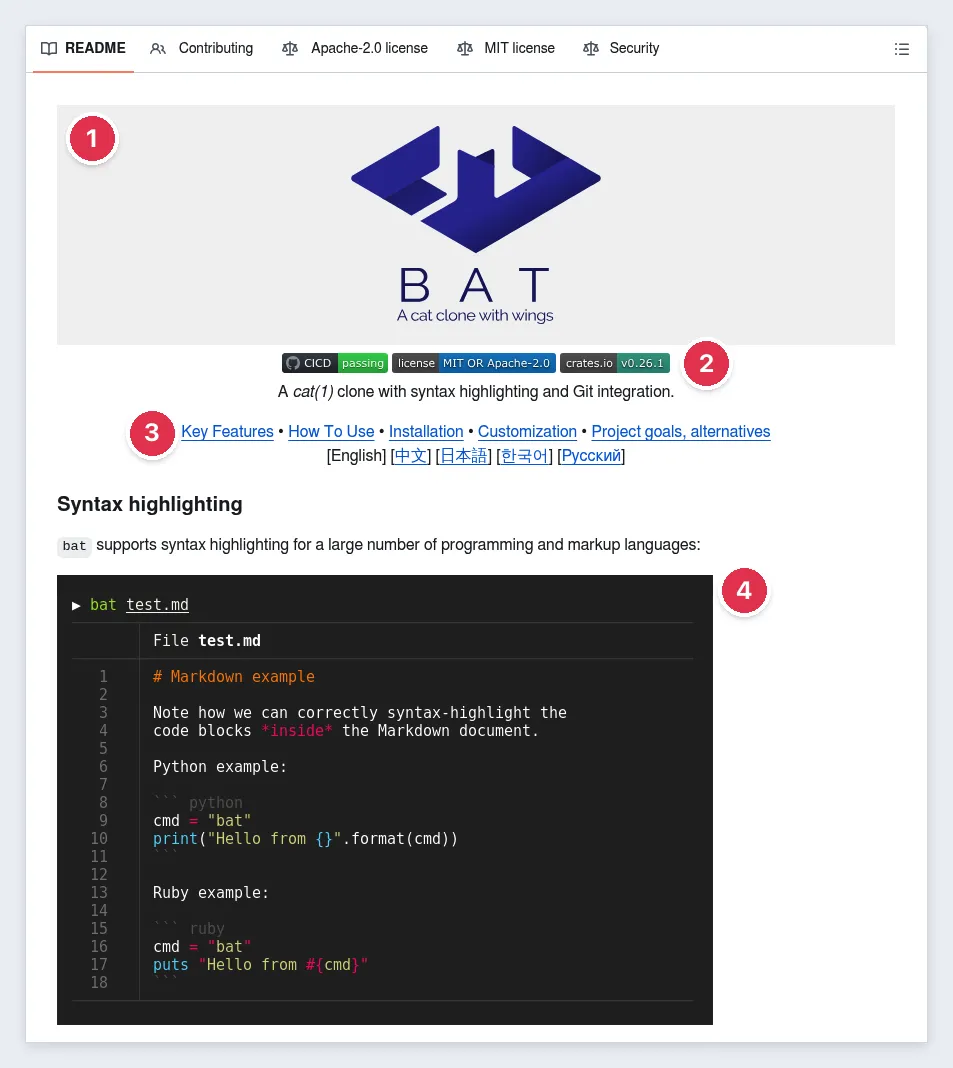
- A committed logo with alt text.
- Three badges.
- One line, then a menu.
- A screenshot per feature.
Skip this: the screenshots are hotlinked from Imgur. GitHub's image proxy still shows them on github.com, but Imgur has blocked UK access since 30 September 2025, so local previews and docs mirrors show UK readers a broken image. Commit images to the repo.
2. lazygit: one short clip per feature
lazygit, a terminal UI for git, pitches itself with a funny rant about git pain, then shows each feature in motion.
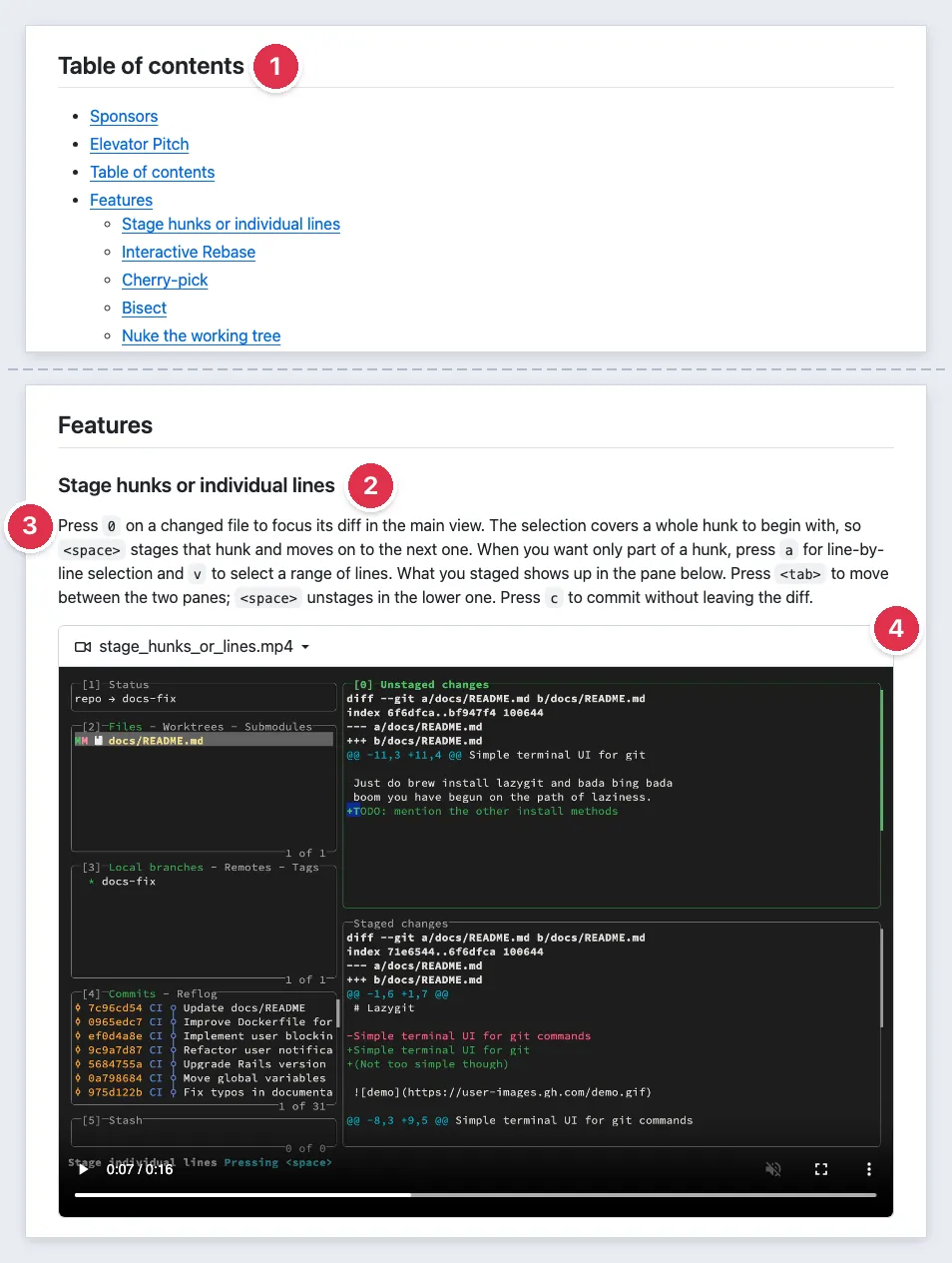
- A table of contents.
- A heading per feature.
- The keys to press, in words.
- A short video, uploaded to GitHub.
Copy this: a short clip per feature beats one long GIF.
3. gum: GIFs recorded from scripts
gum adds prompts and spinners to shell scripts. Its 12 VHS GIFs mostly come from .tape scripts in the repo.
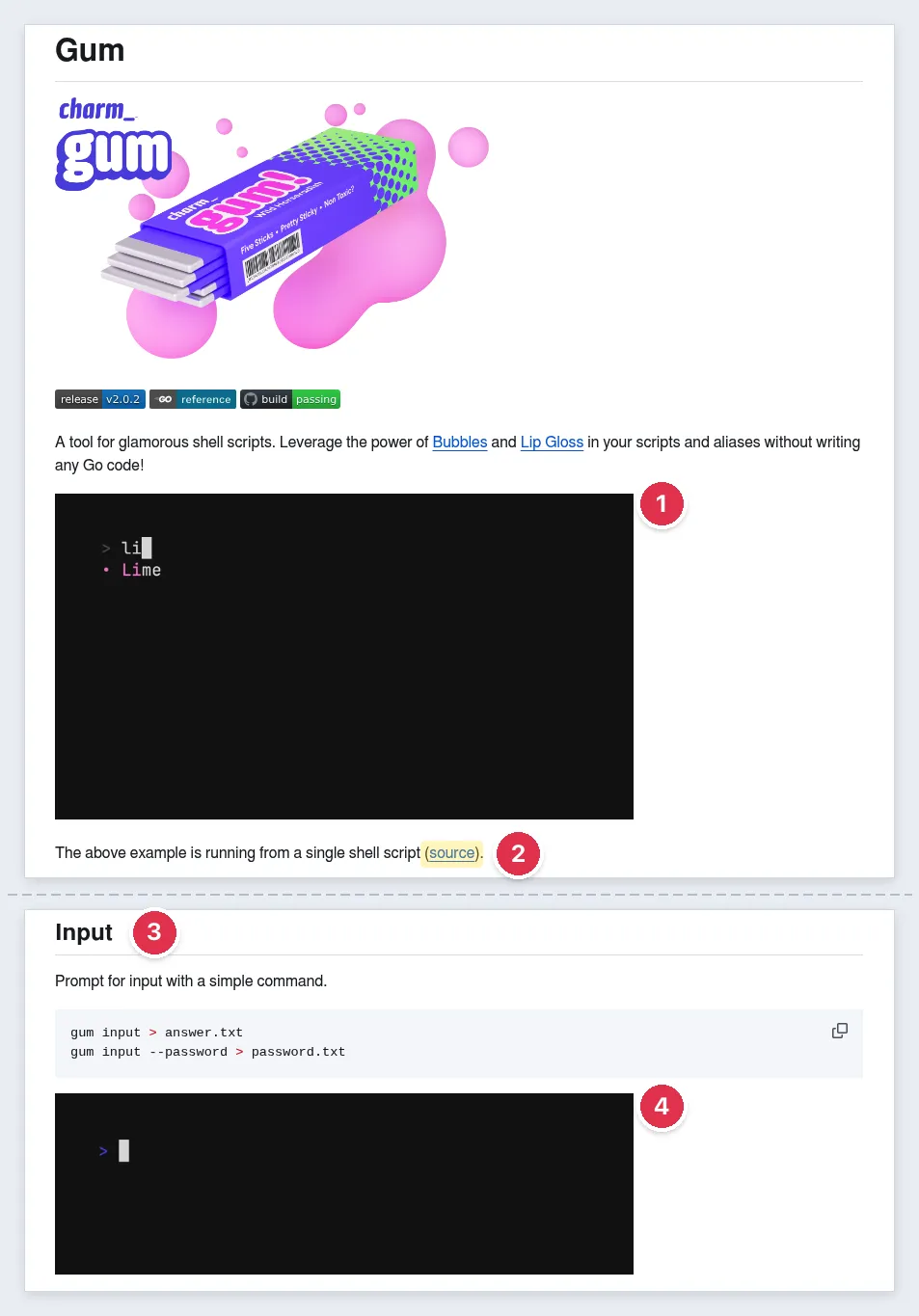
- A demo GIF under the tagline.
- A link to its script.
- A section per command.
- A GIF per command, with alt text like "Shell running gum input typing Not much, you?"
Copy this: scripted demos. Without a host like Charm's, commit the GIF.
4. FastAPI: show the output, not only the code
FastAPI, a Python web framework, goes from code to result in three headings.
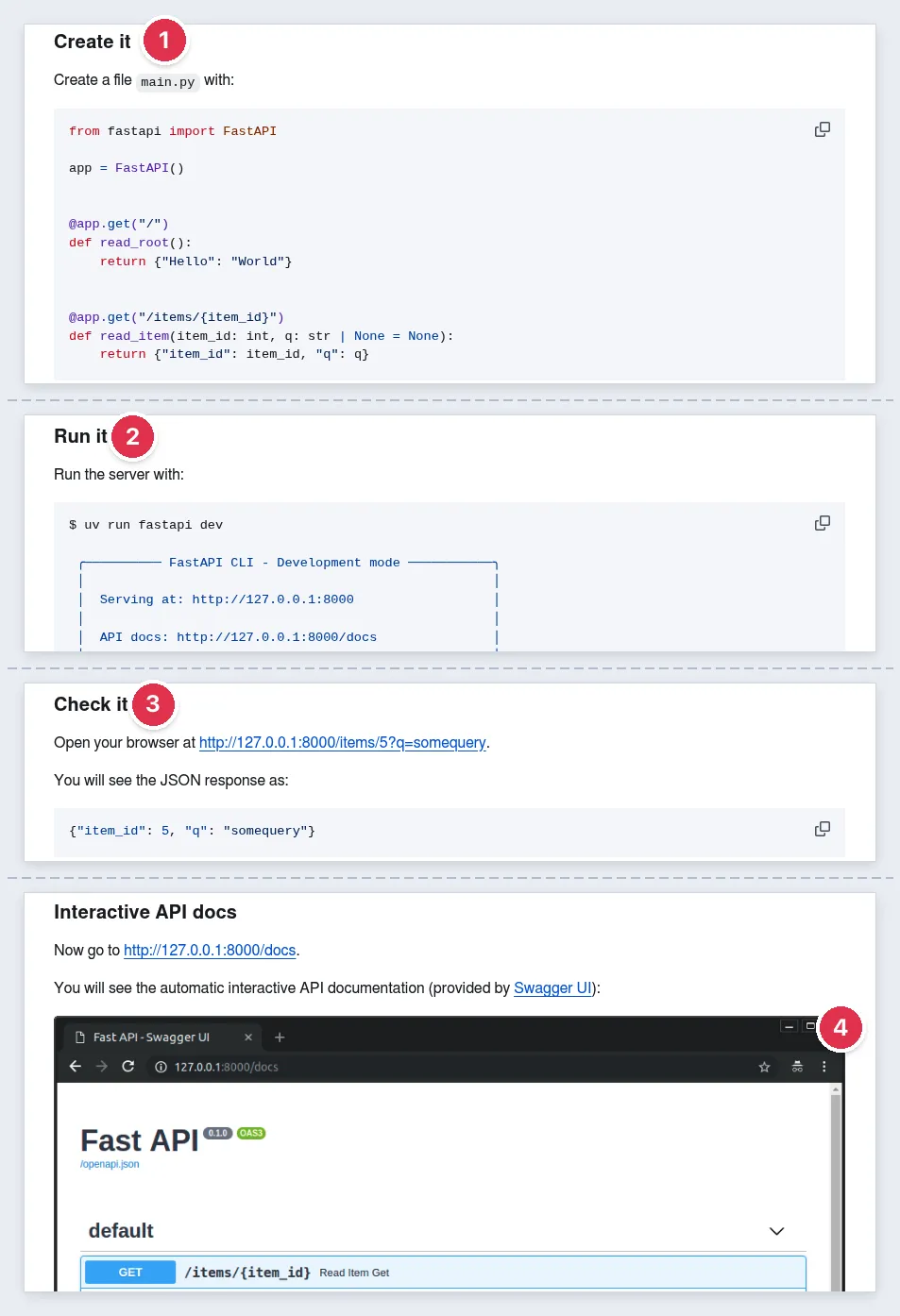
- Create it: a complete
main.py. - Run it: one command and its output.
- Check it: the JSON you'll see.
- The API docs it generates, as a screenshot.
Skip this on small projects: the long sponsor block above the example.
5. Ruff: a chart that follows the theme
Ruff, a Python linter, leads with speed.
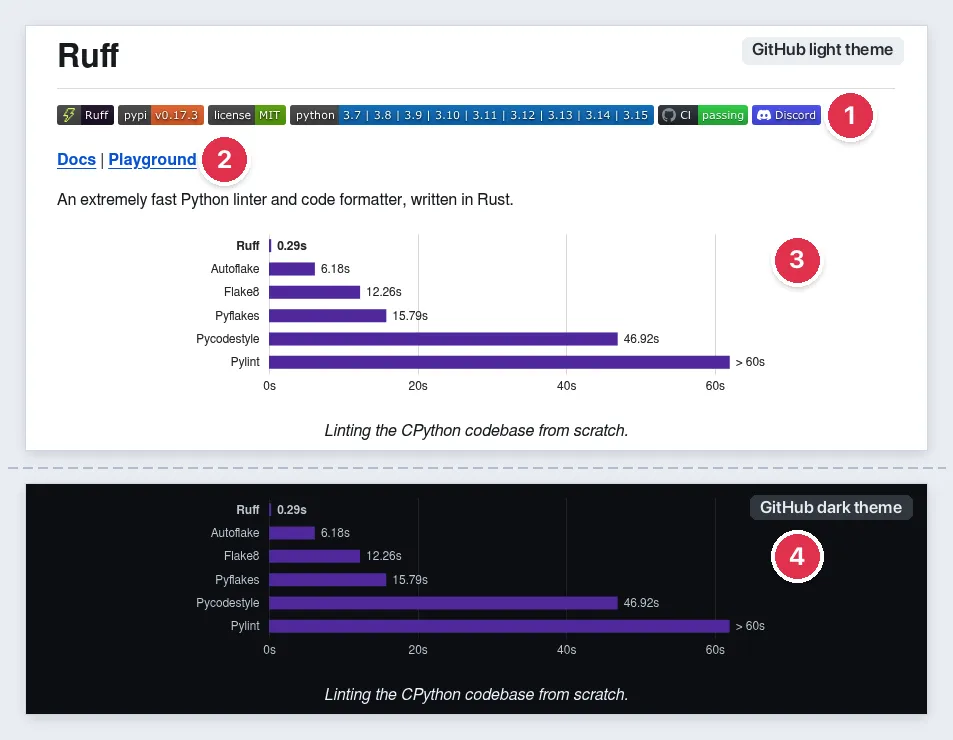
- Badges for version, license and CI.
- Docs and Playground links.
- A benchmark chart with alt text: "Shows a bar chart with benchmark results."
- A dark variant via a
pictureelement, on GitHub's upload domain.
Copy this: theme-aware charts and diagrams.
6. PowerToys: a big app, kept scannable
PowerToys fits over 30 Windows utilities into one scannable README.
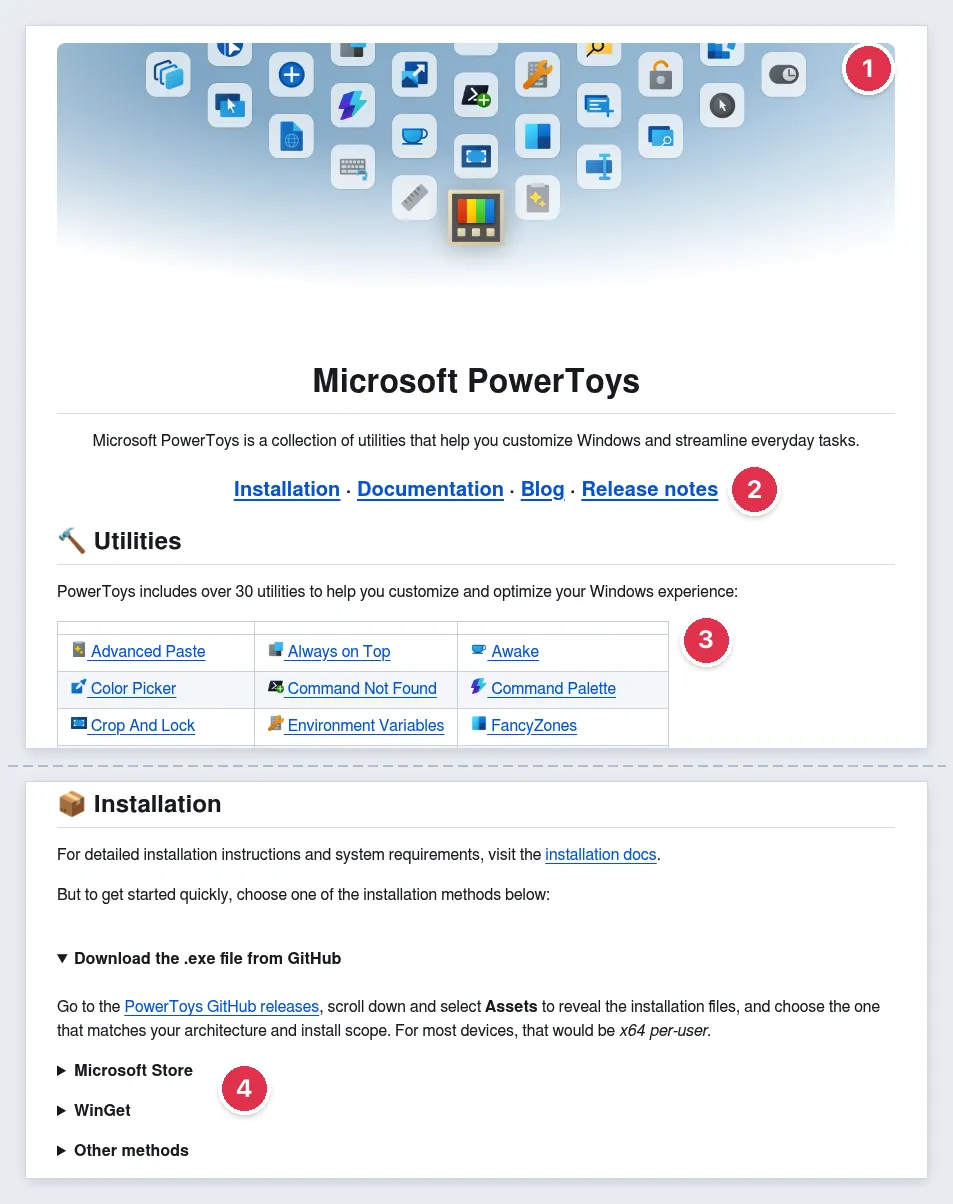
- Light and dark hero images by relative path.
- Docs, blog and release notes up top.
- A utilities table with alt-texted icons.
- Four collapsible install blocks.
Copy this: collapse long install paths. Skip this: the hero image has no alt attribute.
7. Supabase: how it works, in one diagram
The Supabase monorepo README adds a dashboard screenshot plus docs and support links.
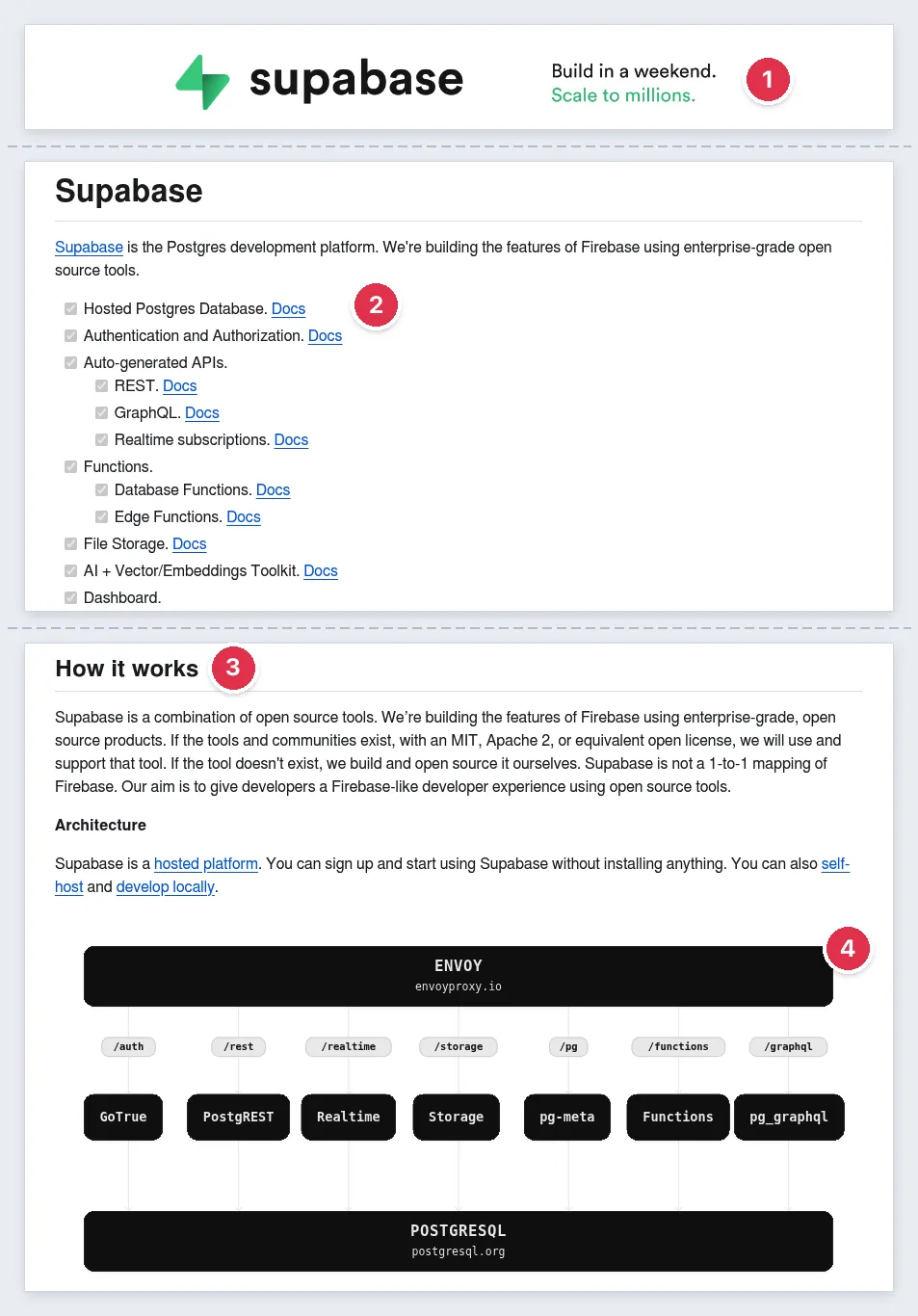
- A logo per theme.
- A feature checklist with docs links.
- "How it works" in plain words.
- An architecture diagram by relative path.
Note: the logo uses older #gh-light-mode-only and #gh-dark-mode-only fragments; GitHub Docs only list picture.
8. React: the README as a signpost
React keeps its README short and lets a docs-as-code site carry the detail.
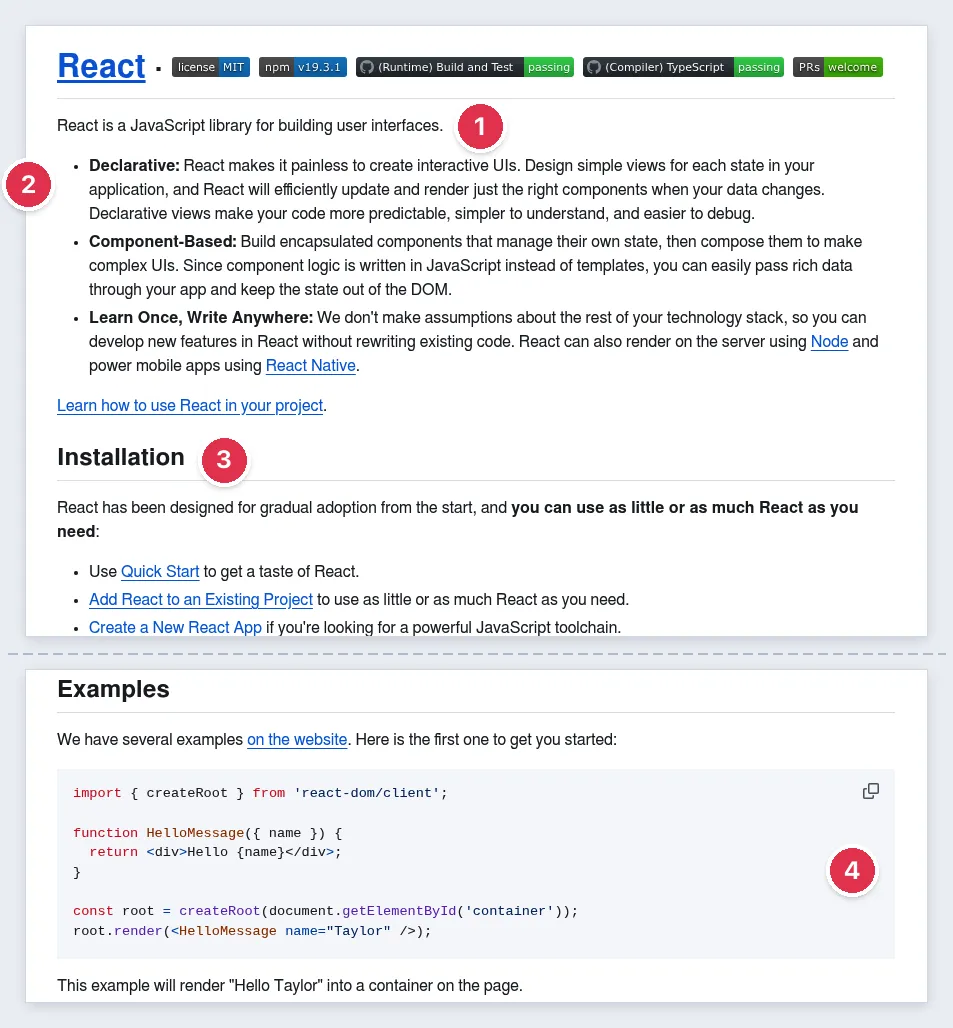
- One sentence on what React is.
- Three principles.
- Install and docs links.
- A tiny example and its output.
9. Internal service README (worked example)
This README lives in private repos, so you rarely see one. Here it is with fake data.
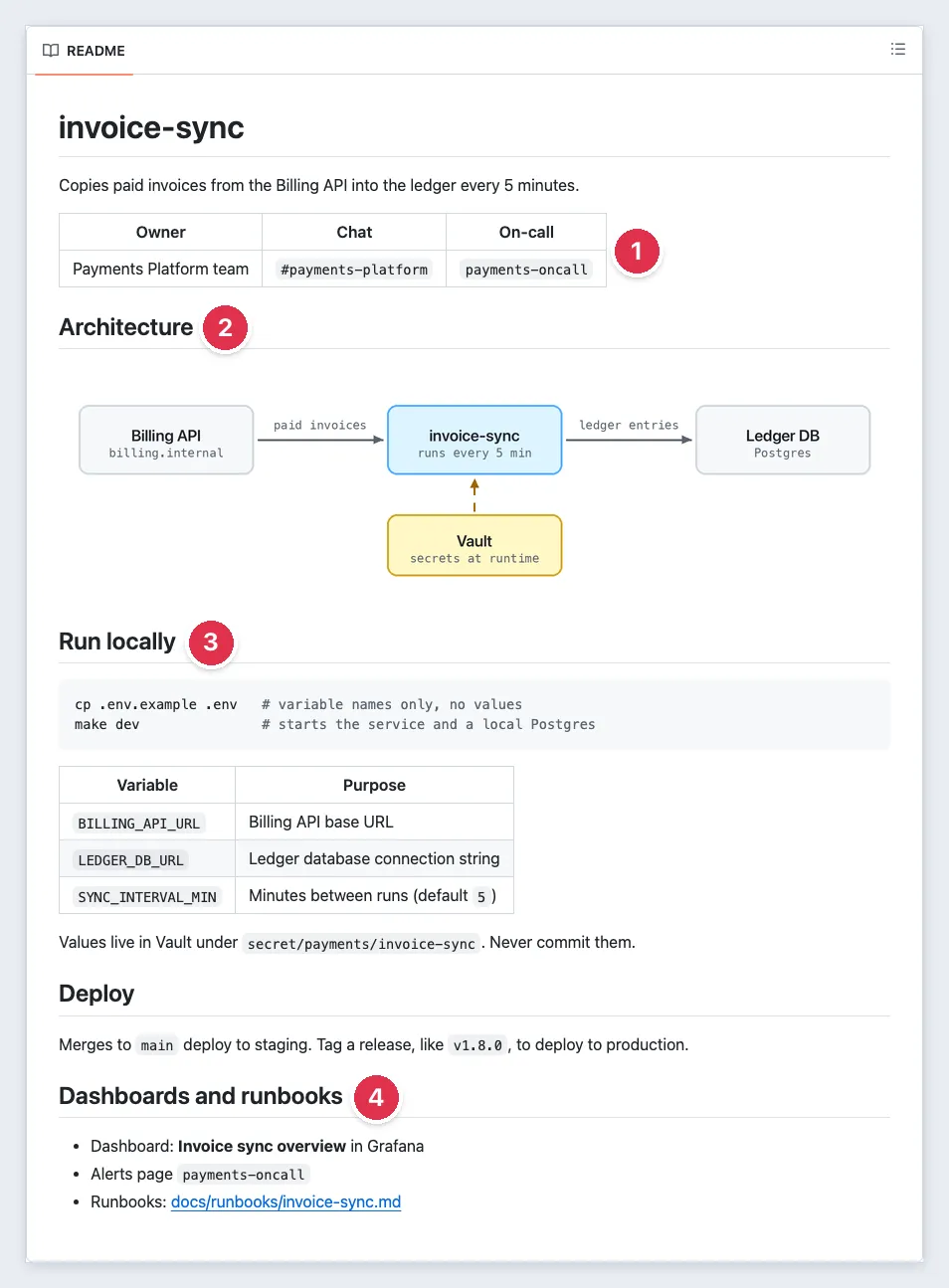
- Owner team, chat and on-call up top.
- One-line purpose and a diagram.
- Run locally with env var names only; secrets come from the vault.
- Deploy, dashboards and a Runbooks line pointing to the runbook.
Copy this: keep it a signpost; alert steps belong in the runbook.
10. Dataset README.txt example (worked example)
For research data, the Cornell guide lists these sections, and Harvard Medical School's guide asks for one plain-text README per dataset, not a Word file.
TITLE    Urban Tree Canopy Survey
CONTACT  A. Rivera, data-team@example.org
DATES    Collected 2026-04-02 to 2026-06-30 (ISO 8601)
LICENSE  CC BY 4.0
FILES    trees_2026.csv (one row per tree), photos/PLOTID_YYYY-MM-DD.jpg
CODES    NA = not measured; SPP = species code
VARIABLES
  dbh_cm     trunk diameter at 1.3 m, centimeters
  height_m   tree height, meters
METHODS  Heights measured with a laser rangefinder.
CITE AS  Rivera A. (2026). Urban Tree Canopy Survey [Data set].
How to add screenshots and GIFs to a README
What to show
Put one hero visual under the description. Crop tight, use fake data, show one idea per visual and add padding for both themes. Number GUI setup steps with matching callouts.
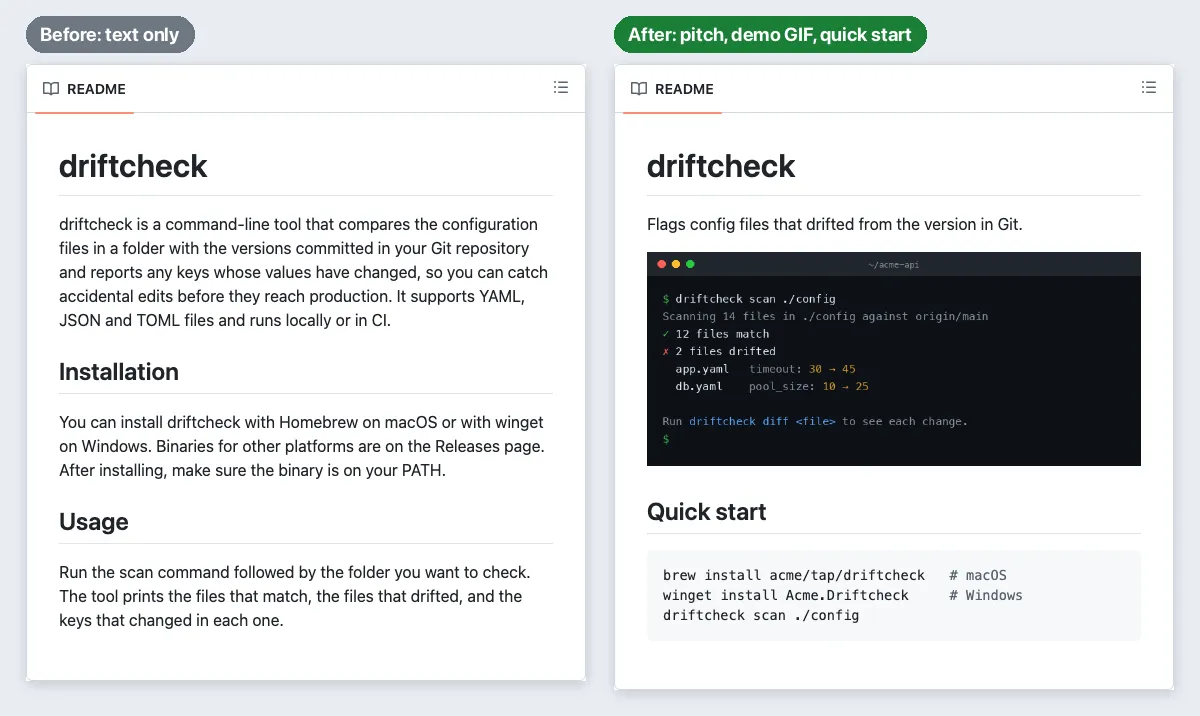
GIF or video demo
Keep a demo to one task in 5 to 10 seconds, about 800 px wide at 10 to 15 fps, recorded on a Mac or Windows. GitHub allows 10 MB per image or GIF, and 10 MB of video (100 MB on paid plans).
An MP4 plays inline only if you upload it in GitHub's editor (a github.com/user-attachments URL); a video tag pointing at a committed .mp4 gets stripped. Check the result logged out.
Terminal tools: asciinema plus agg (how to record a terminal session) or VHS. Built-ins: macOS saves screen recordings as .mov files you can turn into a GIF, and Snipping Tool saves MP4 and can export up to 30 seconds as a GIF.
Store images in the repo with relative paths
Commit images to docs/images/ or .github/assets/ and link them by relative path: they resolve on the current branch and survive forks, and a leading slash starts at the repo root. Paths are case-sensitive on GitHub, even when your Mac or PC is not. To set a size, use an img tag:

<img src="docs/images/hero.png" alt="driftcheck scan results in a terminal" width="800">Dragging a file into GitHub's web editor also works; private repo images show only to people with access.
Light and dark images with the picture element
Logos, diagrams and charts on transparent backgrounds need a dark-mode version. GitHub supports the picture element (changelog):
<picture>
  <source media="(prefers-color-scheme: dark)" srcset="docs/images/logo-dark.svg">
  <img src="docs/images/logo-light.svg" alt="driftcheck logo" width="320">
</picture>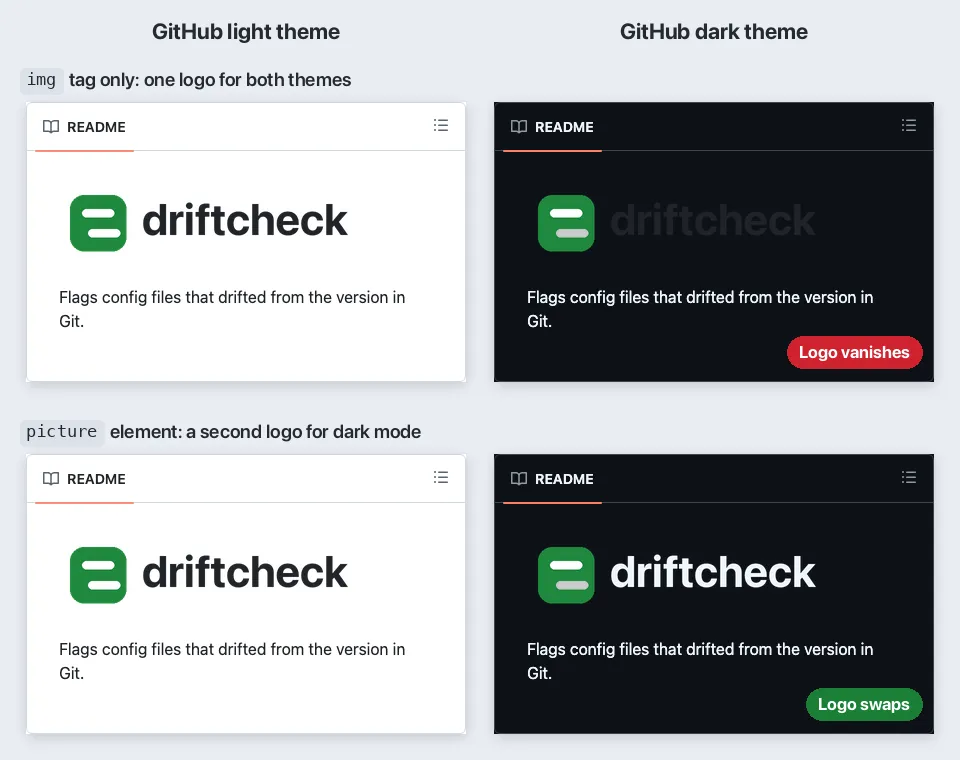
Screenshots on solid backgrounds rarely need one. Test both themes in a public demo repo.
Alt text and file size
Say what the visual shows in under about 125 characters, like "lazygit staging one line from a diff" (image alt text). Use empty alt only for decorative images (W3C decision tree). Keep screenshots under about 1 MB and shrink heavy GIFs.
Redact before you commit
Git history keeps every version, and public repo uploads open without signing in. Cover tokens, emails and customer data with a solid box; blur and pixelate can be reversed (how to redact text). Rotate any committed secret.
To record the demo yourself, ScreenSnap Pro (Mac and Windows) records straight to GIF, or to MP4 you can trim, speed up and auto-zoom in its built-in editor before exporting MP4 or GIF. For screenshots, its image editor adds padding with 500+ backgrounds, numbers steps with the counter tool and covers secrets with a filled rectangle.
Those tools work on screenshots, not recordings, so record demos against fake data. Its cloud share links suit a quick Slack ping, not README images.

Tired of plain screenshots? Try ScreenSnap Pro.
Beautiful backgrounds, pro annotations, GIF recording, and instant cloud sharing, all in one app. Pay $39 once, own it forever.
See pricing and featuresREADME template you can copy
Copy this sample README file for a fictional CLI, driftcheck. HTML comments explain each part.
<!-- Optional: one logo per GitHub theme -->
<picture>
<source media="(prefers-color-scheme: dark)" srcset="docs/images/logo-dark.svg">
<img src="docs/images/logo-light.svg" alt="driftcheck logo" width="320">
</picture>
# driftcheck
Flags config files that drifted from the version in Git.
<!-- Up to 3 badges -->
[](../../actions)
[](LICENSE)

## Features
- Checks YAML, JSON and TOML files
- Fails CI on drift (exit code 1)
## Quick start
Requires Git 2.30 or later.
brew install your-org/tap/driftcheck # macOS
winget install YourOrg.Driftcheck # Windows
Other platforms: see Releases.
## Usage
<!-- The smallest command and its real output -->
$ driftcheck scan ./config
✗ 2 files drifted: app.yaml, db.yaml
## Configuration
|Option| Default| What it does|
|---|---|---|
|--base| origin/main| Branch to compare against|
## How it works
Design notes: [docs/design.md](docs/design.md)
## Contributing
See [CONTRIBUTING.md](CONTRIBUTING.md).
## Support
Open an issue with your OS and version.
## License
MIT. See [LICENSE](LICENSE).- Delete sections that don't apply. For a GUI app, swap Usage for 3 to 5 numbered screenshots.
- Fit the name, description, visual and quick start on the first screen; export a PDF for clients.
- Link your design doc from How it works; this software design document template covers it.
GitHub's syntax guide lists what else a README can use: fenced code with a language, tables, collapsed sections, Mermaid diagrams, badges and alerts such as > [!NOTE].
Common README mistakes and fixes
| Mistake | Fix |
|---|---|
| Images don't show | Match path case, avoid raw links to renamed branches, stop hotlinking, and check private repo access |
| A committed MP4 shows nothing | Upload it through GitHub's editor |
| GIF too heavy | Re-record smaller, compress the GIF, or upload an MP4 |
| README cut off | Move long sections to docs; GitHub truncates past 500 KiB |
| Terminal output as a screenshot | Use a code block; extract the text from old screenshots |
| Code as a styled image | Use a code block; code images suit slides and social posts |
| Stale screenshots | Name files by feature and re-capture each release |
| Secrets in screenshots or .env examples | Use solid boxes and placeholder values; rotate leaked keys |
Frequently Asked Questions
How to write a README that gets read
Start from the template, add one hero visual and check it logged out. ScreenSnap Pro is a one-time $39 purchase for Mac and Windows: 1 license, 2 seats (2 computers, Mac or Windows). See pricing.

Morgan
Indie DeveloperIndie developer, founder of ScreenSnap Pro. A decade of shipping consumer Mac apps and developer tools. Read full bio
@m_0_r_g_a_n_