PRD Template: Product Requirements Document + Example
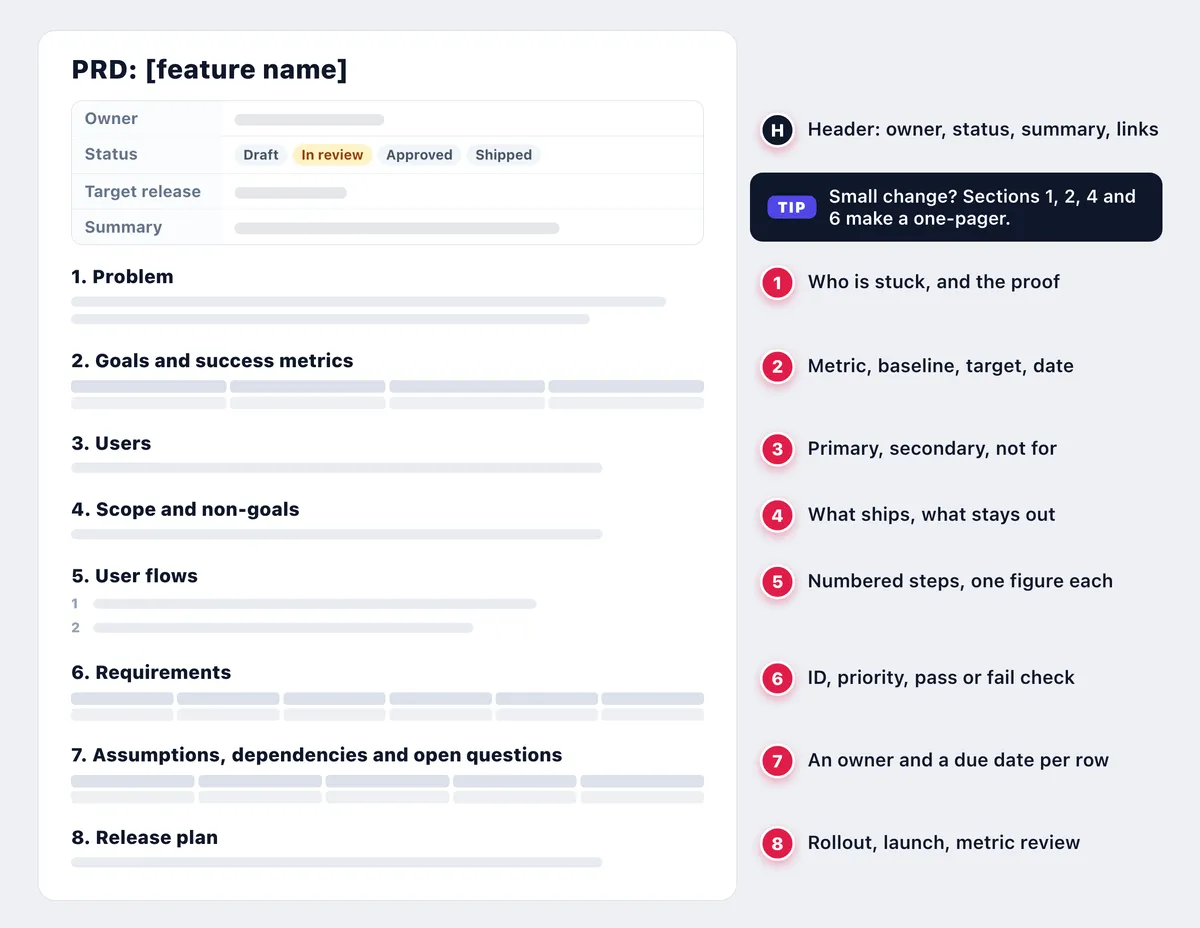
A PRD template is a reusable outline for a product requirements document: the doc that says what a feature must do and why, before engineers decide how to build it. A lean PRD fits on two to four pages, with eight sections:
- Problem: who is stuck, and the proof.
- Goals and success metrics: the change, by when.
- Users: who it is for, and not for.
- Scope and non-goals: what ships, what does not.
- User flows: steps tied to figures.
- Requirements: IDs, priorities, pass or fail checks.
- Assumptions, dependencies and open questions: unknowns with owners.
- Release plan: rollout, launch, metric review.
What is a product requirements document (PRD)?
A product requirements document answers three questions: what are we building, for whom, and how will we know it worked? The product manager owns it, and QA turns each requirement into test cases.
Write it after discovery, before the build. Atlassian's PRD guide calls it the landing page for an epic, and it evolves as you learn.
PRD vs software design document: what vs how
Engineers answer the how in a software design document.
| PRD | Design doc | |
|---|---|---|
| Answers | What and why | How |
| Written by | Product manager | Lead engineer or architect |
| When | Before design | After PRD approval |
| Contains | Problem, goals, scope, flows, requirements | Architecture, data model, APIs, rollout |
| Done when | Metrics reviewed | Implemented |
Sentences that pick a database schema, a queue or a framework belong in the design doc. An SRS (software requirements specification) is the formal cousin, common in contract and regulated work.
PRD template (copy-paste Markdown)
This product requirements document template is plain Markdown. Replace each prompt in square brackets.
# PRD: [feature name]

| Owner | [PM name] |
|---|---|
| Status | Draft / In review / Approved / Shipped |
| Reviewers | [eng lead, design, QA] |
| Target release | [version] |
| Last updated | YYYY-MM-DD |
| Summary | [what ships, for whom] |
| Links | [epic, designs, design doc] |

## 1. Problem
[Who is stuck, and the evidence: tickets, analytics,
recordings, screenshots. No solution yet.]

## 2. Goals and success metrics
| Metric | Baseline | Target | By when |
|---|---|---|---|
| [metric] | [today] | [goal] | [date] |

Guardrail: [metric that must not get worse]

## 3. Users
Primary: [who, and their job] · Secondary: [who] · Not for: [who]

## 4. Scope and non-goals
In scope: [capability] · Non-goals: [what is out, and why]

## 5. User flows
1. [Step] (Fig. 1)
2. [Step] (Fig. 2)

## 6. Requirements
| ID | Requirement | Type | Priority | Acceptance criteria | Screenshot |
|---|---|---|---|---|---|
| REQ-001 | [visible behavior] | Functional | P0 | [pass or fail check] | Fig. 1, marker 1 |

## 7. Assumptions, dependencies and open questions
| # | Type | Item | Owner | Due | Answer |
|---|---|---|---|---|---|
| Q1 | Question / Dependency / Assumption | [item] | [name] | YYYY-MM-DD | [answer, date] |

## 8. Release plan
Rollout: [flag, stages] · Launch: [help article, release notes, support]

Success review: [date], then Shipped
Sections 1, 2, 4 and 6 make a one-pager for small changes.
Paste it into Google Docs with right-click > Paste from Markdown (Google Docs Help), or into Notion or Confluence and check the tables. Confluence also has its own PRD template, and the free Markdown to PDF tool suits drafts without figures.
Keep a PRD.md for AI coding assistants
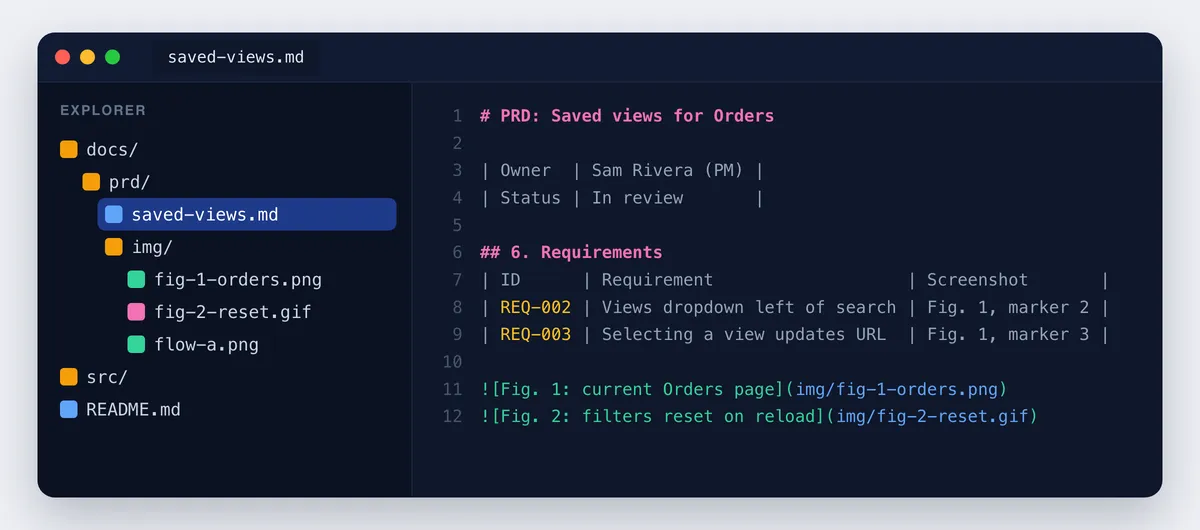
Commit it as docs/prd/saved-views.md so engineers and AI coding assistants share one reviewed spec. IDs, acceptance criteria and non-goals stop assistants from guessing. Ask for commits that cite IDs, check code against the criteria and AI-drafted text against real data, and keep customer data out of prompts.
How to write a PRD, section by section
Share the draft with the eng lead, design and QA, set a comment deadline, then move Status to Approved.
1. Problem
Describe the pain, not a fix: agents rebuild the same filters dozens of times a day, and Q3 brought 27 tickets. Recordings and good bug reports are the best evidence.
2. Goals and success metrics
Give one metric a baseline, target, date and guardrail: 34 s per filter set now, under 5 s within 30 days of launch.
3. Users
Give each user one job: agents want speed, leads want sharing, portal customers are out.
4. Scope and non-goals
List what ships, then what does not and why: "Column layouts are out. Six of the 27 tickets asked for them, but they need a settings model first."
5. User flows
Number the steps of today's flow and the new one, each pointing at a figure; design files and wireframes are attachments (step-by-step instructions with screenshots).
6. Requirements
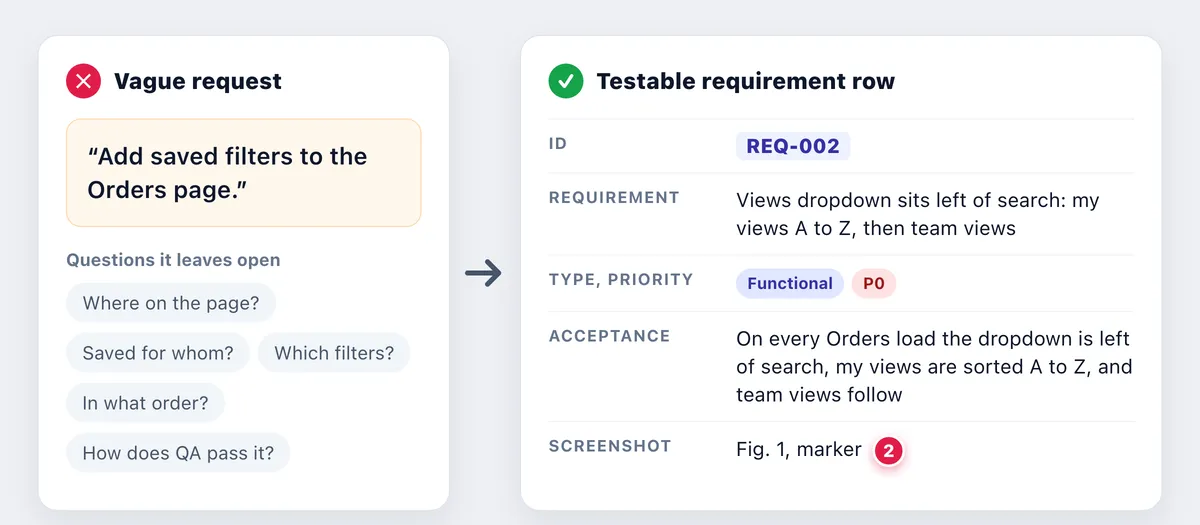
Write one row per visible behavior, with a fixed-width ID you never reuse (REQ-001), a priority (P0 must ship, P1 should, P2 later) and acceptance criteria a tester can pass or fail. HashiCorp's PRD template says to write them like test cases. Copy exact UI labels from a screenshot with the free extract text from image tool.
Give non-functional requirements numbers, and keep story-level acceptance criteria in tickets. Stable IDs feed test cases, a requirements traceability matrix, a requirement ID field in your GitHub issue template and pull requests that quote it.
7. Assumptions, dependencies and open questions
Give each unknown an owner and a due date, like D1 in the example below, and log answers in the row with the date.
8. Release plan
List the flag, stages and launch checklist: help article, release notes, support briefing, analytics. Add UAT sign-off if a client must accept. The metric review comes last, then Shipped; a test plan covers QA.

Tired of plain screenshots? Try ScreenSnap Pro.
Beautiful backgrounds, pro annotations, GIF recording, and instant cloud sharing, all in one app. Pay $39 once, own it forever.
See pricing and featuresPRD example: saved views feature for an Orders page
A condensed product requirements document example, with demo data:
PRD: Saved views for Orders. Owner: Sam Rivera (PM) · Status: In review · Target: v4.12. Summary: agents save filter sets as named views and switch in one click; team leads share them.
Problem: agents rebuild the same 3 to 5 filters dozens of times a day, and filters reset on reload. Evidence: 27 Q3 tickets and 40 recordings at 34 s per filter set (Fig. 1, Fig. 2).
Goals: median filter-set time drops from 34 s to under 5 s within 30 days of general availability (GA); 40% of weekly active agents use a saved view. Guardrail: Orders LCP at or under 2.5 s (p75).
Users: agents with 50+ orders a day, then team leads; not portal customers. Scope: save, rename, delete, switch, set a default, share with team (P1). Non-goals: cross-workspace sharing, scheduled reports, column layouts, mobile app.
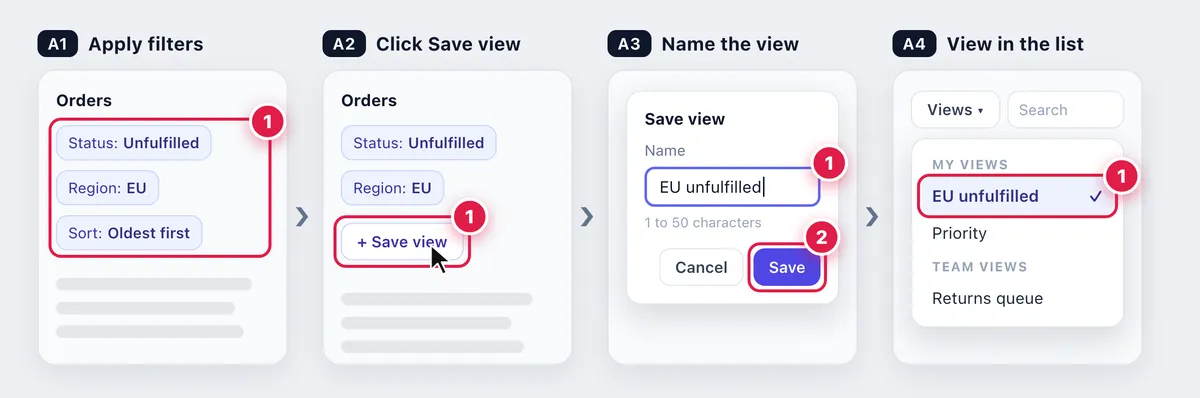
Flow A: apply filters, click Save view, enter a name, and the view joins the list.
| ID | Priority | Requirement | Acceptance criteria | Screenshot |
|---|---|---|---|---|
| REQ-001 | P0 | Save filters and sort as a named view | 1 to 50 characters; duplicates rejected; filters and sort restored | Fig. 1, marker 1 |
| REQ-002 | P0 | Views dropdown left of search: my views A to Z, then team views | Shown there on every load | Fig. 1, marker 2 |
| REQ-003 | P0 | Selecting a view applies it and updates the URL | URL changes (say, /orders?view=priority); reload keeps the view | Fig. 1, marker 3; Fig. 2 |
| REQ-004 | P1 | A default view loads when Orders opens | One default per agent | n/a |
| REQ-005 | P0 | Non-functional: speed | Under 1 s at p95 for 100,000 orders | n/a |
| REQ-006 | P0 | Non-functional: keyboard access | Keyboard operable, visible focus (WCAG 2.2 AA) | n/a |
Open items:
- Q1 (question): max views per agent, 25? PM, Nov 20.
- D1 (dependency): shared views wait on the field-permissions check. Eng lead, Nov 18.
- A1 (assumption): under 25 views per agent; PM checks week-2 data.
Release: saved_views flag. Internal week 1, 10% week 2, GA week 4 with release notes, help article and support briefing. Metric review 30 days later, then Shipped.
Storage, URL format and caching belong in the design doc, not here.
Use annotated screenshots to make requirements unambiguous
Number the current UI and cite the markers from each requirement
Fig. 1 is today's Orders page, marked where REQ-001 to REQ-003 change. Marker 2 shows where the Views dropdown goes, left of search. Rows cite markers ("REQ-002 = Fig. 1, marker 2"), so people say "marker 2," not "the thing near search."
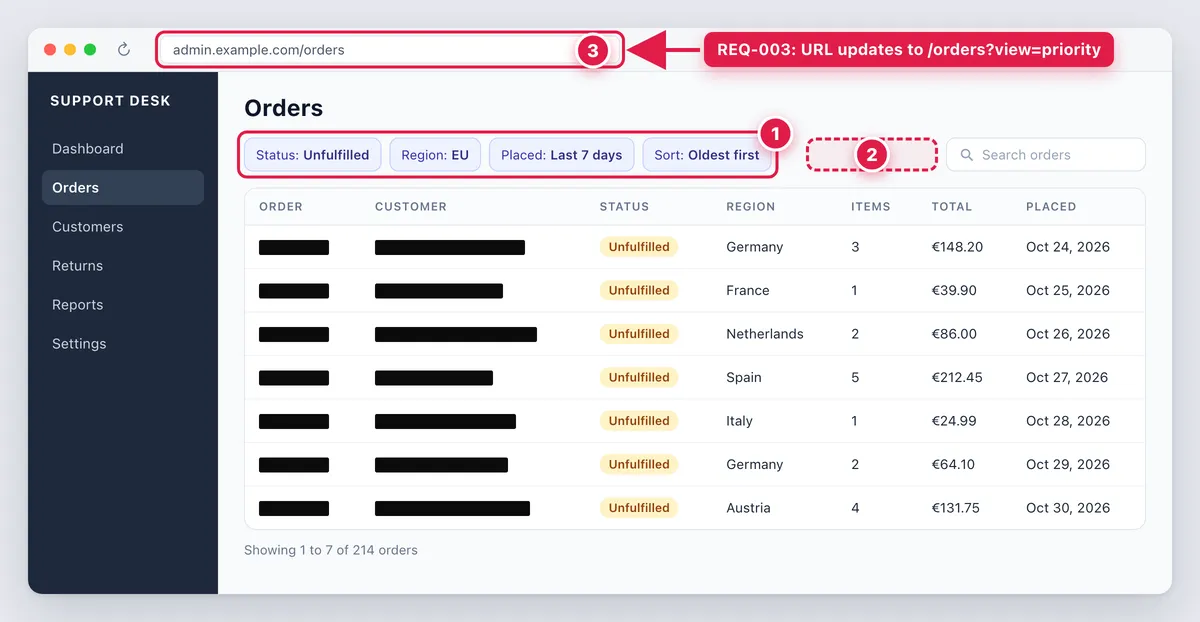
Markers are plain numbers that restart at 1 on each image: the row carries the ID, the image the marker. Where behavior changes, add an arrow and a short callout ("REQ-003: URL updates to /orders?view=priority"). End-state shots belong with acceptance criteria examples.
It works the same way when you annotate a live web page. For QA, each ID plus marker becomes a test step and expected result; testers keep Fig. 1 open as they explore the build.
Show Flow A as numbered frames and one short GIF
Frames A1 to A4 match Flow A's steps; markers, arrows and callouts go on stills only. A 5 to 10 second GIF shows what stills cannot, like filters resetting on reload: unannotated, on test data, named in its caption and cited from REQ-003 (GIF capture on Mac, on Windows).
Long screens, redaction and where the images live
Long, logged-in lists like Orders need a scrolling capture: select the area, start, scroll down slowly by hand, then finish (scrolling screenshot on Mac, on Windows). Solid boxes hide customer names, emails and order IDs, since blur and pixelate can be undone (how to redact text).
Insert or commit the image files (docs/prd/img/); share links suit Slack threads, never image sources. Shared doc rules live in the software design document guide.
For one PRD, macOS Screenshot (⌘ + Shift + 4) with Markup, or Snipping Tool (Win + Shift + S), is enough (Apple Support, Microsoft Support).
If you write PRDs every sprint, ScreenSnap Pro puts capture and markup in one desktop app for Mac and Windows: its counter adds markers 1, 2, 3, and Scrolling Capture grabs long logged-in lists as you scroll down by hand. Arrows, callouts, highlights, a Filled Rectangle for redaction and OCR are built in. Video recordings open in an editor that trims and exports MP4 or GIF, and pin keeps a screenshot over your doc.
PRD best practices and mistakes that cause rework
- Solution first. "Add a Views dropdown" before agreeing on the 34 s problem.
- A control as the goal. Target the change: 34 s to under 5 s.
- No non-goals, so column layouts creep in.
- Adjectives. "Fast" is untestable; REQ-005 says under 1 s at p95.
- Stale screenshots. Date captions; recapture after UI changes.
- Architecture in the PRD. Queues and schemas go to the design doc.
- No owners, no update. Own every open item; set Shipped after the 30-day review.
Frequently Asked Questions
Start your next PRD from the template
Write the problem and one metric first. Then fill in the rest, and number your screenshots.
ScreenSnap Pro is a one-time $39 purchase: 1 license, 2 seats (2 computers, Mac or Windows). See pricing.

Morgan
Indie DeveloperIndie developer, founder of ScreenSnap Pro. A decade of shipping consumer Mac apps and developer tools. Read full bio
@m_0_r_g_a_n_