GitHub Issue Template: Copy-Ready YAML Forms + config.yml
A GitHub issue template is a Markdown or YAML file in your repository's .github/ISSUE_TEMPLATE folder that pre-fills or structures new issues. YAML issue forms add real fields: dropdowns, checkboxes, required inputs and an upload field for screenshots. Commit the file to the default branch, then add config.yml to control the template chooser.
This guide covers the repo setup. For the content side, see what reporters should write in each field.
What is a GitHub issue template?
An issue template decides what people see after they click New issue. GitHub supports two kinds, and one repo can use both.
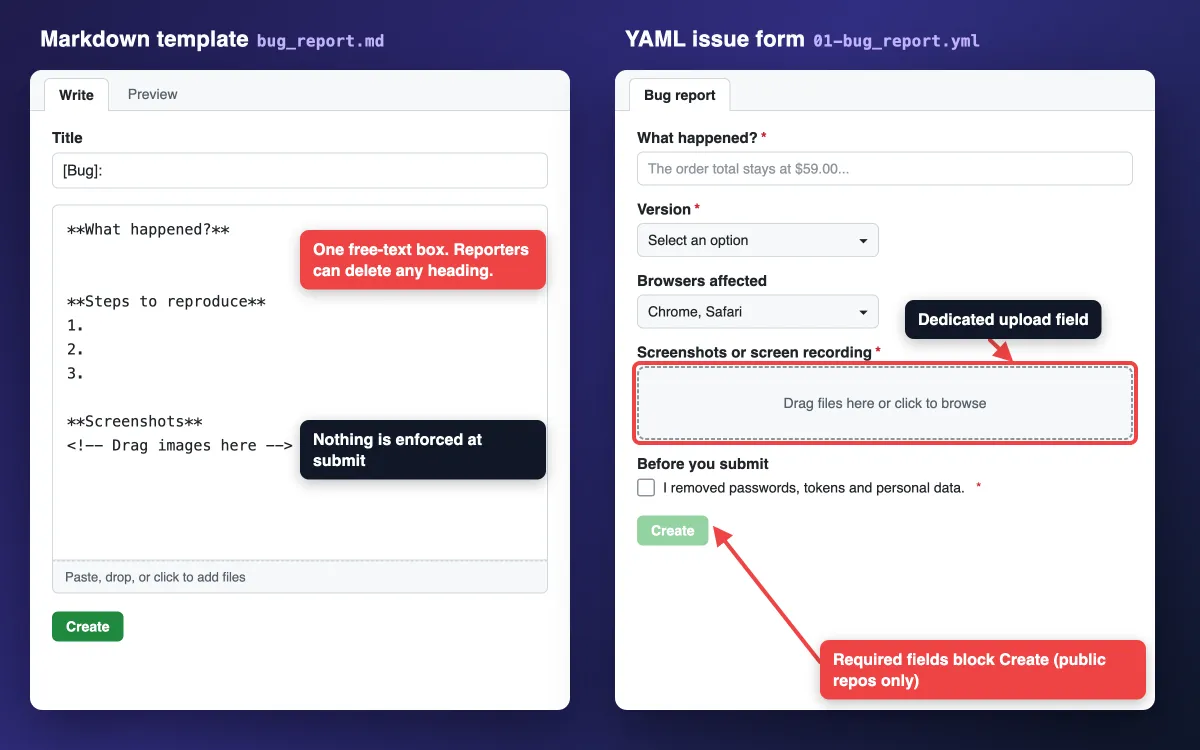
Markdown templates vs YAML issue forms
| Markdown template | YAML issue form | |
|---|---|---|
| File extension | .md | .yml or .yaml |
| What reporters get | One text box with pre-filled headings | Separate fields: text, dropdowns, checkboxes, uploads |
| Required fields | Nothing is enforced | required: true blocks submit, in public repos only |
| Screenshots | Dropped anywhere in the body | A dedicated upload field with an accept list |
| Chooser order | Listed after YAML forms | Listed first |
| Status | Stable | Public preview, subject to change |
Use YAML forms for bug intake, as Kubernetes does in one of these technical documentation examples. Keep Markdown for loose topics like design notes.
Where GitHub issue templates live
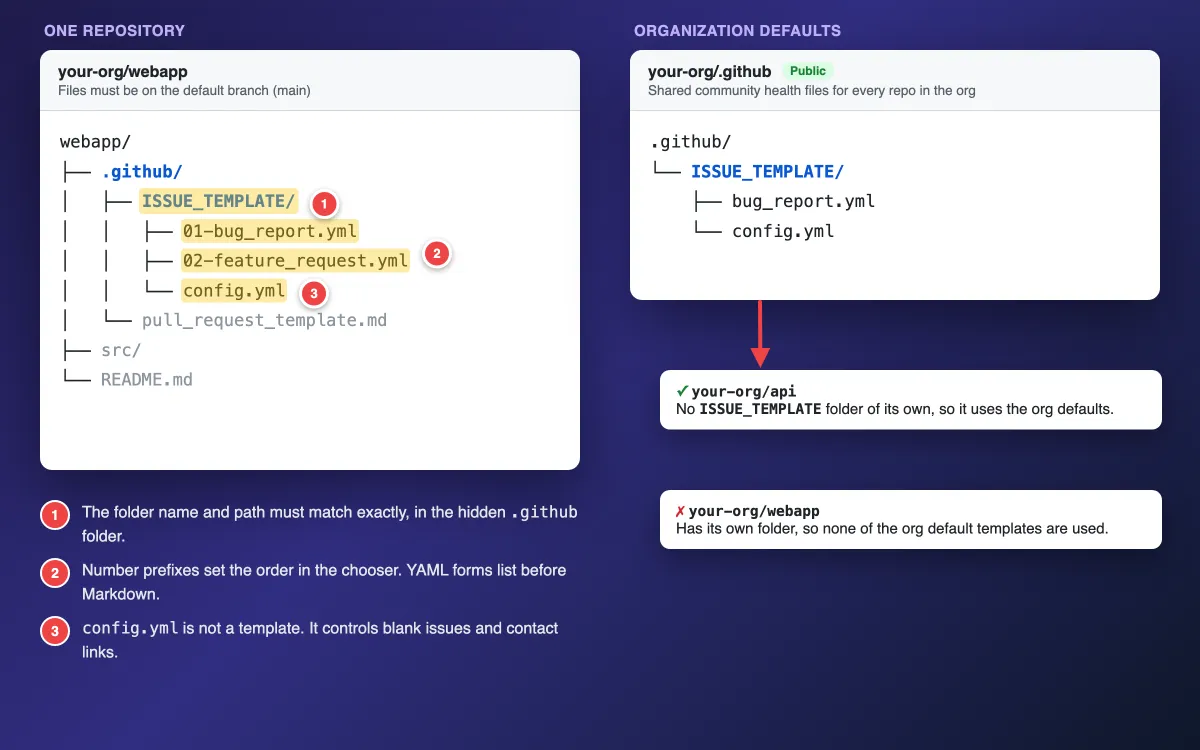
Every template sits in one folder on your default branch:
.github/
└── ISSUE_TEMPLATE/
    ├── 01-bug_report.yml
    ├── 02-feature_request.yml
    └── config.yml
A template on any other branch does not show up. Markdown templates need .md. Forms work as .yml or .yaml. Pull requests use a separate Markdown file with no forms, covered in the pull request template guide.
To share templates across an organization, create a public repository named .github and add the same .github/ISSUE_TEMPLATE/ folder to it. GitHub uses those files for every repo in the account that has no templates of its own.
A repo with its own valid ISSUE_TEMPLATE folder ignores the org defaults completely. Nothing merges, as GitHub's community health file docs explain.
How to create an issue template on GitHub
Option 1: the template builder (Markdown)
- Open the repo and click Settings.
- Under Features, find Issues and click Set up templates. Turn on Issues first if the button is missing.
- Pick a template from Add template, then click Preview and edit.
- Edit the name, about text and body, plus optional title, labels and assignees.
- Click Propose changes and commit to the default branch.
The builder writes the YAML front matter for you (name, about, title, labels, assignees). The template name must be more than 3 characters.
Option 2: commit a YAML issue form
Choose Add file > Create new file, name it .github/ISSUE_TEMPLATE/01-bug_report.yml, paste the form below and commit it to the default branch. Every form needs name, description and body.
The name must be unique across all templates, and longer than 3 characters or the form will not appear. The full key list is in GitHub's syntax for issue forms.
Copy-ready bug report issue form (YAML)
This form validates against the public JSON schema for issue forms. Edit the options, then paste it in.
name: Bug report
description: Something is broken. Show us how to reproduce it.
title: "[Bug]: "
labels: ["bug", "needs-triage"]
body:
  - type: markdown
    attributes:
      value: |
        Thanks for reporting. One bug per issue, please.
  - type: textarea
    id: what-happened
    attributes:
      label: What happened?
      placeholder: The order total stays at $59.00 after I switch to free pickup.
    validations:
      required: true
  - type: textarea
    id: steps
    attributes:
      label: Steps to reproduce
      description: Start from a known page. One action per line.
      placeholder: |
        1. Open /checkout with one $49.00 item
        2. Change delivery to Store pickup (free)
        3. Look at the order total
    validations:
      required: true
  - type: textarea
    id: expected-actual
    attributes:
      label: Expected vs actual
      placeholder: |
        Expected: total drops to $49.00
        Actual: total stays at $59.00
    validations:
      required: true
  - type: dropdown
    id: version
    attributes:
      label: Version
      options:
        - "2.4 (latest)"
        - "2.3"
        - Older
    validations:
      required: true
  - type: dropdown
    id: browsers
    attributes:
      label: Browsers affected
      multiple: true
      options:
        - Chrome
        - Firefox
        - Safari
        - Edge
        - Not browser specific
  - type: input
    id: page-url
    attributes:
      label: Page URL
      placeholder: https://app.example.com/checkout
  - type: upload
    id: visuals
    attributes:
      label: Screenshots or screen recording
      description: Number the steps and point at the broken element.
    validations:
      required: true
      accept: ".png,.jpg,.jpeg,.gif,.mp4,.mov,.webm"
  - type: textarea
    id: logs
    attributes:
      label: Console or server logs
      description: Paste text. It is formatted as code for you.
      render: shell
  - type: checkboxes
    id: checks
    attributes:
      label: Before you submit
      options:
        - label: I searched existing issues for this bug.
          required: true
        - label: I removed passwords, tokens and personal data from screenshots and logs.
          required: true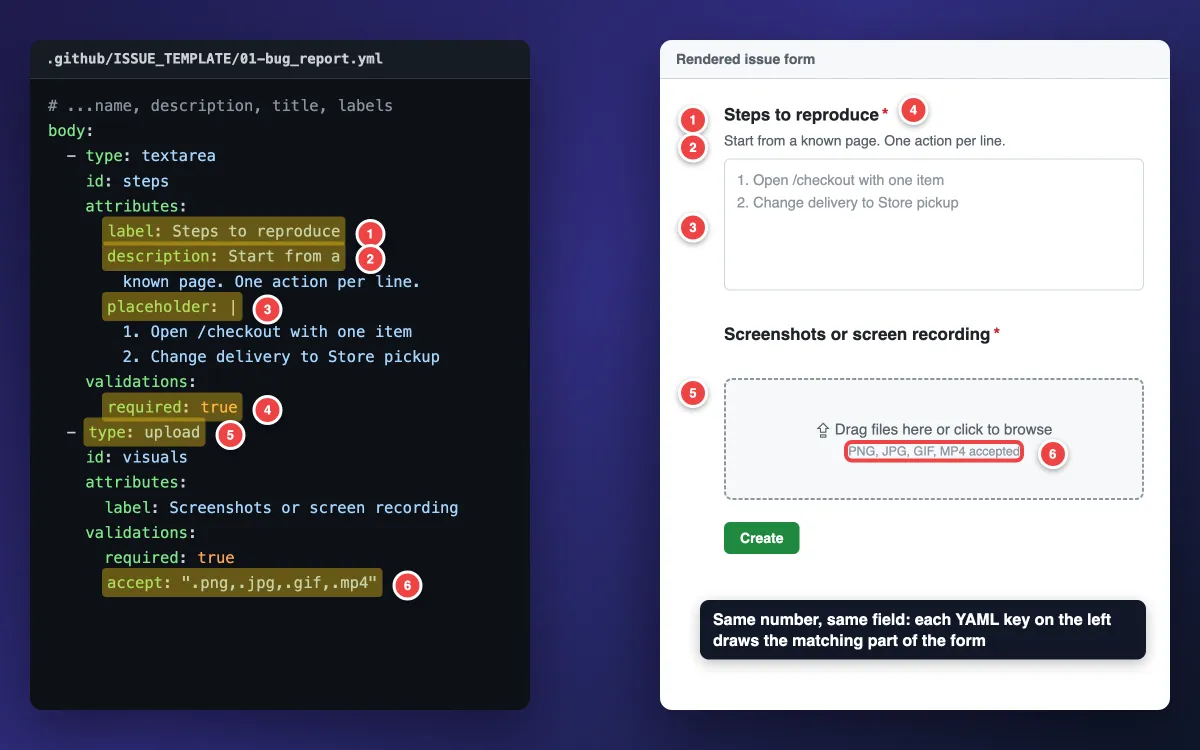
Why each field earns its place
- What happened? A one-line summary a triager can scan.
- Steps to reproduce: the numbered placeholder nudges one action per line, the same rule as a test case.
- Expected vs actual: the placeholder shows the two-line format. Avoid
valueon required fields: pre-filled text counts as an answer, sorequirednever blocks it. - Version and Browsers affected: dropdowns give answers you can filter. Quote numeric options like
"2.3", or the form fails validation. - Page URL and Screenshots: where it broke, and visual proof.
- Console or server logs:
render: shellformats pasted text as code. - Before you submit: the second checkbox is a redaction reminder.
For wording tips per field, use the bug report template guide.
Why screenshots get a separate upload field
GitHub's form schema has a catch. When a textarea uses render, it stops expanding for file attachments. So the logs box cannot hold images.
A separate upload field fixes that, and accept limits it to images and video. The upload field takes images up to 10 MB and videos up to 100 MB.
Private repos: required is not enforced
The schema marks required as "Only for public repositories." In private and internal repos, people can submit with any field empty. Lean on other signals instead:
- Clear labels and a short
markdownintro that says what you need. - A
needs-infolabel you add during triage. - A saved reply that asks for the missing screenshot.
Copy-ready feature request issue form (YAML)
Feature requests need the problem before the solution. The upload field stays optional here.
name: Feature request
description: Suggest an idea or an improvement.
title: "[Feature]: "
labels: ["enhancement"]
body:
  - type: textarea
    id: problem
    attributes:
      label: What problem are you trying to solve?
      placeholder: Every Monday I export the report by hand because...
    validations:
      required: true
  - type: textarea
    id: solution
    attributes:
      label: Proposed solution
    validations:
      required: true
  - type: textarea
    id: alternatives
    attributes:
      label: Alternatives or workarounds you tried
  - type: dropdown
    id: impact
    attributes:
      label: How much does this affect you?
      options:
        - Nice to have
        - Slows me down every week
        - Blocks my work
    validations:
      required: true
  - type: upload
    id: mockup
    attributes:
      label: Annotated screenshot or mockup of where this should live
      description: Optional. Mark the spot in the current UI.
Tired of plain screenshots? Try ScreenSnap Pro.
Beautiful backgrounds, pro annotations, GIF recording, and instant cloud sharing, all in one app. Pay $39 once, own it forever.
See pricing and featuresConfigure the template chooser with config.yml
config.yml sits in the same folder and controls the chooser page.
blank_issues_enabled: false
contact_links:
  - name: Questions and help
    url: https://github.com/your-org/your-repo/discussions
    about: Ask usage questions in Discussions, not in issues.
  - name: Report a security vulnerability
    url: https://github.com/your-org/your-repo/security/policy
    about: Report vulnerabilities privately. Never in a public issue.
  - name: Customer support
    url: https://support.example.com
    about: Account and billing questions go to the support desk.
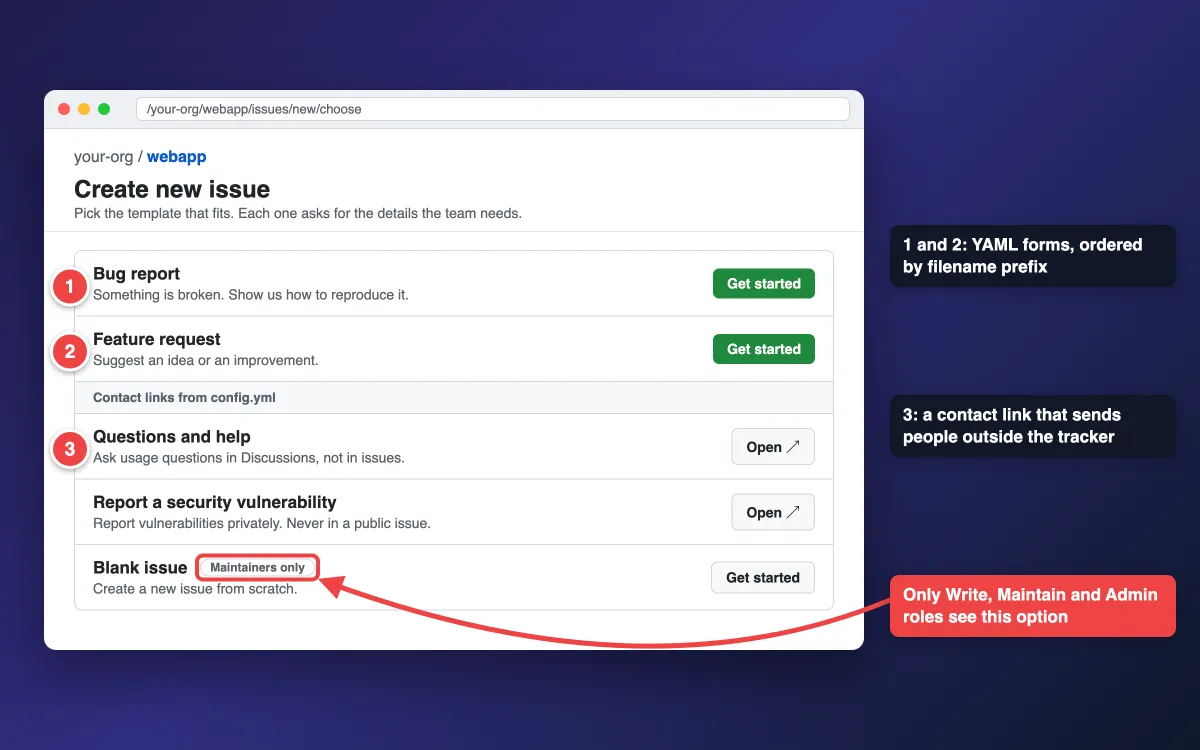
blank_issues_enabled: falsehides the blank issue from Read and Triage roles. Write, Maintain and Admin roles still see it, labeled Maintainers only. That is by design.contact_linksadds buttons that send people elsewhere: Discussions for questions, your security policy for vulnerabilities, a support desk for customers. Each link needsname,urlandabout.
Labels, assignees, projects, issue types and title prefixes
Top-level keys automate triage the moment an issue is filed:
title: "[Bug]: "pre-fills a prefix, so the issue list stays easy to scan.labelsonly applies labels that already exist in the repo. A missing one is skipped. For org defaults, create the label in the.githubrepo and in every repo that uses it.assigneestakes GitHub usernames.projectsusesowner/numberformat, likeyour-org/7. The person filing needs write access to it, so for outside contributors use the project's auto-add workflow.typesets an issue type such asBug. Issue types are defined at the organization level.
Running a bug bash? A short form with labels: ["bug-bash"] keeps every report from the session in one filtered list.
The chooser lists YAML forms first, then Markdown, each sorted by filename. Number your files (1-bug.yml, 2-feature.yml). Once you have 10 or more templates, zero-pad them (01-, 02-), or 10- and 11- land before 2-.
What a good filed GitHub issue looks like
The form only asks. Here is a filled bug report a developer can act on without a follow-up question. Its screenshot follows the capture-and-annotate method from how to annotate a website.
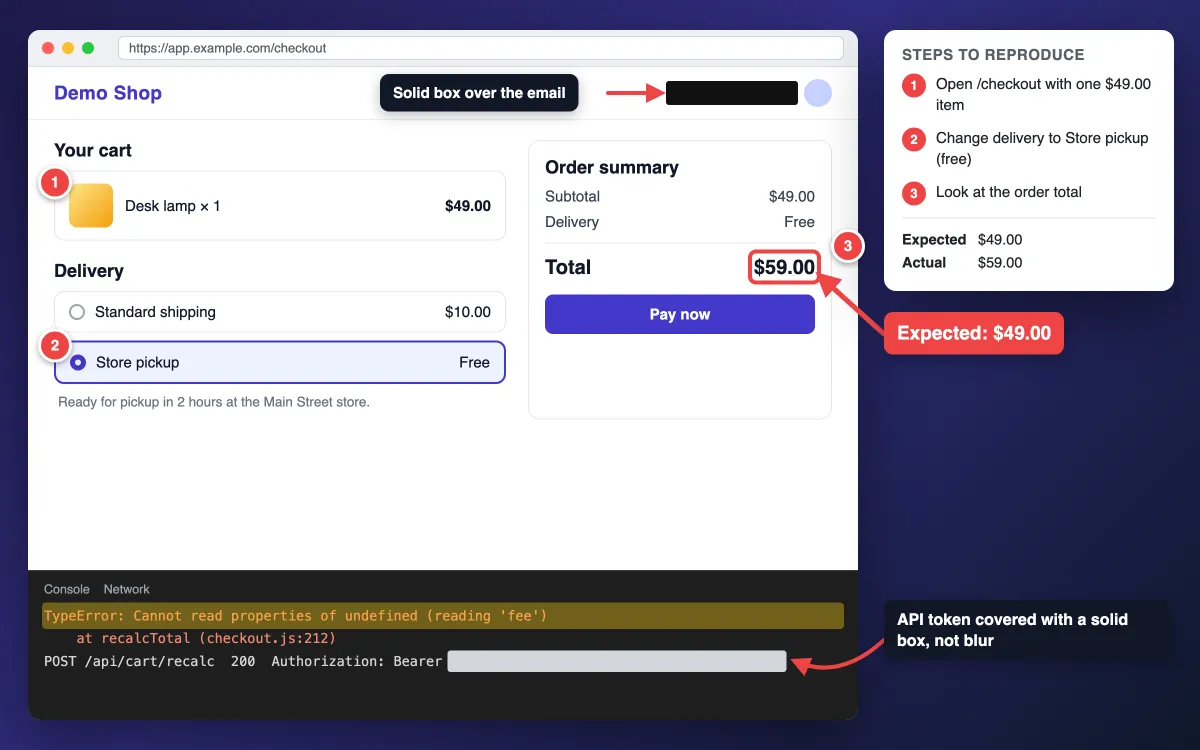
What makes it work:
- Numbered markers match the steps. Markers 1, 2 and 3 line up with the three repro steps, the same idea as step-by-step instructions with screenshots.
- An arrow and a box on the broken value, plus a short callout with the expected number.
- Secrets under solid boxes. On public repos, uploaded files can be accessed without signing in. Cover tokens, emails and customer data with opaque boxes before upload, because blur and pixelate can be reversed. See how to redact text.
- Error text as text. Paste the console error into the logs field so it is searchable. If you only have an image of it, run it through a free image to text tool.
- A short recording of the repro. Record a GIF on Mac or on Windows.
This 5-frame repro GIF is about 19 KB as exported, far under the limit.
Mind the attachment limits: 10 MB for images and GIFs, and 10 MB for videos in comments on free plans (100 MB on paid plans). If a GIF runs over, reduce the GIF file size or use the free GIF compressor.
A .har file is not on the supported list, so ask for a sanitized HAR zipped as .zip.
Built-in tools can annotate (Mac, Windows). ScreenSnap Pro puts the whole kit in one app on Mac and Windows: counter markers, arrows, highlights, text callouts, solid boxes, GIF and video recording, and OCR.
You can pin the expected design on screen while you reproduce. For layout bugs on a public page, its Website Capture grabs the full page from a URL. It renders public URLs only, so for localhost, VPN or logged-in pages, use its Scrolling Capture on your own browser window instead.
More options: full-page guides for Mac and Windows.
Drag the file into GitHub's upload field so GitHub hosts it. A cloud share link suits a quick Slack heads-up, but those uploads are removed periodically, so never use one as the issue's evidence.
Jira teams can use the same routine with screenshots in Jira. If CI runs visual regression tests, attach failed diffs here too.
GitLab issue templates
GitLab calls them description templates. They are Markdown only, with no YAML forms.
- Save
.mdfiles in.gitlab/issue_templates/on the default branch. They appear in the Choose a template dropdown. - A file named
Default.mdpre-fills every new issue. If several defaults exist, the one set in project settings (Premium, Ultimate) wins, then the parent group'sDefault.md, then the project's own. - Group templates (Premium, Ultimate) let one project serve a whole group. A group Owner picks a project that is a direct child of the group. Do this under the group's Settings > General > Templates. Every project in the group can then use those templates.
- Quick actions label and assign the issue, if the person filing has permission.
- Templates cannot make a section required or add an upload field. The template can only ask, so put the ask in an HTML comment under the heading:
## Steps to reproduce
1.

## Screenshots or recording
<!-- Drag annotated screenshots or a short GIF here. Cover tokens and emails with solid boxes first. -->

/label ~bug ~needs-triage
/assign @qa-lead
Merge request templates follow the same rules in .gitlab/merge_request_templates/. GitLab adds a few extra rules for them based on commit messages and branch names.
The full rules are in GitLab's description templates docs.
Troubleshooting: GitHub issue template not showing up
- Not on the default branch. Merge the branch first.
- Wrong path or extension. It must be
.github/ISSUE_TEMPLATE/, with.mdfor Markdown templates and.ymlor.yamlfor forms. - Name too short.
nameneeds more than 3 characters. - Invalid YAML or schema. GitHub shows errors when you create, save or view the form. Common causes are duplicate
idvalues, unquotedyes,trueor numbers inoptions, and a body with onlymarkdownelements. See GitHub's common validation errors. - Org default ignored. The repo has its own
ISSUE_TEMPLATEfolder, so the defaults never load. - Blank issue still visible. You have Write access or above.
- Required fields not enforced. The repo is private or internal.
- Labels missing on new issues. The labels do not exist in that repo yet.
Frequently Asked Questions
Ship two files first
Commit 01-bug_report.yml and config.yml, file one test issue yourself, then refine labels after a week of real reports.
If your team files a lot of visual bugs, ScreenSnap Pro handles the capture side: numbered steps, arrows, solid redaction boxes, GIFs and OCR in one app. It is a $39 one-time purchase with 1 license, 2 seats (2 computers, Mac or Windows). See pricing.

Morgan
Indie DeveloperIndie developer, founder of ScreenSnap Pro. A decade of shipping consumer Mac apps and developer tools. Read full bio
@m_0_r_g_a_n_