Color Picker
Pick any pixel color from a screenshot and copy its HEX code with Tab, then reuse it for annotations or pick custom colors in the ScreenSnap Pro editor.
Pick a color from the screenshot
Press Esc to turn the picker off without copying.
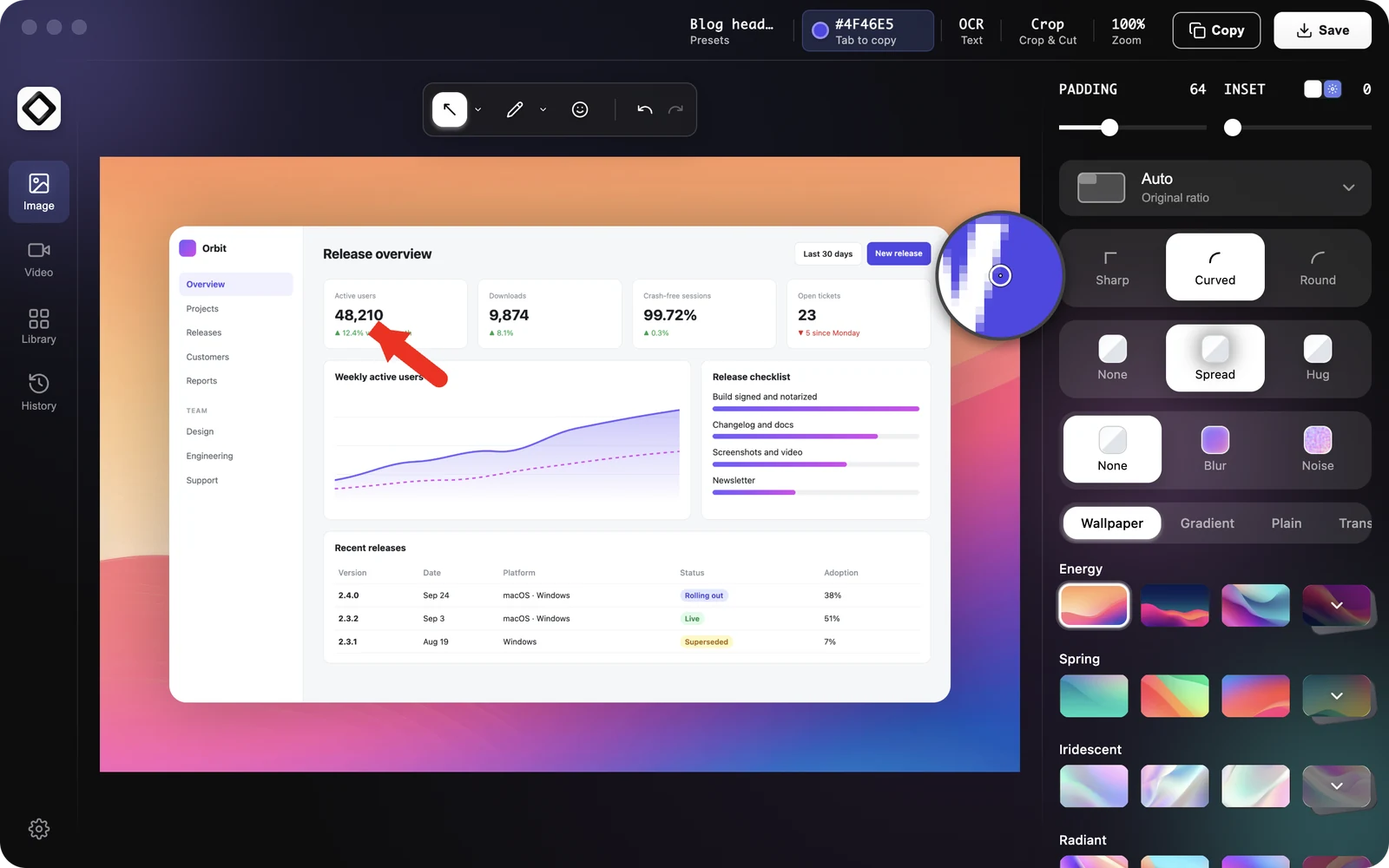
- 1With a screenshot open in the editor, press
Tab, or click the color readout in the top bar (it shows a HEX value aboveTab to activate). - 2A small magnifier follows your pointer and shows the pixels under it up close. The readout now says
Tab to copy. - 3Move over the screenshot. The readout shows the HEX value of the pixel under the pointer.
- 4Press
Tabagain, or click the readout, to copy the value. The readout showsCopied!for a moment and the picker turns off.
If Tab does nothing, click an empty spot next to the screenshot and try again. While a button or text field has keyboard focus, Tab moves between controls instead.
What gets copied
The color is copied as an uppercase HEX code, for example #1A73E8, ready to paste into CSS, a design tool or a message. Colors are read from the screenshot itself, so annotations are not picked. Over the padding or background around the screenshot the readout shows #000000, so keep the pointer on the screenshot.
Use the picked color for annotations
The color you copy also becomes your annotation color, so the next arrow, shape or text uses it right away. This is the quickest way to match annotations to a brand or interface color.
Annotation colors and custom colors
Select an annotation and click the color button in its settings panel to open the palette: Red, Green, Blue, Yellow, Orange, Purple, Pink, White and Black.
The last button (with a pen icon) opens the custom color editor: drag in the color area and the hue slider, or type a value into the Hex color field (3 or 6 digits, the # is optional). Where available, the Pick color from screen eyedropper button lets you pick a color from anywhere on your screen.
Custom colors you use are listed under Recent in the palette (up to 6) and are kept between sessions. The nine standard colors are not added to this list.
Change the color picker shortcut
Open Settings > Shortcuts and change Color Picker under Editor Shortcuts. You can use Tab, a single letter, number or function key, or a combination that includes Cmd or Ctrl. The hint in the top bar updates to show your key. See Change or Turn Off Shortcuts.